Shelf Availability and Planogram Compliance
Turn merchandiser and store shelf photos into SKU-level facings, out-of-stock gaps, price-label checks and planogram scores, with doubtful detections sent to a reviewer.
- Capability:
- Computer Vision
- Industry:
- Retail, D2C & Quick Commerce
Who it is for
- Head of Trade Marketing
- Retail Execution Manager
- Category Manager
- Store Operations Head
The problem
Brands pay for shelf space, end caps and chiller visibility, and retailers commit to planograms, but nobody can check every shelf every week. Merchandiser audits are sampled, slow to compile and hard to verify.
Audits that are slow and sampled
Manual audits cover a fraction of stores, and results reach the category team weeks after the shelf has changed.
Unverifiable photos
Merchandisers upload photos from the app, but old images, reused shots and photos from the wrong store are hard to catch.
Look-alike packs
Pack sizes, flavours and new variants look similar, so manual counts of facings and share of shelf are inconsistent.
Paid visibility without proof
Display and visibility payments to retailers are made on claimed execution, with little photo evidence linked to each payout.
What we build
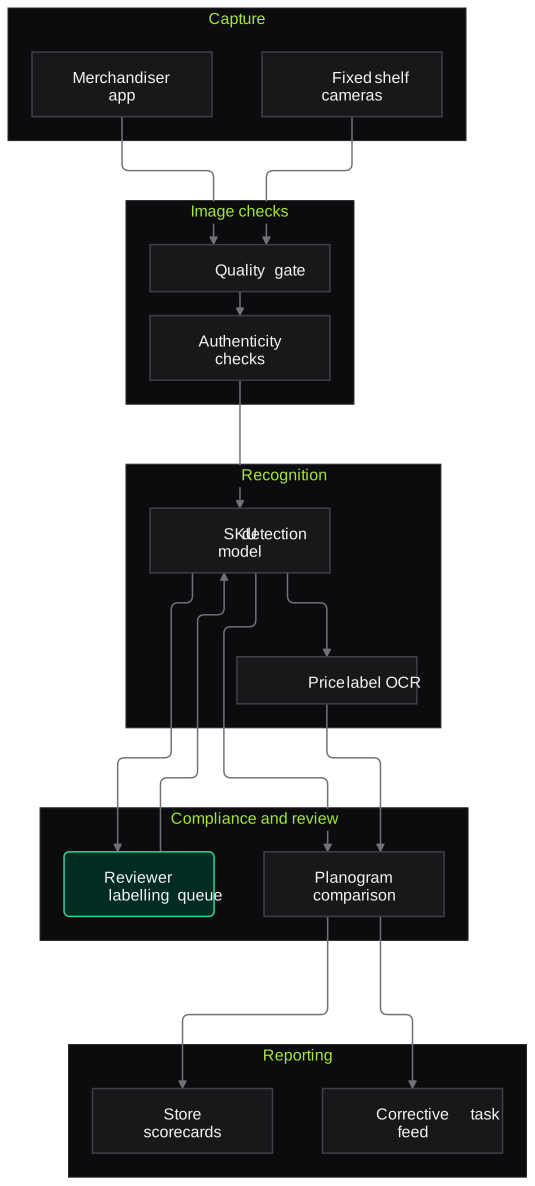
We build a shelf recognition system trained on your pack images, including variants and recent launches. Photos come from a merchandiser app or fixed shelf cameras. Each image first passes a quality and authenticity check for blur, angle, timestamp, location and duplicates, and a poor shot triggers an immediate retake. The model then detects each SKU, counts facings, finds gaps, reads shelf-edge price labels and compares the shelf with the planogram for that store. Low-confidence products go to a reviewer, whose labels improve the model. Category and sales teams get store scorecards and task lists.
- Recognises your SKUs and key competitors' by pack, including size and flavour variants
- Counts facings and share of shelf, and detects out-of-stock gaps
- Compares the shelf with the store's planogram and lists misplaced or missing SKUs
- Reads shelf-edge labels and flags price or MRP mismatches
- Checks photo quality, timestamp, GPS and duplicates at capture, before the merchandiser leaves the store
- Store scorecards and corrective tasks sent back to merchandisers and store managers
How it works
- 01Capture shelf photosMerchandisers photograph bays in the app, or fixed cameras capture shelves on a schedule.
- 02Check image quality and authenticityBlur, angle, timestamp, location and duplicate checks run at once, and poor images prompt a retake.
- 03Recognise SKUs and gapsThe model detects SKUs, counts facings, reads price labels and finds empty slots.
- 04Route low-confidence itemsProducts the model is unsure about go to a reviewer for labelling before they count.
- 05Compare with planogramThe shelf is compared with the planogram and visibility agreement for that store.
- 06Score and assign tasksStore scores, out-of-stock lists and corrective tasks go to sales and store teams.

Architecture
- Capture
- Merchandiser mobile app with guided capture
- Fixed shelf cameras where installed
- Store and visit metadata
- Image checks
- Blur and angle quality gate
- Timestamp, GPS and duplicate-image checks
- Recognition
- SKU detection model trained on your packs
- Price label OCR
- Gap and facing counter
- Compliance and review
- Planogram comparison engine
- Reviewer labelling queue
- Model retraining with confirmed labels
- Reporting
- Store and category scorecards
- Task feed to the sales force or store app
Inputs and outputs
Inputs
- Shelf photos from the merchandiser app or fixed cameras
- Pack images for your SKUs and key competitors
- Store-wise planograms and visibility agreements
- Price lists and MRP master
- Store master with location and visit schedule
Outputs
- SKU-level facings, share of shelf and out-of-stock list per store
- Planogram compliance score with misplaced and missing SKUs
- Price label mismatch flags
- Photo authenticity flags for audit
- Corrective tasks for merchandisers and store managers
Where people stay in control
Reviewers label packs the model is unsure about, and new launches, before they count in scores. Area sales managers decide any visibility payout or penalty using the photo evidence; the system does not calculate payouts on its own.
Integrations
- Sales force automation or merchandiser app
- Planogram software or planogram files from category teams
- DMS or retailer master for store lists
- BI tools such as Power BI or Looker
- Cloud storage for shelf images
Guardrails
- Image quality and authenticity gate at capture
- Low-confidence detections excluded from scores until reviewed
- Shopper faces blurred in stored images
- Payouts and penalties never calculated without a manager's review
Compliance notes
- Shoppers who appear in photos are blurred, supporting data minimisation under the DPDP Act 2023.
- In-store photography follows the terms agreed with each retailer.
A typical pilot
Duration: 4 weeks
One category, such as biscuits or personal care, in twenty to thirty stores of one city, using merchandiser photos alongside the current manual audit.
Deliverables
- 01SKU recognition model for the pilot category
- 02Capture checks inside your merchandiser app or a pilot app
- 03Store scorecards and task feed
- 04Accuracy report against manual audits of the same shelves
- 05Roll-out plan covering categories, cities and devices
What we measure
- SKU recognition accuracy
- Detections compared with a manual count on a sample of the same photos.
- Out-of-stock agreement
- Gaps flagged by the model compared with a physical audit in pilot stores.
- Photo rejection at capture
- Share of photos sent back for retake, by reason.
- Audit effort per store
- Time from visit to a completed store report, compared with the current process.
FAQs
01How many images of each SKU do you need?
We start from your pack artwork and a set of real shelf photos for each SKU, then add examples as reviewers confirm uncertain detections. New launches are added the same way before they count in scores.
02Does it work in general trade stores, not just modern trade?
Yes, though kirana shelves are more crowded and less orderly. Guided capture in the app and clear rules on what counts, such as the brand's chiller or a specific bay, keep results consistent.
03Can it run on low-end Android phones?
Capture and quality checks run on the phone, while recognition runs in the cloud once the image uploads. Images queue offline and sync when the network returns.
04Can we measure competitors too?
Yes. Competitor packs can be added to the model for share-of-shelf measurement. Only what is visible on the shelf is measured.
Related use cases
- Retail, D2C & Quick Commerce
Dark-Store Picking and Packing QC
A camera at the packing station checks each tote against the order before the bag is sealed, catching wrong variants, missing items and near-expiry stock, and keeps an image per order.
- Retail, D2C & Quick Commerce
Catalogue Enrichment from Product Images
Read product photos and back-of-pack images to fill category attributes, mandatory declarations and listing copy for each marketplace, with every value checked before publishing.
- Retail, D2C & Quick Commerce
Distributor Trade Claims and Scheme Settlement
Read distributor claim sheets and proofs, apply scheme rules from your circulars, recalculate eligible amounts, catch duplicates and give finance a clean credit note sheet to approve.
- Healthcare & Hospitals
Pharmacy Shelf and Expiry Monitoring
Photograph pharmacy shelves, ward stores and crash cart drawers to read batch and expiry dates, find near-expiry and missing items, and flag look-alike medicines stored side by side.

Founded by Akhilesh Mittal. 8 years building a security platform for a New Zealand company. IIT ISM Dhanbad and IMT Ghaziabad. Builds production agentic AI.
Pick one leak and measure it
Book a discovery call. We will choose one narrow pilot, such as COD confirmation, one claim type or one dark store, run it alongside your current process and report what we measured.