Dark-Store Picking and Packing QC
A camera at the packing station checks each tote against the order before the bag is sealed, catching wrong variants, missing items and near-expiry stock, and keeps an image per order.
- Capability:
- Computer Vision
- Industry:
- Retail, D2C & Quick Commerce
Who it is for
- Head of Dark Store Operations
- City Operations Manager
- Dark Store Manager
- Head of Customer Experience
The problem
Quick commerce dark stores pick and pack an order in a few minutes, with no time for a second check. Toned milk instead of full cream, a 500 g pack instead of 1 kg or a missing item becomes a complaint, a refund and sometimes a lost customer.
Wrong variants and missing items
Look-alike packs, sizes and flavours are easy to mix up at speed, and each mistake turns into a refund or a re-delivery.
Near-expiry stock reaching customers
Dairy, bread and fresh items close to their date get picked during rush hours, leading to complaints and food-safety risk.
No evidence for complaints
When a customer reports a missing item, support has no record of what went into the bag and often refunds by default.
Speed leaves no room for checks
A manual second check at the packing station would slow every order, so it is skipped.
What we build
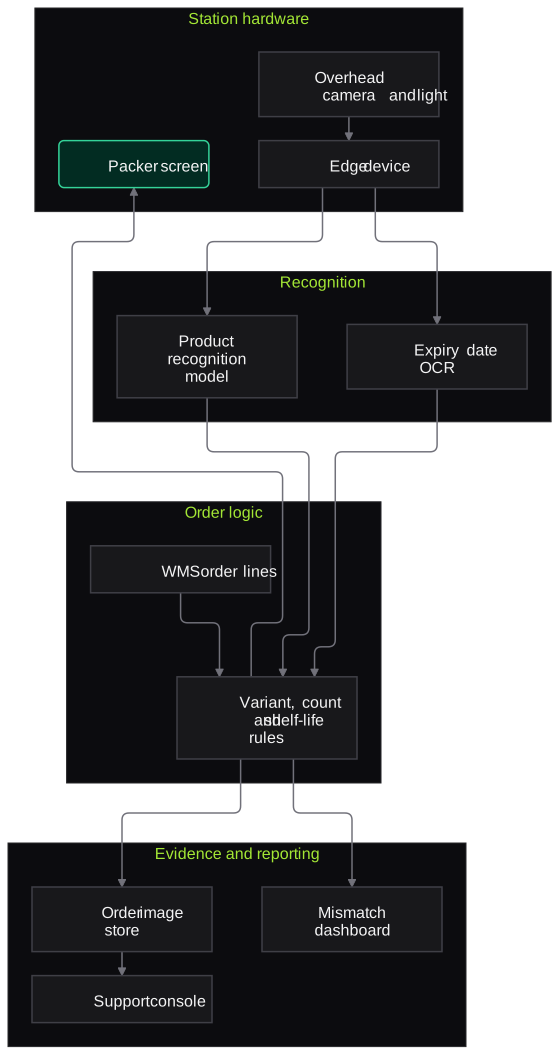
We build a packing-station check around an overhead camera above the tote or bag area. As the packer places items, the model identifies each product and compares it with the order lines from your WMS: right SKU, right variant, right count. Where the date is visible, it reads the expiry and applies your category shelf-life rule. If everything matches, the packer seals and dispatches as usual. If something is missing, extra or uncertain, the screen shows exactly which line to recheck. Every order gets an image linked to its order ID, which support can open when a complaint arrives.
- Identifies products in the tote and matches them to order lines by SKU, variant and count
- Reads printed expiry dates where visible and applies your minimum shelf-life rules by category
- Flags damaged, leaking or crushed packs for replacement before sealing
- Shows the packer which line to recheck without stopping the station
- Stores an image per order, linked to the order ID, for complaint handling
- Store dashboards of mismatch types by SKU, shift and picker
How it works
- 01Load the orderThe packer scans the order or tote, and the station pulls order lines from the WMS.
- 02Capture the toteThe overhead camera captures items as they are placed in the packing area.
- 03Match items to the orderThe model identifies each product and compares SKU, variant, count and visible expiry with the order.
- 04Packer rechecks flagsMismatches and uncertain items appear on screen for the packer to fix or confirm.
- 05Seal and dispatchOnce every line matches or is confirmed, the bag is sealed and handed to the rider.
- 06Keep evidence and reportThe image is stored against the order ID, and mismatch data feeds store dashboards.

Architecture
- Station hardware
- Overhead camera and LED light above the packing area
- Edge device or mini PC at the station
- Packer screen or tablet
- Recognition
- Product recognition model trained on the store assortment
- Expiry date OCR
- Damage and leak detector
- Order logic
- WMS order line fetch
- Variant, count and shelf-life rules by category
- Evidence and support
- Order image store with retention policy
- Support console view by order ID
- Operations reporting
- Mismatch dashboard by store, SKU and shift
- New SKU onboarding queue
Inputs and outputs
Inputs
- Order lines and tote IDs from the WMS
- Product images for the dark store assortment
- Category shelf-life and substitution rules
- Overhead camera images at the packing station
- Customer complaint tickets referencing order IDs
Outputs
- Match or recheck prompt per order on the packer screen
- Image per order linked to the order ID
- Near-expiry and damaged-pack flags
- Mismatch dashboard by store, SKU, shift and picker
- Evidence view for support agents handling complaints
Where people stay in control
Packers resolve every flagged line before sealing, and shift leads decide substitutions. Support agents decide refunds using the order image; the system provides evidence and does not approve or deny refunds.
Integrations
- WMS or dark-store management system
- Customer support platform such as Freshdesk or Zendesk
- Product information or catalogue system for reference images
- Cloud storage for order images
- BI dashboards for city operations
Guardrails
- Time budget per check so the station keeps its pace
- Manual fallback when the camera or model is unavailable
- Uncertain items always shown to the packer, never silently passed
- Camera framed on the packing area, not on staff faces
- Order images kept only for the agreed retention period
Compliance notes
- Expiry checks help evidence FSSAI expectations that food sold online reaches customers with adequate remaining shelf life.
- Images exclude staff faces and are kept only as long as complaint handling needs, in line with the DPDP Act 2023.
A typical pilot
Duration: 4 weeks
Two or three packing stations in one dark store, covering the store's highest-volume categories, with post-pack audits as the benchmark.
Deliverables
- 01Station hardware specification and installation
- 02Recognition model for the pilot assortment
- 03Packer screen and order image store
- 04Accuracy report against post-pack audits and complaints
- 05Roll-out plan with per-station cost
What we measure
- Mismatch detection
- Flags compared with errors found in post-pack audits of the same orders.
- False flags
- Flags the packer confirmed as correct, checked against audit samples.
- Time added per order
- Packing duration from WMS timestamps, with and without the check.
- Complaints with evidence
- Share of missing or wrong item complaints on pilot orders where support could open the order image.
FAQs
01Will it slow down packing?
It is designed to run while the packer works, not as an extra step. We measure packing time from WMS timestamps during the pilot and tune camera position and screen prompts so the station keeps pace.
02How does it handle new SKUs, which we add every week?
New products are added from catalogue images and a few photos taken at the station. Until a SKU is learned, the system marks it as unverified rather than guessing.
03Can it read expiry dates on every product?
Only where the date faces the camera. Many dates are printed on the back or bottom, so expiry checks work best for categories where packers place the date face up, such as dairy and bread.
04Do customers see the image?
That is your choice. Most teams use it internally for complaint handling first, and some share it with the customer when a complaint is disputed.
Related use cases
- Retail, D2C & Quick Commerce
Shelf Availability and Planogram Compliance
Turn merchandiser and store shelf photos into SKU-level facings, out-of-stock gaps, price-label checks and planogram scores, with doubtful detections sent to a reviewer.
- Retail, D2C & Quick Commerce
Order Status and Returns Voice Agent
A multilingual voice agent that answers where-is-my-order calls from live courier data, starts returns and exchanges under your policy, and hands disputes to an agent with context.
- Retail, D2C & Quick Commerce
Vendor Invoice and Credit Note Reconciliation
Match vendor invoices, GRNs, RTVs and credit notes, recalculate what each vendor owes you from the agreements, and chase missing or short credit notes with evidence.
- Logistics & Supply Chain
Parcel Damage and Dimension Detection
Camera stations at induction, sortation and dispatch measure each parcel for volumetric weight and flag visible damage, keeping time-stamped images as evidence for claims and billing.

Founded by Akhilesh Mittal. 8 years building a security platform for a New Zealand company. IIT ISM Dhanbad and IMT Ghaziabad. Builds production agentic AI.
Pick one leak and measure it
Book a discovery call. We will choose one narrow pilot, such as COD confirmation, one claim type or one dark store, run it alongside your current process and report what we measured.