Certificate of Analysis Extraction and Spec Matching
Read supplier and in-house certificates of analysis, extract every test result and compare it with your approved specification, so QC sees out-of-limit, missing and mismatched lines at a glance.
- Capability:
- Document Intelligence
- Industry:
- Pharma & Life Sciences
Who it is for
- Quality Control Manager
- Head of Quality Assurance
- Supplier Quality Manager
- Stores and Warehouse Manager
The problem
Every lot of API, excipient and packaging material arrives with a supplier certificate of analysis, each in its own layout. QC compares the COA line by line with the approved specification and vendor approval before sampling and testing, and similar checks repeat for finished-product COAs sent to customers.
Formats vary by supplier
Test names, units and limit expressions differ between suppliers, so a COA cannot be checked with a fixed template.
Specification drift
Suppliers sometimes quote an older pharmacopoeia edition or their own limits, which is easy to miss when the result itself passes.
Missing tests
A residual solvent, microbial or elemental impurity test that is in your specification but absent from the COA can slip through a quick visual check.
Lot and date mismatches
Batch numbers and manufacture or retest dates on the COA do not always match the container label, invoice or goods receipt note.
What we build
We build a COA checking pipeline that reads each certificate, whether a digital PDF or a scan, and extracts material, supplier, batch, dates and every test with its result, unit and limit. Test names are mapped to your specification through a maintained synonym list, units are normalised, and each result is compared with your approved limit. The system also checks that every specified test is present, that the cited pharmacopoeia matches your specification, and that batch and dates match the goods receipt. QC sees a pass, flag or missing status for every line, with the source shown beside it.
- Extracts tests, results, units and limits from digital and scanned COAs in any supplier layout
- Maps supplier test names to your specification through a QC-approved synonym library
- Normalises units and limit expressions such as NMT, NLT and ranges
- Flags out-of-limit results, missing tests and differing pharmacopoeia references
- Matches batch number and dates against the goods receipt note and label
- Keeps a per-supplier history to show results drifting towards limits
How it works
- 01Receive the COACOAs arrive with the consignment, by email or from a supplier portal, and are linked to the goods receipt note.
- 02Extract test dataOCR and an LLM extract header details and the test table with results, units and limits.
- 03Map to specificationEach test is mapped to the approved specification for that material and vendor, and units are normalised.
- 04Compare and check completenessResults are compared with limits, missing tests are listed, and batch and dates are matched to the goods receipt.
- 05QC reviewFlags, unmapped tests and low-confidence values go to a QC reviewer, who accepts, rejects or raises a query with the supplier.
- 06Record the outcomeChecked COA data is stored against the lot in LIMS or ERP with the reviewer's decision.

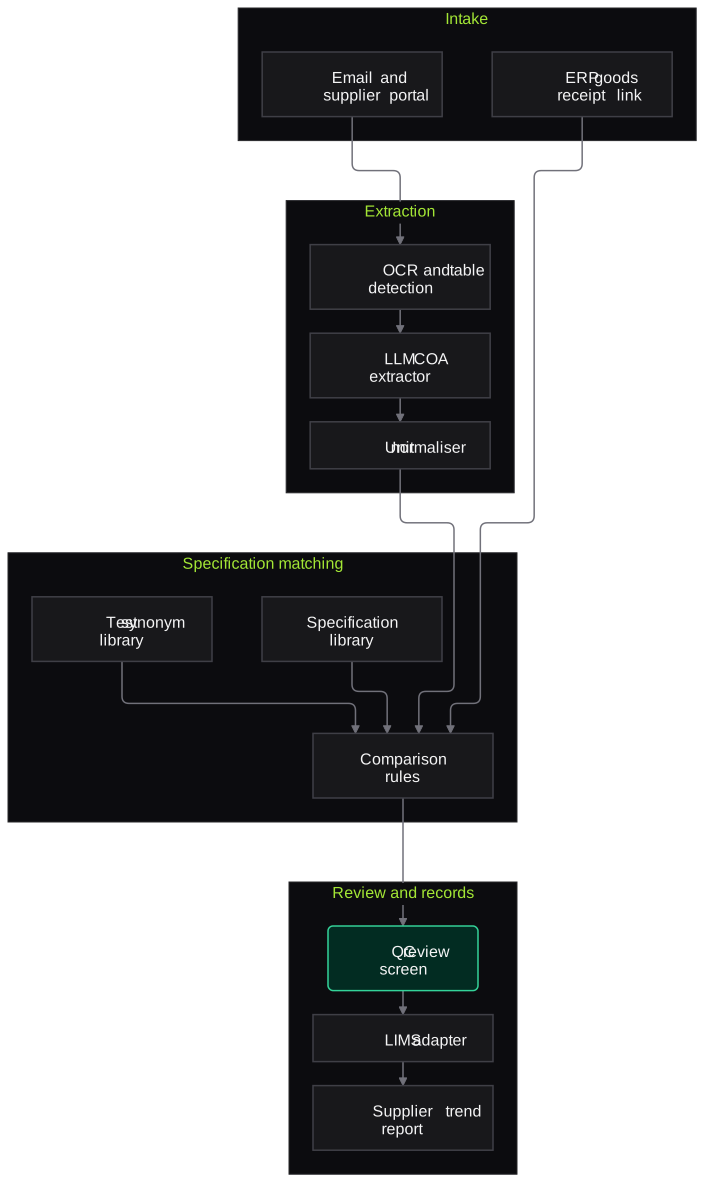
Architecture
- Intake
- Email and supplier portal connectors
- Goods receipt link from ERP
- Scan station at stores
- Extraction
- OCR with table detection
- LLM extractor with COA schema
- Unit and limit normaliser
- Specification matching
- Approved specification library by material and vendor
- Test name synonym library
- Comparison and completeness rules
- Review and records
- QC review screen with source highlights
- LIMS or ERP adapter
- Supplier trend report
Inputs and outputs
Inputs
- Supplier COAs for APIs, excipients and packaging materials
- Approved material specifications and approved vendor list
- Goods receipt notes and supplier invoices
- Pharmacopoeia references cited in your specifications
- In-house finished-product COAs before dispatch
Outputs
- Line-by-line comparison with pass, flag or missing status
- List of out-of-limit results and absent tests
- Batch and date mismatch alerts against the goods receipt
- Structured COA data stored against the lot
- Supplier-wise trend of results near limits
Where people stay in control
QC reviews every flagged line, unmapped test and low-confidence value, and decides whether to accept the COA, query the supplier or reject the lot. The COA check supports, and does not replace, your sampling and testing programme and the QA release decision.
Integrations
- LIMS such as LabWare, LabVantage or STARLIMS
- ERP such as SAP for goods receipt and lot status
- Supplier portal or shared mailbox
- Document management system for approved specifications
- QMS for supplier complaints and CAPA
Guardrails
- New test-name synonyms added only after QC approval
- Specifications pulled from the effective version only
- No automatic lot release; status changes stay with QC and QA
- Low-confidence values always shown next to the source image
- Periodic re-check of a sample of cleared COAs by QC
Compliance notes
- Supports vendor qualification and material control expectations under GMP, including India's revised Schedule M.
- Where COA data feeds GMP decisions, records and audit trails are designed to align with 21 CFR Part 11 and EU GMP Annex 11.
A typical pilot
Duration: 3 weeks
A group of high-volume raw materials from a few suppliers, using recent COAs already reviewed by QC, followed by a short live run.
Deliverables
- 01Synonym and unit library for the pilot materials
- 02Working COA checking pipeline
- 03QC review screen
- 04Accuracy report against QC's own COA reviews
- 05Plan to extend to the remaining materials
What we measure
- Extraction accuracy per test line
- Extracted results and limits compared with QC-verified values for the same COAs.
- Test mapping accuracy
- Supplier test names checked by QC for correct mapping to the specification.
- Flags confirmed by QC
- QC decision recorded against each flag raised.
- Review time per COA
- Timed checks on comparable COAs with and without the pipeline.
Built on related work
Claims reconciliation platform
Packaged-food brand (anonymised)
OCR and LLM platform that matches distributor claims spreadsheets against invoices and proofs, applies policy rules, detects duplicates, recalculates amounts, routes uncertain lines to an exception queue and keeps an audit trail. Finance keeps final approval.
FAQs
01Does this replace our COA review SOP?
No. The pipeline does the reading and comparing, and your SOP is updated to describe how QC reviews its output. Lot release decisions stay with QC and QA.
02What about COAs that are not in English?
Most supplier COAs are in English or bilingual. Where a supplier issues COAs only in another language, we test extraction on samples during the pilot and report results per supplier.
03Can it check pharmacopoeia limits directly?
It checks against your approved specification, which already reflects the monograph you follow. It also flags when a supplier cites a different pharmacopoeia or edition, so QC can decide whether that matters.
04Will it work for the finished-product COAs we issue?
Yes. The same comparison can check COAs generated from LIMS before they go to customers or regulators, catching transcription errors and missing tests.
Related use cases
- Pharma & Life Sciences
Batch Manufacturing Record Review
Pre-review of executed batch manufacturing and packaging records that flags blank fields, out-of-limit values, signature gaps and unlinked deviations, with page references, before QA starts.
- Manufacturing
Supplier Quality Certificate Verification
Check mill test certificates and certificates of conformance against your material specs, tie heat numbers to GRNs, and flag out-of-spec, missing or reused certificates for IQC.
- Pharma & Life Sciences
Packaging and Label Inspection
Camera checks on cartons, labels and blister foils that verify batch, expiry, MRP and codes, compare print against approved artwork, and reject mismatches with image evidence.
- Pharma & Life Sciences
Regulatory Dossier and SOP Q&A Assistant
A question-answering assistant over your effective SOPs, specifications and CTD dossier modules that cites the exact section, respects versions and access rights, and says when it does not know.

Founded by Akhilesh Mittal. 8 years building a security platform for a New Zealand company. IIT ISM Dhanbad and IMT Ghaziabad. Builds production agentic AI.
Test one record type on your own batches
Book a discovery call to choose a narrow pilot, such as BMR pre-review for one product or COA checks for one material group, and compare the results with your QA team's own review.