Regulatory Dossier and SOP Q&A Assistant
A question-answering assistant over your effective SOPs, specifications and CTD dossier modules that cites the exact section, respects versions and access rights, and says when it does not know.
- Capability:
- Document Intelligence
- Industry:
- Pharma & Life Sciences
Who it is for
- Head of Quality Assurance
- Regulatory Affairs Manager
- QA Documentation Lead
- Plant Head
The problem
A plant can hold thousands of controlled documents: SOPs, work instructions, specifications, validation protocols and the CTD modules filed for each market. When an operator, auditor or regulatory associate needs an answer, they search the DMS by document number and read until they find it, and sometimes they find a superseded version.
Answers buried in long documents
Finding the dirty hold time for one vessel or the dissolution method agreed for one market means opening several documents and reading them in full.
Version confusion
Printed copies and local folders drift from the effective version in the DMS, and people quote superseded SOPs during audits.
Slow responses to agency queries
Regulatory affairs teams assemble replies to deficiency letters by hunting through Module 2 and Module 3 sections filed years earlier.
Uneven answers across shifts
New joiners ask supervisors the same questions, and the answer depends on who is on shift and what they remember.
What we build
We build a retrieval-based assistant that indexes only effective, approved documents from your DMS and regulatory archive, tagged with version, effective date, site and market. Users ask in plain English or Hindi and get a short answer that cites the exact section and page, with a link to the controlled copy. If the documents do not contain the answer, the assistant says so instead of improvising. Access follows your existing roles, so a user at one site cannot retrieve another site's dossiers. The assistant is read-only: it never edits documents and does not replace reading the SOP before executing a task.
- Indexes SOPs, specifications, validation protocols and CTD Modules 2 and 3 by version, site and market
- Answers with section and page citations and opens the controlled copy in the DMS
- Excludes draft, obsolete and withdrawn documents from every answer
- Compares one topic across markets, such as a specification filed in two dossiers
- Filters retrieval by role and site before the model sees any text
- Logs every question, answer and source for QA sampling
How it works
- 01Sync effective documentsA connector pulls approved, effective documents and their metadata from the DMS and regulatory archive on a schedule.
- 02Parse and indexDocuments are split by section with tables and headings preserved, and indexed with version, site and market tags.
- 03Ask a questionA user asks in the web app or Microsoft Teams, and retrieval is restricted to what their role allows.
- 04Retrieve and answerRelevant sections are retrieved and the model drafts a short answer that cites each source passage.
- 05Check groundingIf retrieved text does not support the answer, or sources conflict, the assistant declines and names the document owner.
- 06Sample and improveQA samples logged answers each week, marks errors, and retrieval settings are tuned under change control.

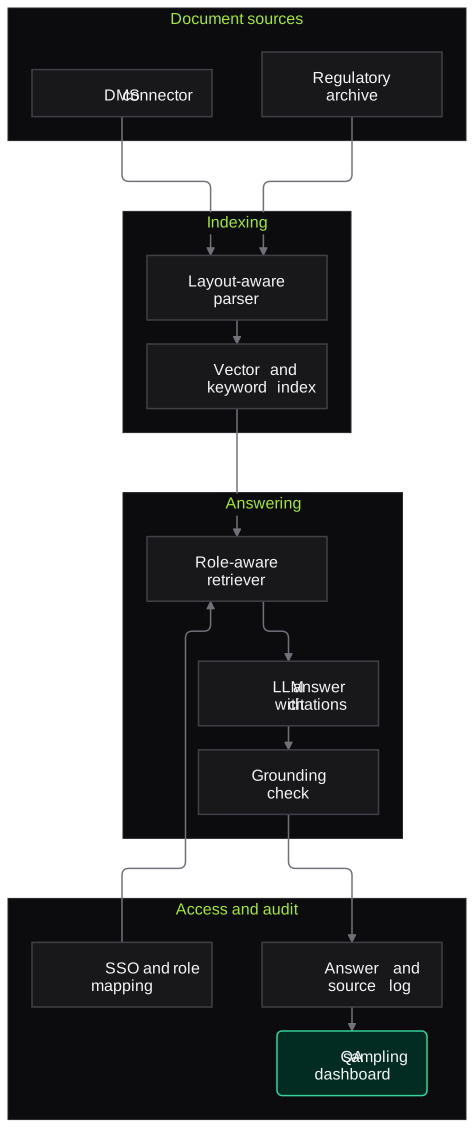
Architecture
- Document sources
- DMS connector for effective SOPs and specifications
- Regulatory archive for CTD modules
- Metadata sync for version, site and market
- Indexing
- Layout-aware parser for tables and headings
- Section-level vector index
- Keyword index for document numbers and test names
- Answering
- Role-aware retriever
- LLM answer generator with citation format
- Grounding and conflict check
- Access and audit
- SSO with role and site mapping
- Question, answer and source log
- QA sampling dashboard
Inputs and outputs
Inputs
- Effective SOPs and work instructions from the DMS
- Specifications and standard test procedures
- CTD Module 2 and Module 3 sections per market
- Validation and qualification protocols
- User roles and site mapping from SSO
Outputs
- Short answers with section and page citations
- Links to the controlled copy in the DMS
- Cross-market comparison tables for a chosen topic
- Log of questions, answers and sources
- List of unanswered questions for document owners
Where people stay in control
Document owners decide what gets indexed through the normal DMS approval flow. QA samples logged answers on a fixed schedule and flags errors, and the assistant is positioned as a search aid, not a substitute for reading the controlled SOP.
Integrations
- Document management system such as Veeva Vault, OpenText or MasterControl (via API or export)
- Regulatory information management or eCTD archive
- Microsoft Teams or an internal web portal
- SSO such as Microsoft Entra ID
- Learning management system for links to training records
Guardrails
- Only effective, approved versions are indexed; drafts and obsolete versions are excluded
- Answers without a supporting citation are blocked
- Retrieval filtered by role, site and market before generation
- Read-only access; the assistant cannot edit or approve documents
- Weekly answer sampling, with errors fed back under change control
Compliance notes
- If people rely on its answers in GxP work, the assistant is validated for that intended use and kept under change control, in line with EU GMP Annex 11 and 21 CFR Part 11 expectations.
- Designed to support data integrity by keeping a complete log of questions, retrieved sources and answers.
A typical pilot
Duration: 4 weeks
One site's SOP set for one department, such as quality control, plus one product's Module 3 for one market.
Deliverables
- 01Indexed document set with version and access mapping
- 02Working assistant in a test environment for named users
- 03Question bank of real queries agreed with QA
- 04Answer accuracy and citation report
- 05Validation approach and roll-out plan
What we measure
- Answer correctness
- QA reviewers grade each answer in the agreed question bank against the source document.
- Citation accuracy
- A reviewer checks whether each cited passage actually contains the stated answer.
- Correct refusals
- Questions with no answer in the document set are checked for whether the assistant declined.
- Time to find an answer
- Timed searches on sample questions using the DMS alone and using the assistant.
FAQs
01How do you stop it from making things up?
Answers are generated only from retrieved sections, and a grounding check blocks any answer whose claims the cited text does not support. When nothing relevant is found, the assistant says it cannot answer and points to the document owner. The pilot report counts these refusals separately.
02Can it answer from obsolete SOPs?
No. Only documents marked effective in your DMS are indexed, and the index refreshes when a new version becomes effective. Superseded versions drop out of retrieval.
03Does it work with scanned legacy dossiers?
Yes. Older dossier PDFs go through OCR with layout detection first. Pages with poor scan quality are listed in the pilot report so you can decide whether to re-scan them.
04Does this need to be validated?
If people rely on its answers in GxP activities, yes, proportionate to the risk. We provide user requirements, a risk assessment and test evidence from the pilot question bank that your CSV team can build on.
Related use cases
- Pharma & Life Sciences
Batch Manufacturing Record Review
Pre-review of executed batch manufacturing and packaging records that flags blank fields, out-of-limit values, signature gaps and unlinked deviations, with page references, before QA starts.
- Pharma & Life Sciences
Validation and Security Testing of AI Tools in GxP Settings
Risk-based testing of LLM and ML tools used in quality, manufacturing or pharmacovigilance: accuracy, prompt injection, data leakage and audit-trail checks, packaged as validation evidence.
- Pharma & Life Sciences
Certificate of Analysis Extraction and Spec Matching
Read supplier and in-house certificates of analysis, extract every test result and compare it with your approved specification, so QC sees out-of-limit, missing and mismatched lines at a glance.
- Manufacturing
Maintenance Log and SOP Assistant
A shop-floor assistant that answers technicians' questions from breakdown history, OEM manuals and SOPs, in Hindi or English, with the source page or work order behind every answer.

Founded by Akhilesh Mittal. 8 years building a security platform for a New Zealand company. IIT ISM Dhanbad and IMT Ghaziabad. Builds production agentic AI.
Test one record type on your own batches
Book a discovery call to choose a narrow pilot, such as BMR pre-review for one product or COA checks for one material group, and compare the results with your QA team's own review.