Batch Manufacturing Record Review
Pre-review of executed batch manufacturing and packaging records that flags blank fields, out-of-limit values, signature gaps and unlinked deviations, with page references, before QA starts.
- Capability:
- Document Intelligence
- Industry:
- Pharma & Life Sciences
Who it is for
- Head of Quality Assurance
- QA Batch Release Manager
- Qualified Person
- Production Manager
The problem
Executed batch manufacturing records (BMRs) and batch packaging records (BPRs) are still hand-filled on many sites, with in-process checks, equipment logs, line clearance and printouts attached. QA reads every page before release, and the record is often the slowest step between packing and dispatch.
Every page read, every time
Reviewers check dispensing weights, process parameters, yield calculations and signatures page by page, even when most of the record is in order.
Small errors found late
A missing second-person verification, an unrecorded time or a wrong yield calculation often surfaces at release and sends the record back to the floor.
Deviations not linked
A parameter excursion noted in the margin may have no deviation number, or the deviation may still be open when the batch is presented for release.
Good documentation practice slips
Overwriting, corrections without date and initials, and blank fields left unstruck are common audit observations that are tedious to catch by hand.
What we build
We build a review assistant that reads scanned or electronic batch records against the master record for that product. It extracts every entry, checks recorded values against the limits in the master BMR, recalculates yields and reconciliations, and confirms each step carries the required signatures and dates. It looks for good documentation practice issues such as blank fields and corrections without initials, and checks deviation and change control numbers against your QMS. The output is a findings sheet with each item linked to the page image, so QA reviews by exception and still signs off the whole record.
- Maps each executed page to its step in the master BMR or BPR
- Reads handwritten entries, stamps and attached printouts such as weighing slips and HMI reports
- Checks recorded parameters against master record limits and recalculates yield and reconciliation
- Detects missing signatures, dates, second-person checks and unstruck blank fields
- Matches deviation, OOS and change control references against the QMS and flags open items
- Produces a findings sheet linked to page images for QA review and sign-off
How it works
- 01Scan or export the executed recordThe completed BMR or BPR is scanned on the shop floor or exported from the MES and tagged with product and batch number.
- 02Align to the master recordEach page is matched to its master BMR step, so the expected fields, limits and signatories are known.
- 03Extract entriesHandwritten and printed values, signatures, dates and attachments are extracted with a confidence score per field.
- 04Confirm unclear readsFields the system cannot read confidently are shown to a reviewer to confirm instead of being guessed.
- 05Run checksValues are compared with limits, calculations are repeated, GDP rules are applied and deviation references are matched to the QMS.
- 06QA reviews findingsThe QA reviewer works through the findings sheet, returns corrections to production and completes the formal review.

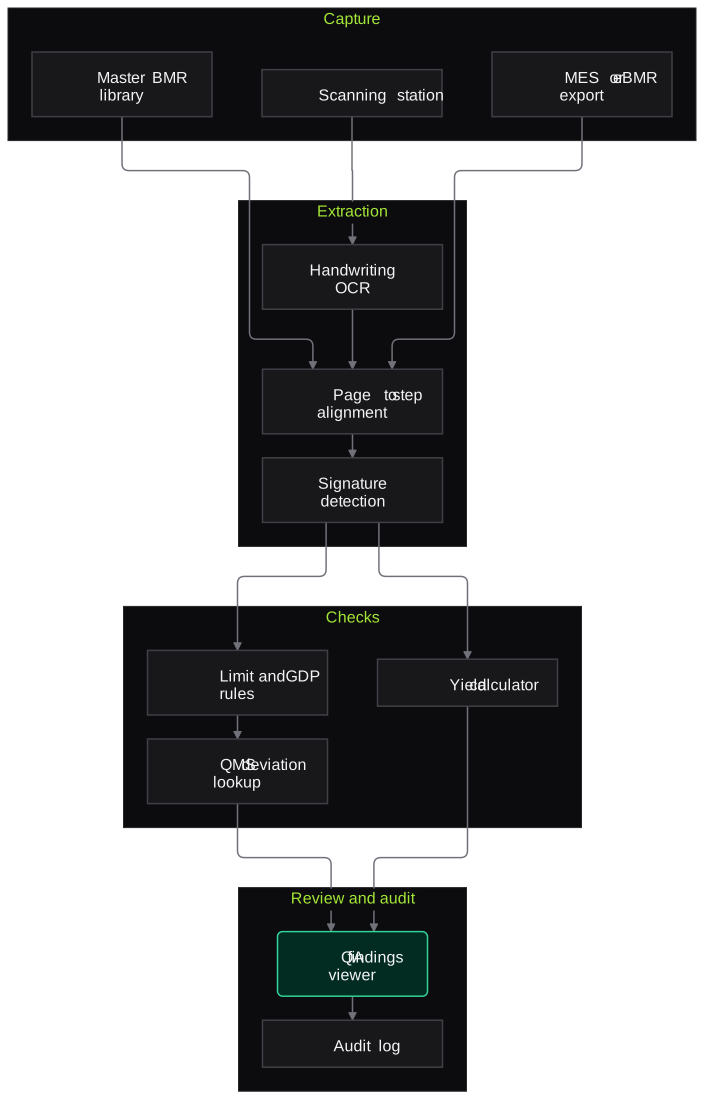
Architecture
- Capture
- Shop-floor scanning station with batch barcode
- MES or eBMR export connector
- Master BMR and BPR library
- Extraction
- Handwriting-capable OCR
- Page-to-step alignment model
- Signature and stamp detection
- Checks
- Limit rules from the master record
- Yield and reconciliation calculator
- GDP rule set
- QMS lookup for deviations and change controls
- Review
- Findings sheet with page image viewer
- Reviewer confirmation queue
- Audit
- Log of extractions, checks and reviewer actions
- Batch-level review report export
Inputs and outputs
Inputs
- Executed BMR and BPR scans or eBMR exports
- Approved master BMR and BPR for the product
- Attached printouts such as weighing slips, HMI reports and line clearance checklists
- Deviation, OOS and change control register from the QMS
- Authorised signatory list per step
Outputs
- Findings sheet grouped by severity with page references
- Recalculated yields and reconciliation figures
- List of open or unlinked deviations
- Extracted batch data for trending in your annual product quality review
- Audit log of all checks and reviewer decisions
Where people stay in control
Reviewers confirm any entry the system could not read confidently, and QA decides whether each finding is a genuine issue. Batch disposition stays with the Qualified Person or authorised QA; the assistant only prepares the review.
Integrations
- MES or eBMR system (export or API)
- QMS such as TrackWise, MasterControl or an in-house system
- Document management system holding master records
- ERP batch status in SAP or similar
- Shop-floor scanners and network folders
Guardrails
- No automatic batch disposition; release stays with authorised QA
- Per-field confidence threshold, with unclear handwriting sent for confirmation
- Check rules derived from the approved master record and version-controlled
- Every finding linked to the source page image
- Periodic full manual review of sampled batches to measure what the system missed
Compliance notes
- Treated as a computerised system supporting GMP review and validated for that intended use, with audit trails aligned to 21 CFR Part 11 and EU GMP Annex 11.
- Supports good documentation practice and ALCOA+ data integrity expectations, including under India's revised Schedule M.
A typical pilot
Duration: 5 weeks
One product and one record type, such as the granulation-to-compression BMR, using previously reviewed batches plus live batches in parallel.
Deliverables
- 01Check list derived from the master BMR and agreed with QA
- 02Working pre-review pipeline on historical and live batches
- 03Findings viewer for QA reviewers
- 04Comparison report against findings from your manual review
- 05Validation plan and production estimate
What we measure
- Finding recall
- Findings from your completed manual reviews compared with what the assistant flagged on the same batches.
- False flags
- Findings the QA reviewer marks as not an issue, counted per batch.
- Handwriting read accuracy
- Sampled extracted entries compared with the page image by a reviewer.
- Review time per batch
- Timed QA review of comparable batches with and without the findings sheet.
FAQs
01Our BMRs are handwritten. Will this work?
Yes, that is the usual case. Extraction handles handwritten entries and stamps, and anything below the confidence threshold is shown to a reviewer rather than guessed. The pilot reports read accuracy separately for handwritten and printed fields.
02Does it replace QA review?
No. It moves QA from reading every page to working through a findings sheet, but QA still reviews and signs the record. We also recommend periodic full manual review of sampled batches as a control.
03We already run an eBMR. Is this still useful?
An eBMR enforces many entry checks at the point of entry. The assistant then focuses on cross-record checks: deviations, attachments, calculations and consistency with the QMS and LIMS.
04How long does it take to add a new product?
Each product needs its master record mapped into checks. The pilot shows how long that takes for your record format, and later products reuse the same rule types.
Related use cases
- Pharma & Life Sciences
Certificate of Analysis Extraction and Spec Matching
Read supplier and in-house certificates of analysis, extract every test result and compare it with your approved specification, so QC sees out-of-limit, missing and mismatched lines at a glance.
- Pharma & Life Sciences
Regulatory Dossier and SOP Q&A Assistant
A question-answering assistant over your effective SOPs, specifications and CTD dossier modules that cites the exact section, respects versions and access rights, and says when it does not know.
- Pharma & Life Sciences
Tablet and Vial Visual Defect Detection
Vision models that flag chipped, cracked, spotted or broken tablets and cap, crimp, glass or particle defects in vials, sending uncertain units to manual inspection and storing every reject image.
- Pharma & Life Sciences
Validation and Security Testing of AI Tools in GxP Settings
Risk-based testing of LLM and ML tools used in quality, manufacturing or pharmacovigilance: accuracy, prompt injection, data leakage and audit-trail checks, packaged as validation evidence.

Founded by Akhilesh Mittal. 8 years building a security platform for a New Zealand company. IIT ISM Dhanbad and IMT Ghaziabad. Builds production agentic AI.
Test one record type on your own batches
Book a discovery call to choose a narrow pilot, such as BMR pre-review for one product or COA checks for one material group, and compare the results with your QA team's own review.