Packaging and Label Inspection
Camera checks on cartons, labels and blister foils that verify batch, expiry, MRP and codes, compare print against approved artwork, and reject mismatches with image evidence.
- Industry:
- Pharma & Life Sciences
Who it is for
- Packaging Manager
- Head of Quality Assurance
- Plant Engineering Manager
- Artwork and Labelling Lead
The problem
Labelling and packaging errors are a common reason for product recalls. Every carton, label and foil carries variable data printed on the line, such as batch number, manufacturing and expiry dates, MRP and often a QR code or barcode, and operators check samples by eye. Artwork changes add a second risk upstream.
Variable data printed wrong
Smudged, missing or wrong batch and expiry overprint, often after a changeover, can pass a periodic visual check.
Artwork version errors
An outdated carton or leaflet version reaching the line, or a text change missed in proofreading, affects the whole batch.
Unreadable or wrong codes
QR codes and barcodes needed for track-and-trace or Indian labelling rules must scan correctly and must encode the right data.
Thin evidence of checks
Manual line checks leave little beyond a signed checklist when an auditor or customer asks how a defect escaped.
What we build
We build vision inspection for carton, label and foil lines. Cameras capture each unit; the system reads the overprinted batch, dates and MRP, checks them against the batch details set at line clearance, decodes and grades the QR code or barcode, and compares the printed layout with the approved artwork. A separate proofing tool compares a new artwork PDF with the previous approved version and highlights every text, colour and layout change for the labelling team. Units that fail trigger the line's reject mechanism, and each rejection is stored with its image and reason.
- Reads batch number, manufacturing and expiry dates and MRP on cartons, labels and blister foils
- Verifies printed data against the batch details set at line clearance
- Decodes and grades QR codes, Data Matrix and linear barcodes, and checks their content
- Compares each printed unit with the approved artwork to catch wrong or mixed components
- Proofs new artwork PDFs against the previous approved version and lists every change
- Stores an image and reason for every rejected unit, linked to the batch
How it works
- 01Set up the batchAt line clearance the operator scans the batch order, and the station loads expected batch data and the approved artwork reference.
- 02Capture each unitCameras triggered by the line sensor capture every carton, label or foil at line speed.
- 03Read and verifyVariable data is read, codes are decoded and graded, and the layout is compared with the reference.
- 04Accept or rejectUnits that fail any check are rejected by the line mechanism; uncertain reads are rejected too and counted separately.
- 05Operator and QA reviewThe operator reviews reject images, and repeated failures stop the line for QA investigation.
- 06Batch inspection reportAt batch end, counts, reject reasons and sample images are compiled for the batch packaging record.

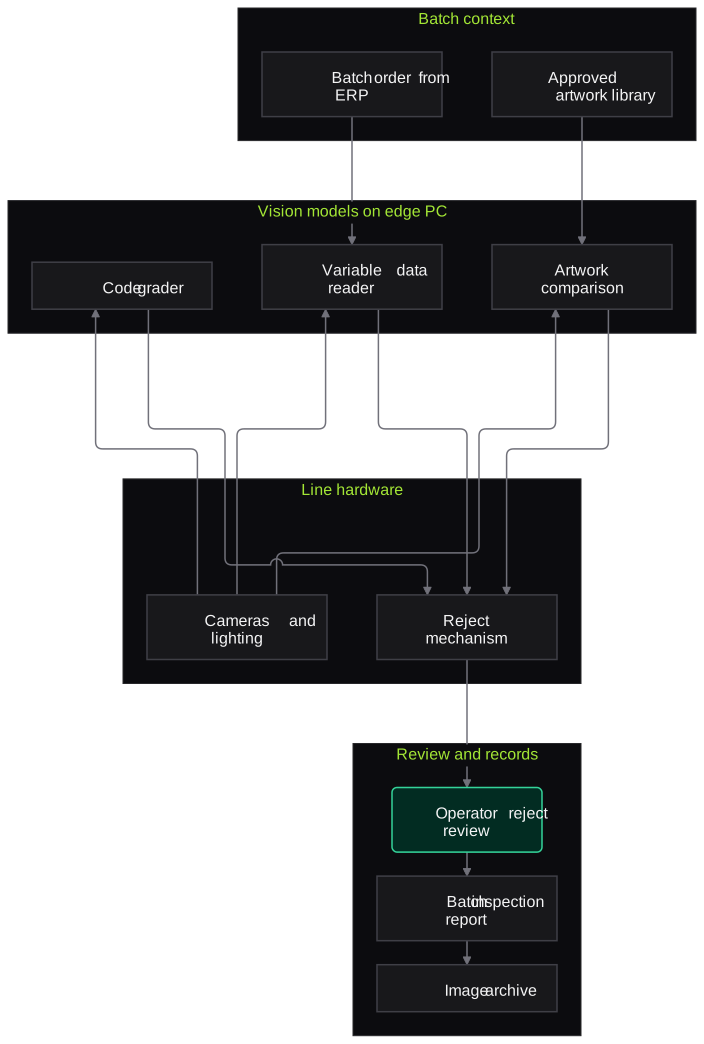
Architecture
- Line hardware
- Industrial cameras and lighting
- Line sensor trigger and reject mechanism
- Edge PC at the line
- Batch context
- Batch order from ERP or MES
- Approved artwork library
- Vision models
- Variable data reading and verification
- Code decoder and grader
- Artwork comparison model
- Review and records
- Operator reject review screen
- Batch inspection report
- Image archive with audit trail
Inputs and outputs
Inputs
- Batch order with batch number, dates and MRP
- Approved artwork PDFs for cartons, labels, foils and leaflets
- Camera images from the packaging line
- Line sensor and encoder signals
- Rules for expected QR code or barcode content
Outputs
- Accept or reject decision per unit
- Reject images with reason codes
- Code grading results
- Artwork change report for new versions
- Batch-level inspection summary for the BPR
Where people stay in control
Operators review rejected units, and QA investigates repeated failures before the line restarts. The labelling team approves every artwork change the proofing tool highlights, and QA approves any change to inspection recipes.
Integrations
- ERP or MES for batch orders
- Artwork management system
- Line PLC for triggers and rejects
- Serialisation or track-and-trace system where in use
- QMS for deviations raised from inspection failures
Guardrails
- Uncertain reads treated as rejects, never as passes
- Challenge test with known defective samples at batch start and end
- Inspection recipes locked and changed only through change control
- Every reject image retained with batch and timestamp
- Line stop after repeated consecutive rejects for investigation
Compliance notes
- Supports labelling controls under GMP, including India's revised Schedule M, and the QR code or barcode requirements in Indian labelling rules for APIs and specified brands.
- Inspection software and recipes are validated as a GMP computerised system, with audit trails aligned to 21 CFR Part 11 and EU GMP Annex 11.
A typical pilot
Duration: 6 weeks
One carton or label line for one product family, starting with offline images from earlier runs and moving to an in-line station that logs rejects without actuating them.
Deliverables
- 01Camera and lighting specification for the line
- 02Verification and artwork models set up for the pilot SKUs
- 03Challenge test set with known defects
- 04Inspection report comparing system results with manual checks
- 05Validation and installation plan
What we measure
- Detection of seeded defects
- Known defective samples, such as wrong batch or missing expiry, run through the station in challenge tests.
- False rejects
- Rejected units that operator review finds acceptable, counted per batch.
- Variable data read accuracy
- Printed values read by the system compared with the batch order for every unit captured.
- Artwork change detection
- Known differences between artwork versions checked against what the proofing tool reports.
FAQs
01We already have OCR and OCV cameras. What is different?
Many lines have vendor OCR for one or two fields. We add artwork comparison, code content checks and a batch-level evidence trail, and can work alongside existing cameras where their images are accessible.
02Can it keep up with our line speed?
Models run on an edge PC next to the line, and the pilot measures processing time per unit at your actual speed. Camera and trigger choice depends on line speed and is specified during the pilot.
03How do you add new SKUs?
Each new SKU needs its approved artwork and variable-data layout loaded, followed by a short challenge test. This runs under your change control procedure.
04Does it check package leaflets?
The proofing tool compares leaflet artwork PDFs version to version. In-line leaflet inspection depends on how the leaflet is presented on your line, which we assess during the pilot.
Related use cases
- Pharma & Life Sciences
Tablet and Vial Visual Defect Detection
Vision models that flag chipped, cracked, spotted or broken tablets and cap, crimp, glass or particle defects in vials, sending uncertain units to manual inspection and storing every reject image.
- Pharma & Life Sciences
Batch Manufacturing Record Review
Pre-review of executed batch manufacturing and packaging records that flags blank fields, out-of-limit values, signature gaps and unlinked deviations, with page references, before QA starts.
- Pharma & Life Sciences
Certificate of Analysis Extraction and Spec Matching
Read supplier and in-house certificates of analysis, extract every test result and compare it with your approved specification, so QC sees out-of-limit, missing and mismatched lines at a glance.
- Manufacturing
Visual Quality Inspection on Production Lines
Cameras and vision models at the inspection station flag scratches, dents, missing features and print errors, divert clear rejects and hold borderline parts for an inspector.

Founded by Akhilesh Mittal. 8 years building a security platform for a New Zealand company. IIT ISM Dhanbad and IMT Ghaziabad. Builds production agentic AI.
Test one record type on your own batches
Book a discovery call to choose a narrow pilot, such as BMR pre-review for one product or COA checks for one material group, and compare the results with your QA team's own review.