Policy Wording Comparison Assistant
Align two or more policy wordings clause by clause, highlight what was added, removed, narrowed or broadened, and answer questions with citations to the exact clause.
- Capability:
- Document Intelligence
- Industry:
- Insurance
Who it is for
- Product Manager, Health or Commercial Lines
- Broker Placement Lead
- Underwriter
- Legal and Compliance Counsel
The problem
Policy wordings change at every renewal, product refile and negotiation with a corporate client's broker. A narrowed definition, a new sub-limit or a moved exclusion can hide inside a document that looks almost identical to last year's, and finding it means slow, careful reading line by line.
Renumbered clauses defeat redlines
Word-processor comparisons break when sections are reordered or renumbered, producing pages of noise and hiding the real changes.
Meaning changes, not just words
Replacing 'any' with 'the' or adding one qualifying phrase to a definition can change cover materially without looking like a big edit.
Comparisons across insurers are inconsistent
Brokers building group health or property comparisons extract room-rent limits, co-pays, deductibles and exclusions by hand, and each insurer's format differs.
Customer summaries drift from the wording
Brochures and customer information sheets can fall out of step with the filed wording after several revisions.
What we build
We build a comparison assistant that reads policy wordings, endorsements and customer-facing summaries and breaks each into clauses with their numbering and headings. It aligns equivalent clauses across documents even when they are reordered or renamed, then classifies each difference as added, removed, narrowed, broadened or editorial. A parameter table pulls the items your team cares about, such as waiting periods, sub-limits, co-pay, deductibles and territorial limits, into one view with clause citations. Users can ask questions across the documents and get answers that quote the clause or say it was not found. It is a drafting and review aid, not a coverage opinion.
- Segments wordings, endorsements and schedules into clauses, keeping numbering and headings
- Aligns equivalent clauses across versions and insurers, even when reordered or renamed
- Classifies each difference as added, removed, narrowed, broadened or editorial
- Builds a parameter table for limits, waiting periods, co-pays, deductibles and exclusions, with citations
- Checks customer information sheets and brochures against the wording for inconsistencies
- Answers questions across the document set, quoting the clause or stating that it was not found
How it works
- 01Load the document setUsers upload the wordings, endorsements and summaries to compare, tagged by version and source.
- 02Segment into clausesEach document is split into clauses with numbering, headings and cross-references preserved.
- 03Align equivalent clausesClauses are matched across documents, and low-confidence alignments are flagged for a reviewer.
- 04Classify differencesEach aligned pair is labelled by type of change, with the changed text highlighted.
- 05Build the comparison tableAgreed parameters are extracted into a table, with each cell citing its clause.
- 06Review and exportA product, legal or placement reviewer confirms material differences and exports the redline and table.

Architecture
- Document intake
- Upload and version tagging
- PDF and Word parsers
- OCR for scanned wordings
- Clause modelling
- Clause segmenter with numbering detection
- Definition and cross-reference resolver
- Comparison
- Clause alignment using headings and semantic similarity
- Difference classifier
- Parameter extractor
- Review and Q&A
- Side-by-side redline viewer
- Material change sign-off
- Question answering with clause citations
- Output and audit
- Excel and Word export
- Version and review history
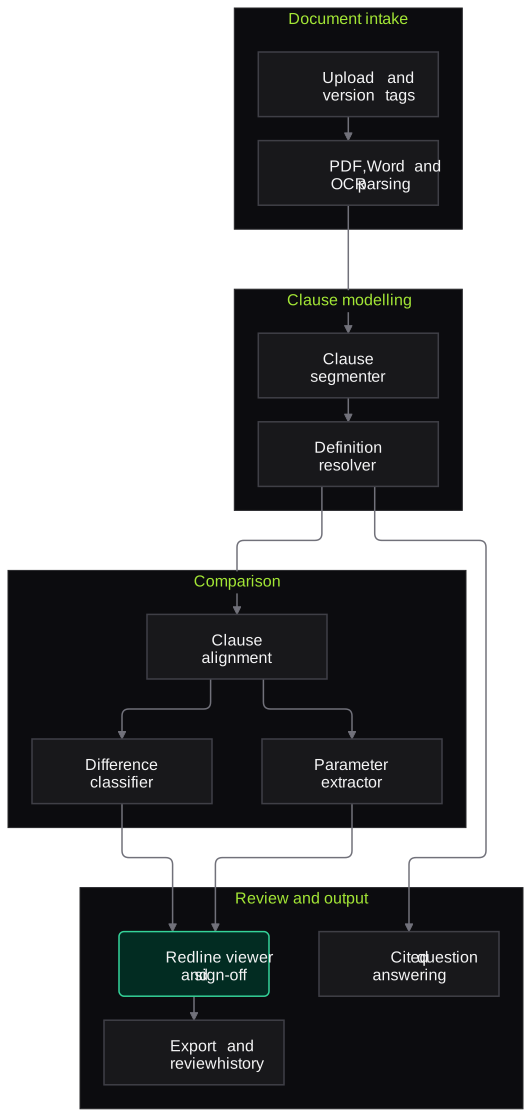
Inputs and outputs
Inputs
- Policy wordings, current and proposed or expiring
- Endorsements and clause libraries
- Customer information sheet, prospectus or brochure
- Schedule of benefits or policy schedule
- Broker manuscript wording or client requirement list
- Competitor wordings from public sources
Outputs
- Clause-aligned redline view
- Difference register with change type and citations
- Parameter comparison table in Excel or PDF
- Consistency flags between customer summaries and the wording
- Cited answers to reviewer questions
Where people stay in control
Product, legal or placement staff review every difference marked as material before it is used in a filing, a client comparison or a negotiation. The assistant never states whether a specific loss or claim is covered.
Integrations
- Document management system or SharePoint
- Product filing workspace
- Broker placement platform
- Microsoft Word and Excel export
- CRM for client comparison records
Guardrails
- Answers only from the uploaded documents, with clause citations
- States 'not found' instead of filling gaps from general knowledge
- Material-change labels confirmed by a person before export
- Exact document versions recorded for every comparison
- No coverage opinions or claim decisions
Compliance notes
- Helps product and compliance teams check that customer information sheets and brochures match the wording, in line with IRDAI's emphasis on clear and consistent disclosure to policyholders.
- Outputs are review aids for qualified staff, not legal advice.
A typical pilot
Duration: 3 weeks
One product family, such as retail health indemnity, comparing the current wording with its previous version, its customer information sheet and two public competitor wordings.
Deliverables
- 01Parameter list agreed with product and legal teams
- 02Working comparison assistant on the pilot document set
- 03Redline and parameter table outputs
- 04Accuracy report on alignment and difference classification
- 05Roll-out plan for other product lines or broker use
What we measure
- Clause alignment accuracy
- Reviewer checks of matched clause pairs across the pilot documents.
- Material differences missed and over-flagged
- Tool output compared with a reviewer's independent comparison of one document pair.
- Citation correctness
- Share of table cells and answers whose cited clause actually supports the value.
- Reviewer time per comparison
- Timed for the pilot comparison against the team's usual manual method.
FAQs
01Can it compare scanned or older wordings?
Yes. Scanned wordings go through OCR first, and the clause segmenter handles older numbering styles. Pages with poor scan quality are flagged so a reviewer can check the text.
02Can it tell us whether a claim would be covered?
No. It shows what the wordings say and where they differ, with citations. Coverage decisions belong to your claims and legal teams.
03Does it work for group health and commercial wordings as well as retail products?
Yes. The parameter list is configurable, so a broker comparing group health terms and an underwriter reviewing a property endorsement can each use their own set of fields.
04Is our unpublished product wording safe?
Documents stay in your environment or a dedicated cloud tenancy, access is role-based, and model endpoints are configured not to retain or train on your content.
Related use cases
- Insurance
Commercial Underwriting Submission Intake
Turn broker emails, proposal forms, schedules of values and loss histories into a structured, checked submission record, with gaps and appetite issues flagged for the underwriter.
- Insurance
Mis-Selling and Disclosure Testing for Insurance Bots
Test insurance sales and service bots for mis-selling, missing disclosures, prompt injection and data leakage, in English, Hindi and Hinglish, with transcript evidence for every finding.
- Legal
Contract Clause Extraction and Risk Flags
Extract key clauses, dates and obligations from executed and incoming contracts, compare them with your playbook and flag deviations, with every item linked to the clause it came from.
- Legal
NDA Review and Redline Suggestions
Review incoming NDAs against your playbook, produce tracked-change redlines with comments in Word, and send only the non-standard ones for full lawyer review, so routine NDAs stop queuing.

Founded by Akhilesh Mittal. 8 years building a security platform for a New Zealand company. IIT ISM Dhanbad and IMT Ghaziabad. Builds production agentic AI.
Pick one claim type, product line or bot to start
Book a discovery call and we will scope a short pilot on your own de-identified documents or staging bot, with clear measures agreed up front.