Commercial Underwriting Submission Intake
Turn broker emails, proposal forms, schedules of values and loss histories into a structured, checked submission record, with gaps and appetite issues flagged for the underwriter.
- Capability:
- Document Intelligence
- Industry:
- Insurance
Who it is for
- Head of Commercial Underwriting
- Underwriting Operations Manager
- Property and Engineering Underwriter
- Broker Relationship Manager
The problem
Commercial submissions arrive by email from brokers in every shape: a placement slip, a proposal form, a location schedule in a spreadsheet with merged cells, a risk inspection report and several years of claims experience. Before an underwriter can think about the risk, someone has to key it in, chase what is missing and check whether another broker has already sent the same client.
Keying before underwriting
Underwriting assistants re-enter insured details, sums insured by location and loss history into the workbench, which delays quotes in busy renewal months.
Messy schedules of values
Location schedules mix building, plant and stock values, use different occupancy terms and rarely add up to the sum insured on the proposal form.
Missing information found late
A missing fire NOC, inspection report or claims history is often discovered after the underwriter has started reviewing, so the broker query goes out late.
Clearance and appetite checks are manual
Duplicate submissions from competing brokers and risks outside appetite are spotted from memory, not through a consistent check.
What we build
We build an intake agent that watches your underwriting mailbox or broker portal. It reads each email and its attachments, identifies the line of business, the insured and the broker, and extracts the data your underwriting guidelines need. Schedules of values are normalised into a clean location table with occupancy, construction and values split by building, plant and stock, then reconciled to the proposal. Loss histories become a year-by-year summary. The agent checks completeness, clearance and appetite rules, drafts a broker query for gaps and gives the underwriter a summary with every figure linked to its source. Pricing and acceptance stay with the underwriter.
- Classifies submissions by line of business, such as property, engineering, marine cargo, liability or group health
- Extracts insured, broker, period, limits, deductibles and requested covers from slips and proposal forms
- Normalises messy schedules of values into a clean location table and reconciles totals to the proposal
- Summarises loss history by year, cause and amount, with large losses called out
- Runs clearance against existing submissions and policies, and checks appetite and referral rules from your guidelines
- Drafts a broker query for missing documents and gives the underwriter a source-linked summary
How it works
- 01Capture the submissionEmails and attachments from the underwriting mailbox or broker portal are grouped into one submission.
- 02Classify and extractLine of business, insured, broker and requested cover are identified, and key fields are extracted from each document.
- 03Normalise schedules and lossesLocation schedules and loss histories are converted into standard tables and reconciled to the proposal.
- 04Check clearance, appetite and completenessDuplicates, out-of-appetite features and missing documents are flagged against your rules.
- 05Resolve gapsAn underwriting assistant reviews the flags and sends the drafted broker query where information is missing.
- 06Underwriter reviewThe underwriter receives a source-linked summary in the workbench and decides whether and how to quote.

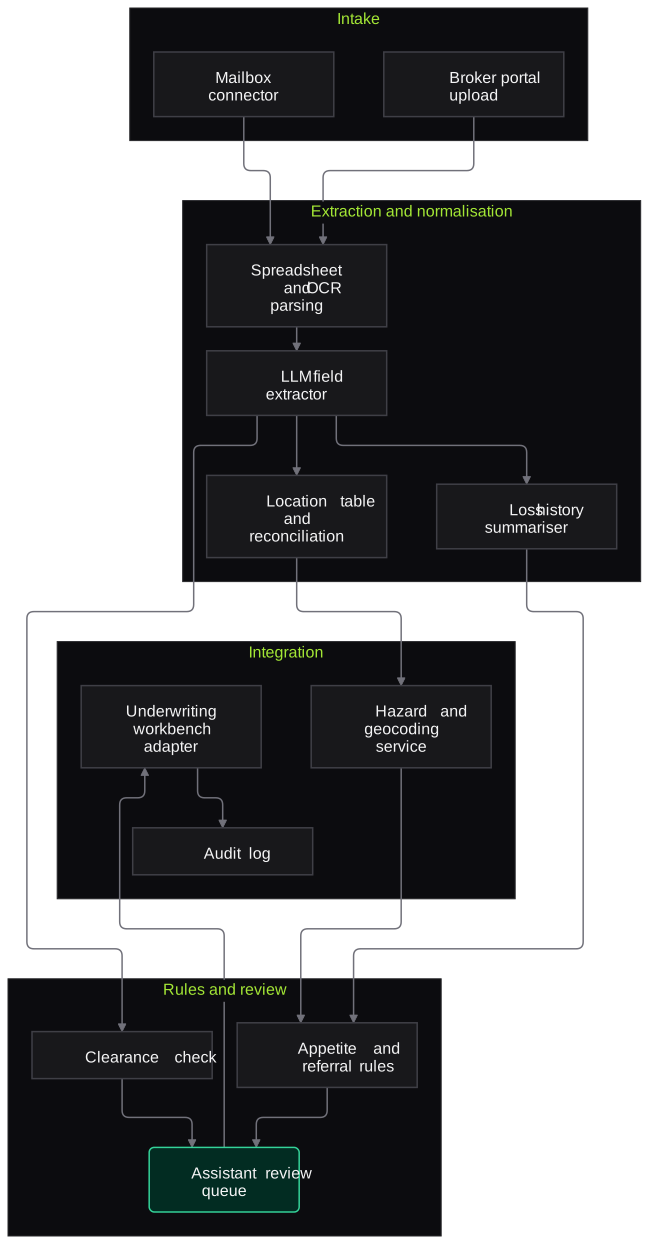
Architecture
- Intake
- Underwriting mailbox connector
- Broker portal upload
- Submission grouping
- Extraction
- Spreadsheet parser for merged cells and multi-tab schedules
- OCR for scanned proposals and inspection reports
- LLM field extractor with line-of-business schemas
- Normalisation
- Location table builder with occupancy mapping
- Sum insured reconciliation
- Loss history summariser
- Rules and review
- Clearance check against submissions and policies
- Appetite and referral rules from guidelines
- Assistant review queue with broker query drafts
- Integration
- Underwriting workbench or policy admin adapter
- Geocoding and natural hazard data service
- Audit log
Inputs and outputs
Inputs
- Broker email, placement slip or market reform contract
- Proposal form and expiring policy schedule
- Schedule of values or location list in Excel
- Risk inspection or survey report
- Loss history or claims experience statement
- Employee census for group health submissions
Outputs
- Structured submission record in the underwriting workbench
- Normalised location table with values reconciled to the proposal
- Loss history summary by year and cause
- Clearance, appetite and completeness flags
- Drafted broker query for missing information
- Underwriter summary with source-cell and page links
Where people stay in control
Underwriting assistants review every flag and approve broker queries before they are sent. Underwriters make all decisions on acceptance, terms and price; the agent prepares the file and never quotes.
Integrations
- Shared underwriting mailbox on Microsoft 365 or Google Workspace
- Underwriting workbench or policy administration system
- Broker portal
- Geocoding and natural hazard data services
- CRM for broker relationship tracking
- Document management system
Guardrails
- No pricing, acceptance or declinature by the agent
- Appetite and referral rules owned and versioned by underwriting, not inferred by the model
- Every extracted figure linked to its source cell or page
- Location totals reconciled to the proposal sum insured, with differences flagged
- Submissions kept separate by broker so one broker's documents never appear in another broker's file
Compliance notes
- Group health census data is personal data under the DPDP Act 2023, so it is masked in logs and access is limited to the underwriting team.
- Keeps underwriting authority with authorised underwriters, consistent with the delegated authority structures insurers already maintain.
A typical pilot
Duration: 4 weeks
Property and fire submissions from one regional underwriting mailbox, processed retrospectively and then in shadow mode for new submissions.
Deliverables
- 01Field schema and appetite rules agreed with underwriting
- 02Working intake pipeline on real, access-controlled submissions
- 03Underwriter summary view
- 04Extraction accuracy report
- 05Production plan covering further lines of business
What we measure
- Field and location extraction accuracy
- Compared with the values underwriting assistants keyed for the same submissions.
- Time from email receipt to underwriter-ready file
- Timestamps captured in shadow mode and compared with the current process.
- Gaps detected at intake
- Missing items flagged by the agent compared with queries the underwriter later raised.
- Underwriter usefulness rating
- Short structured feedback from underwriters on each summary they used.
FAQs
01Can it handle our brokers' messy spreadsheets?
Yes. It reads multi-tab workbooks, merged cells and inconsistent headings, and maps columns to your location schema. Where a mapping is uncertain, it asks the assistant to confirm rather than guessing.
02Does it work with London market or ACORD-style submissions?
Yes. The extraction schemas are configurable, so market reform contracts, ACORD-style forms and Indian proposal formats can each map into one submission record.
03Will it price risks or recommend terms?
No. It prepares and checks information. Rating, terms and the decision to quote remain with your underwriters.
04How is broker confidentiality protected?
Submissions are stored and displayed per broker and per insured, with role-based access. Clearance checks compare identities without exposing one broker's documents to another.
Related use cases
- Insurance
Policy Wording Comparison Assistant
Align two or more policy wordings clause by clause, highlight what was added, removed, narrowed or broadened, and answer questions with citations to the exact clause.
- Accounting, Audit & Consulting
Financial Statement Spreading
Read audited financials, notes and schedules in Schedule III, Ind AS or IFRS layouts and map every line into your spreading template or CMA format, each figure traced to its page.
- Legal
Contract Clause Extraction and Risk Flags
Extract key clauses, dates and obligations from executed and incoming contracts, compare them with your playbook and flag deviations, with every item linked to the clause it came from.

Founded by Akhilesh Mittal. 8 years building a security platform for a New Zealand company. IIT ISM Dhanbad and IMT Ghaziabad. Builds production agentic AI.
Pick one claim type, product line or bot to start
Book a discovery call and we will scope a short pilot on your own de-identified documents or staging bot, with clear measures agreed up front.