NDA Review and Redline Suggestions
Review incoming NDAs against your playbook, produce tracked-change redlines with comments in Word, and send only the non-standard ones for full lawyer review, so routine NDAs stop queuing.
- Capability:
- Document Intelligence
- Industry:
- Legal
Who it is for
- Head of Legal Operations
- In-House Counsel
- Legal Manager (Commercial)
- Law Firm Associate
The problem
NDAs are the agreement most legal teams see most often: before every vendor evaluation, partnership discussion or senior hire. Most are close to standard, but each still needs a careful read for an over-broad definition, a hidden non-solicit or a one-way obligation, and the queue holds up the business.
Routine work, constant volume
Lawyers redline the same clauses again and again while sales and procurement wait to start conversations.
Traps in short documents
Residuals clauses, non-solicitation, perpetual terms and broad injunctive relief hide in otherwise ordinary NDAs.
Counterparty paper varies
Every counterparty uses its own template, structure and numbering, so a checklist alone does not help.
No negotiation memory
Positions agreed with a counterparty last year are not visible to the lawyer reviewing the next NDA with them.
What we build
We build an NDA assistant that takes the counterparty's Word or PDF draft, identifies whether it is mutual or one-way and who the parties are, and checks each clause against your playbook: definition of confidential information, exclusions, permitted and compelled disclosure, term and survival, return or destruction, residuals, non-solicitation, remedies, governing law and jurisdiction. It produces a Word document with tracked changes and margin comments explaining each edit in your house style. NDAs within playbook fallbacks are marked standard for a quick lawyer sign-off; anything outside goes to a lawyer with the issues listed. Past positions agreed with the same counterparty are shown alongside.
- Identifies NDA type, parties, purpose and governing law from any template
- Clause-by-clause comparison with your standard and fallback positions
- Tracked-change redlines and margin comments in native Word format
- Detects residuals, non-solicitation, perpetual terms and other non-standard provisions
- Shows positions previously agreed with the same counterparty
- Triage into standard, edits within fallback, or escalate to a lawyer
How it works
- 01Receive the draftThe business submits the counterparty NDA through an intake form or a shared mailbox.
- 02Identify structureParties, type, purpose and clause structure are identified whatever the template.
- 03Check against the playbookEach clause is compared with your positions and fallbacks, and missing protections are noted.
- 04Draft redlinesTracked changes and explanatory comments are generated in the counterparty's own document.
- 05Triage and reviewStandard NDAs go to a lawyer for quick sign-off; non-standard ones go with an issue list.
- 06Send and recordThe approved redline goes to the counterparty, and final positions are saved for next time.

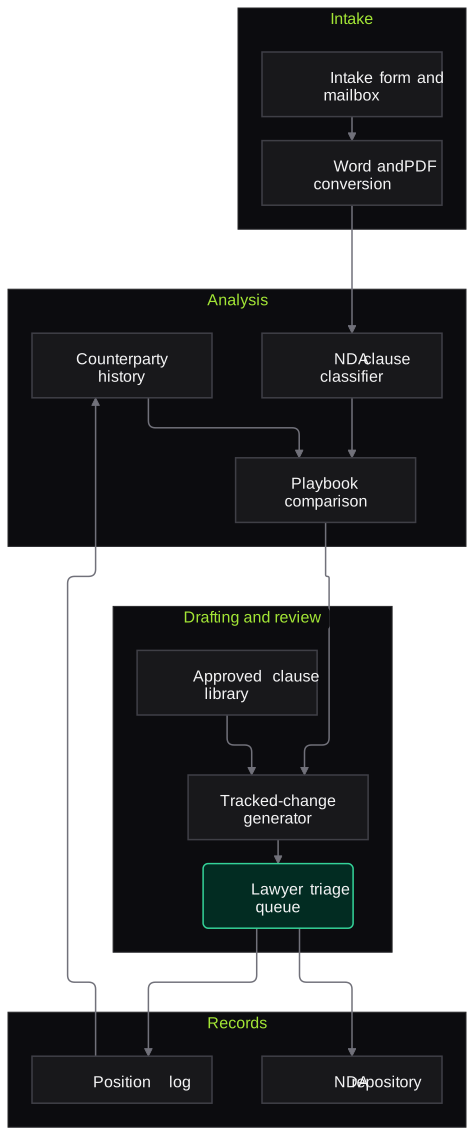
Architecture
- Intake
- Intake form and shared mailbox
- Word and PDF conversion
- Matter and requester tagging
- Analysis
- Clause classifier for NDA provisions
- Playbook comparison engine
- Counterparty position history lookup
- Drafting
- Tracked-change generator for Word
- Comment writer in house style
- Library of approved clause language
- Review
- Triage queue for lawyers
- Approve, edit or reject actions
- Records
- Signed NDA repository
- Negotiated position log per counterparty
Inputs and outputs
Inputs
- Counterparty NDA drafts in Word or PDF
- Your NDA playbook with standard and fallback positions
- Approved clause library
- Previously negotiated NDAs with the same counterparty
- Request details: purpose, business owner and urgency
Outputs
- Word document with tracked changes and comments
- Issue list for non-standard NDAs
- Triage category for each NDA
- Record of agreed positions per counterparty
- Turnaround and volume reports for legal operations
Where people stay in control
A lawyer signs off every NDA before it is sent, including those marked standard. Non-standard provisions and anything outside the playbook are decided by a lawyer, who can edit or discard any suggested redline.
Integrations
- Microsoft Word and Outlook
- Contract lifecycle management system
- Document management system
- Legal intake or ticketing tool
- E-signature platform
Guardrails
- Redlines use only approved clause language from your library
- Every suggested change carries a comment giving the playbook reason
- No NDA sent without lawyer sign-off
- Counterparty drafts processed in your environment and not used for training
- Playbook changes versioned and approved by the legal team
Compliance notes
- Supports review by your lawyers; it does not provide legal advice.
- NDA records include personal data of signatories; designed to support DPDP Act 2023 safeguards.
A typical pilot
Duration: 3 weeks
Inbound NDAs from one business unit, with every redline reviewed by a lawyer and compared with what they would have drafted.
Deliverables
- 01NDA playbook encoded with your legal team
- 02Working redline generator in Word
- 03Triage queue
- 04Comparison report of suggested and final redlines
- 05Roll-out plan and cost estimate
What we measure
- Redline acceptance
- Suggested changes kept, edited or removed by the reviewing lawyer.
- Missed issues
- Non-standard provisions found by lawyers but not flagged.
- Turnaround time
- Time from intake to redline sent, compared with recent NDAs.
- Triage agreement
- How often the lawyer agreed with the standard or escalate classification.
FAQs
01Will the redlines look like our own?
Yes. Edits come from your approved clause library and comments follow your house style, so the counterparty sees your usual positions.
02Can it handle NDAs in different formats?
Yes. It identifies clauses by meaning rather than numbering, so it works across counterparty templates, converted PDFs and mutual or one-way structures.
03Do lawyers still need to read every NDA?
Yes, but standard NDAs arrive with the redline and checks done, so sign-off is quick. Non-standard ones arrive with a clear issue list.
04How long does it take to set up?
A typical pilot runs for three weeks, most of it spent encoding your playbook and testing on recent NDAs. Production timing depends on your CLM and intake tools.
Related use cases
- Legal
Contract Clause Extraction and Risk Flags
Extract key clauses, dates and obligations from executed and incoming contracts, compare them with your playbook and flag deviations, with every item linked to the clause it came from.
- Legal
Due Diligence Data Room Review
Index a virtual data room against your request list, extract issues from contracts, corporate records and licences, and draft report tables and query lists for lawyers to confirm.
- Legal
Confidentiality and Privilege Leakage Testing for Legal AI
Test your legal copilot, contract tool or client chatbot for cross-matter leakage, privilege exposure, prompt injection hidden in documents and weak access controls, with evidence and fixes.

Founded by Akhilesh Mittal. 8 years building a security platform for a New Zealand company. IIT ISM Dhanbad and IMT Ghaziabad. Builds production agentic AI.
Bring one matter type or one contract stack
Pick a workflow that hurts, such as NDA review, cause list tracking or a diligence index. We will run a short pilot on de-identified or consented documents and go through the output with your lawyers line by line.