Insurance Pre-Auth and Claim File Preparation for Hospitals
Assemble cashless pre-auth, enhancement and final claim files for TPAs, insurers and government schemes, and check each against the payer's checklist before submission.
- Capability:
- Document Intelligence
- Industry:
- Healthcare & Hospitals
Who it is for
- Head of TPA and Insurance Desk
- Revenue Cycle Manager
- Chief Financial Officer
- Medical Superintendent
The problem
A hospital insurance desk handles cashless requests for many insurers, TPAs and government schemes, each with its own forms, portals and document checklists. A pre-auth needs the request form, doctor's notes, investigation reports, a cost estimate and policy and ID documents; the final claim adds the bill breakup, discharge summary, pharmacy bills and implant invoices. One missing report or a mismatch between estimate and notes brings a query, and the patient waits at discharge.
Payer-specific checklists
Each TPA, insurer and scheme asks for slightly different documents and formats, and desk staff keep the differences in their heads.
Queries and deficiency letters
Missing investigation reports, unsigned notes or unclear line items trigger queries that delay approval and discharge.
Mismatches across documents
The diagnosis on the pre-auth, the procedure in the OT notes and the package on the final bill do not always line up.
Deductions found too late
Non-payable items, room-category issues and missing implant documentation surface only at settlement.
What we build
We build a claim file assistant for the hospital insurance desk. When a cashless request starts, it gathers the patient's policy or e-card, ID, doctor's notes, investigations and estimate from the HIS, fills the payer's pre-auth form fields and checks the file against that payer's checklist. For enhancements and final claims, it compares the bill breakup with the discharge summary, OT notes and approved amount, highlights likely non-payable items and missing documents, and drafts replies to TPA queries using the relevant pages of the record. Desk staff review and submit through the payer portal, or through NHCX where the hospital is onboarded. Every file keeps a log of what was sent and when.
- Payer-specific document checklists for insurers, TPAs, PM-JAY, CGHS, ECHS and state schemes, maintained by your desk
- Pre-fills pre-auth and enhancement form fields from HIS data and clinical notes
- Cross-checks diagnosis, procedure, package and dates across notes, estimate and final bill
- Highlights likely non-payable items and room-category issues before submission
- Drafts replies to TPA queries with the relevant pages of the patient record attached
- Tracks each file's submission, query and approval history
How it works
- 01Open the caseWhen a cashless admission is registered, the assistant opens a case and pulls policy, ID and clinical documents from the HIS.
- 02Prepare the pre-authForm fields are pre-filled and the file is checked against the payer checklist, with gaps listed for the desk.
- 03Desk review and submissionDesk staff close the gaps, review the file and submit it through the payer portal or NHCX.
- 04Queries and enhancementsPayer queries are read, the right documents found and a reply drafted; enhancements are prepared when the treating team revises the plan.
- 05Prepare the final claimAt discharge, the bill breakup is checked against the discharge summary, OT notes and approvals, and missing documents are flagged.
- 06Submit and trackThe final file is submitted after desk review and its status is tracked through to settlement.

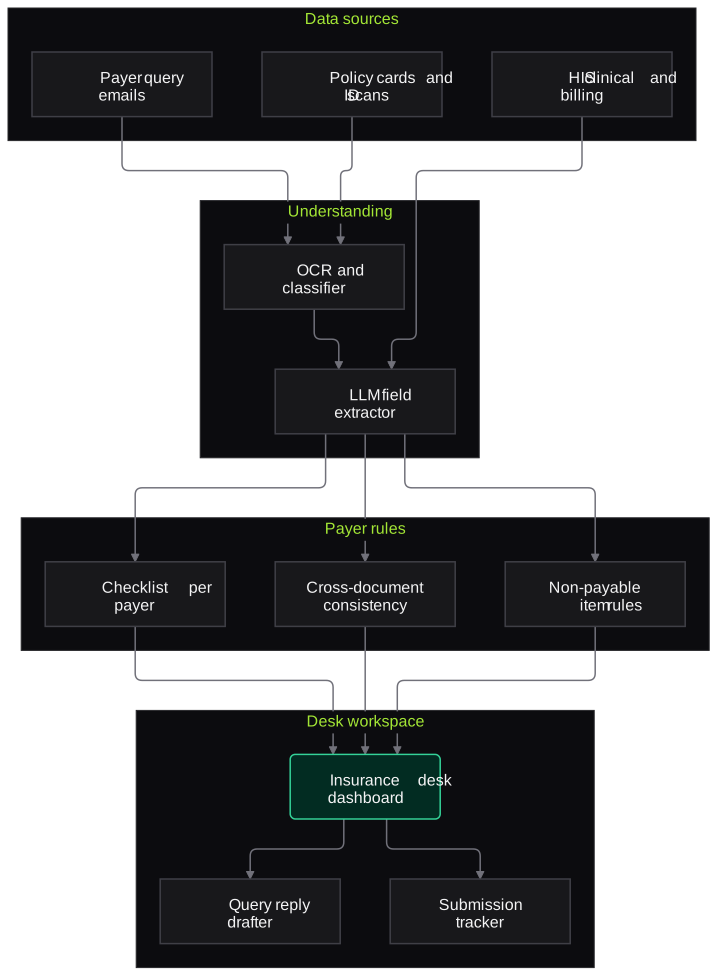
Architecture
- Data sources
- HIS patient, billing and clinical modules
- Scanned policy cards and ID with masked Aadhaar
- Payer query emails and portal downloads
- Document understanding
- OCR and document classifier
- LLM extractor for clinical and billing fields
- Payer rules
- Checklist library per insurer, TPA and scheme
- Cross-document consistency checks
- Non-payable item and room-category rules
- Desk workspace
- Case dashboard with gaps and deadlines
- Query reply drafter
- Submission tracker
- Integration and audit
- Payer portal upload packs and NHCX connector where available
- Audit log of every submission
Inputs and outputs
Inputs
- Policy or e-card, patient ID with masked Aadhaar, and scheme card
- Doctor's admission notes and treatment plan
- Investigation and imaging reports
- Cost estimate and package details
- Final bill, itemised breakup, pharmacy and implant invoices
- Discharge summary and OT notes
Outputs
- Pre-filled pre-auth and enhancement forms
- Payer checklist status with missing items
- Consistency and non-payable item flags
- Draft query replies with supporting documents attached
- Submission and settlement tracking log
Where people stay in control
Insurance desk staff review and submit every file, and treating doctors confirm any clinical statement in a query reply. The assistant never submits to a payer or changes clinical content on its own.
Integrations
- Hospital information system (billing, clinical and pharmacy modules)
- Insurer and TPA portals
- National Health Claims Exchange (NHCX) where the hospital is onboarded
- PM-JAY and state scheme portals, through desk-uploaded packs
- Email inbox used by the insurance desk
Guardrails
- No claim, query reply or enhancement submitted without desk review
- Clinical statements drafted only from signed notes and confirmed by the doctor before sending
- Masked Aadhaar only; full numbers never stored, per UIDAI rules
- Payer checklists versioned so every change is traceable
- Access limited to insurance desk roles, with full audit logging
Compliance notes
- Helps hospitals meet payer documentation requirements and IRDAI's expectations on faster cashless processing; claim decisions remain with insurers and TPAs.
- Patient health data processed only for claim purposes, in line with the DPDP Act 2023.
A typical pilot
Duration: 4 weeks
Cashless files for two or three high-volume TPAs or insurers in one department, prepared in parallel with the current desk process.
Deliverables
- 01Checklists and form mappings for the pilot payers
- 02Working assistant connected to HIS exports
- 03Insurance desk dashboard
- 04Comparison report against recent files and their query history
- 05Roll-out plan for remaining payers and schemes
What we measure
- Gaps caught before submission
- Checklist gaps found by the assistant compared with the queries payers later raised.
- Query rate
- Queries received on pilot files compared with recent files for the same payers.
- Desk preparation time
- Time from admission to pre-auth submission, and from discharge order to final claim submission.
- Flag usefulness
- Desk feedback on whether each consistency and non-payable flag was valid.
Built on related work
Claims reconciliation platform
Packaged-food brand (anonymised)
OCR and LLM platform that matches distributor claims spreadsheets against invoices and proofs, applies policy rules, detects duplicates, recalculates amounts, routes uncertain lines to an exception queue and keeps an audit trail. Finance keeps final approval.
FAQs
01Does it work with government schemes like PM-JAY?
Yes, as checklists and package mappings. Scheme portals have their own rules on access, so the assistant prepares and checks the documents and the desk uploads them through the official portal.
02Will it decide what we bill?
No. Billing stays with your billing team and claim decisions with insurers and TPAs. The assistant flags items that commonly attract deductions so your team can review them before submission.
03Can it reply to TPA queries automatically?
It drafts replies and attaches the relevant documents. Desk staff, and the treating doctor where clinical content is involved, review and send them.
04How do you keep payer checklists current?
Your desk team owns the checklist library through a simple admin screen. Changes are versioned, and each file shows which checklist version it was checked against.
Related use cases
- Healthcare & Hospitals
Discharge Summary and Medical Record Structuring
Draft discharge summaries from the inpatient file and turn past records into structured diagnoses, procedures, medicines and allergies, each linked to its source for the doctor to verify.
- Healthcare & Hospitals
Lab Report Digitisation and Trend Extraction
Turn external lab reports, PDFs and phone photos into structured results mapped to standard test codes, and show trends over time to the treating doctor with every value linked to its source.
- Insurance
Pre-Authorisation Request Triage for TPAs
Read incoming cashless requests, check completeness, policy terms and tariffs, and put a prioritised, source-linked summary in front of the TPA medical officer.
- Insurance
Health Claim Document Extraction
Turn hospital bills, discharge summaries and investigation reports into structured, checked claim data, with uncertain fields routed to an assessor instead of guessed.

Founded by Akhilesh Mittal. 8 years building a security platform for a New Zealand company. IIT ISM Dhanbad and IMT Ghaziabad. Builds production agentic AI.
Start with one department and one document type
Book a discovery call. We will pick one workflow, such as discharge summaries in one department or pre-auth files for one TPA, and scope a short pilot with your team.