Lab Report Digitisation and Trend Extraction
Turn external lab reports, PDFs and phone photos into structured results mapped to standard test codes, and show trends over time to the treating doctor with every value linked to its source.
- Capability:
- Document Intelligence
- Industry:
- Healthcare & Hospitals
Who it is for
- Head of Clinical Informatics
- OPD Operations Manager
- Consultant physicians in chronic care clinics
- Product Manager, digital health app
The problem
Patients with diabetes, kidney disease or thyroid conditions arrive with a folder of reports from different labs, or a phone full of PDFs and photos. The doctor flips through pages to find last year's HbA1c or creatinine, while test names, units and reference ranges differ from lab to lab.
Different names for the same test
Glycated haemoglobin, HbA1c and A1c appear on different reports, and each lab lays out its panels differently.
Unit and range differences
Results arrive in mg/dL, mmol/L or micromol/L with lab-specific reference ranges, which makes side-by-side comparison error-prone.
Consultation time spent searching
Minutes of a short OPD slot go on locating prior values instead of talking to the patient.
Reports outside the HIS
External reports are scanned as images, if at all, so they never appear in trend views or registries.
What we build
We build a lab report digitisation service that reads reports from any lab, whether native PDFs, scans or phone photos. It extracts each test name, result, unit, reference range as printed, sample date and lab name, and maps tests to a standard code system such as LOINC so that equivalent tests line up. Units are converted only where the conversion is on a list your laboratory medicine team approves, and the original value is always kept. Results flow into the patient record and a trend view that shows values over time, with each point linked to its source report. Values outside the printed reference range are marked as such; interpretation stays with the doctor.
- Reads native PDFs, scans and phone photos from any lab, including multi-page panels
- Extracts test name, result, unit, printed reference range, sample date and lab
- Maps tests to a standard code system such as LOINC, with a review queue for unmapped names
- Converts units only from an approved list and always keeps the original value
- Builds trend views for chronic-care markers your clinicians choose, with source links on every point
- Detects duplicate uploads of the same report
How it works
- 01Receive reportsReports arrive through front-desk scanning, patient upload on WhatsApp or an app, or lab interfaces.
- 02Extract resultsOCR and an LLM extract each test, result, unit, range and date, with a confidence score for each.
- 03Map and normaliseTests are mapped to standard codes and units normalised where approved; unmapped or low-confidence items are queued.
- 04Review exceptionsA trained data reviewer or nurse confirms flagged items against the source image.
- 05Update the recordConfirmed results are written to the patient record and appear in the trend view.
- 06Doctor views trendsDuring the consultation, the doctor sees trends with links to the source reports and interprets them.

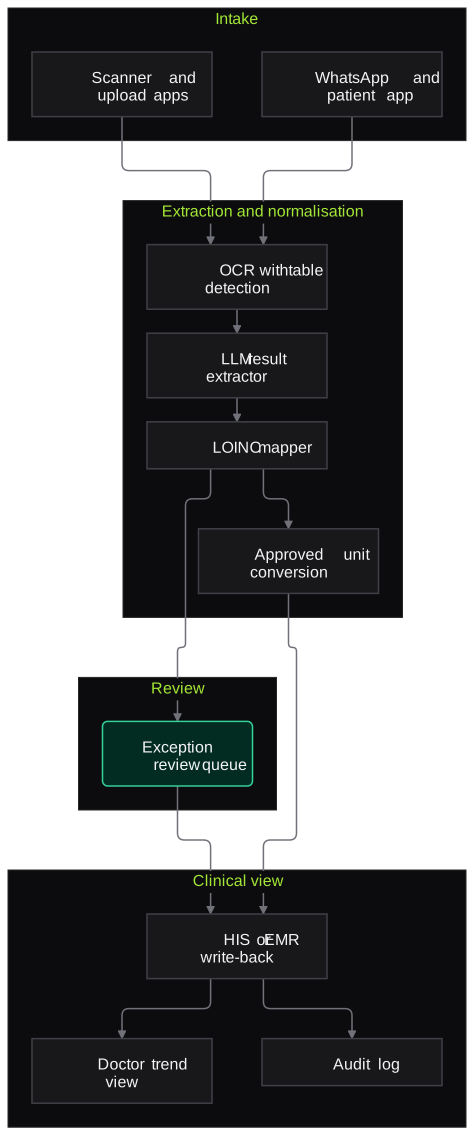
Architecture
- Intake
- Front-desk scanner app
- WhatsApp or patient app upload
- Lab interface feed via HL7 or API
- Extraction
- OCR with table detection
- LLM result extractor with schema
- Normalisation
- Test name to LOINC mapper
- Approved unit conversion list
- Duplicate report detector
- Review
- Exception review queue with source image
- Patient matching checks on UHID, name and age
- Clinical view
- HIS or EMR write-back
- Trend view for doctors
- Audit log
Inputs and outputs
Inputs
- External lab reports as PDFs, scans or phone photos
- Lab interface feeds where available
- Patient identifiers from the HIS, such as UHID
- Test name mapping list maintained by the lab or informatics team
- Unit conversion list approved by laboratory medicine
Outputs
- Structured results with test code, value, unit, range and date
- Trend views for chronic-care markers
- Out-of-printed-range markers with source links
- Exception queue for unmapped or uncertain results
- Audit trail of extraction and reviewer changes
Where people stay in control
A trained reviewer confirms any uncertain or unmapped result before it enters the record, and the laboratory medicine team approves the unit conversion list. Doctors interpret every result; the system only organises and displays them.
Integrations
- HIS or EMR (HL7, FHIR or API)
- Laboratory information system for in-house results
- WhatsApp Business API or patient app for uploads
- ABDM-linked health record apps where the patient consents
- Document management system
Guardrails
- Original value and unit always stored alongside any converted value
- Conversions only from the approved list; all others shown as printed
- No interpretive comments, risk scores or diagnoses generated
- Patient matching on UHID with name and age checks to prevent misfiling
- Every trend point links back to its source page
Compliance notes
- Patient-uploaded reports handled with consent and purpose limitation under the DPDP Act 2023.
- Structured outputs can follow FHIR-based formats used in ABDM where the hospital is integrated.
A typical pilot
Duration: 3 weeks
External reports for patients of one chronic-care clinic, such as diabetes or nephrology, digitised for a set of common markers.
Deliverables
- 01Test mapping and unit conversion lists for the pilot markers
- 02Extraction pipeline and review queue
- 03Trend view prototype for doctors
- 04Accuracy report per test and report format
- 05Integration plan for HIS write-back
What we measure
- Value-level accuracy
- Extracted results compared with manually entered values for a sample of reports.
- Mapping coverage
- Test names mapped automatically compared with those sent for review.
- Patient matching errors
- Reports linked to the wrong patient, found through reviewer checks.
- Doctor usefulness
- Structured feedback from pilot doctors on whether the trend view helped them find prior results.
FAQs
01Does it interpret results or flag diseases?
No. It shows values, units, the lab's printed reference range and trends. Whether a value matters for the patient is the doctor's call.
02How do you handle method differences between labs?
Every result is shown with its lab name and printed range, so the doctor can see the source. Unit conversions are limited to a list approved by your laboratory medicine team.
03Can patients upload reports themselves?
Yes, through WhatsApp or your app, with consent captured at upload. Each report is matched to the patient record and checked before it enters the trend view.
04Which tests does it support?
Any test printed on a report can be extracted. Trend views start with markers your clinicians choose, such as HbA1c, creatinine, lipid profile and TSH, and expand from there.
Related use cases
- Healthcare & Hospitals
Discharge Summary and Medical Record Structuring
Draft discharge summaries from the inpatient file and turn past records into structured diagnoses, procedures, medicines and allergies, each linked to its source for the doctor to verify.
- Healthcare & Hospitals
Clinical Documentation from Doctor Dictation
Doctors dictate in English or Hinglish after a consultation, round or procedure, and the system drafts a structured note or prescription in your EMR template for the doctor to check and sign.
- Healthcare & Hospitals
Insurance Pre-Auth and Claim File Preparation for Hospitals
Assemble cashless pre-auth, enhancement and final claim files for TPAs, insurers and government schemes, and check each against the payer's checklist before submission.
- Healthcare & Hospitals
Post-Discharge Follow-Up Calls
Scripted follow-up calls after discharge, in the patient's language, that check medicines, follow-up visits and clinician-defined warning signs and hand any concern to a nurse.

Founded by Akhilesh Mittal. 8 years building a security platform for a New Zealand company. IIT ISM Dhanbad and IMT Ghaziabad. Builds production agentic AI.
Start with one department and one document type
Book a discovery call. We will pick one workflow, such as discharge summaries in one department or pre-auth files for one TPA, and scope a short pilot with your team.