Online Test Proctoring Assistance
Flag possible malpractice in remote tests from webcam frames and browser events, so a trained proctor reviews short evidence clips and decides, rather than software disqualifying students.
- Capability:
- Computer Vision
- Industry:
- Education & Coaching
Who it is for
- Controller of Examinations
- Head of Online Programmes
- Assessment Product Manager (Edtech)
- Proctoring Operations Lead
The problem
Online scholarship tests, mock tests and university semester exams let students sit from home, but institutions still need confidence in the result. Live human proctoring does not scale to thousands of candidates, and many off-the-shelf tools flag so much that proctors stop trusting them, or penalise students for things they cannot control.
Too few proctors per candidate
One invigilator can watch only a handful of video tiles, so most of a large remote test goes effectively unwatched.
False flags from real homes
Shared rooms, poor lighting, low-end webcams and patchy bandwidth produce flags that have nothing to do with cheating.
No usable evidence
When a result is challenged, the institution often has a risk score but no clip or timeline showing what actually happened.
Privacy concerns from parents
Continuous recording of minors at home raises questions about consent, storage and who can watch the footage.
What we build
We build a proctoring assistant that sits alongside your test platform. Before the test it compares the candidate's face with the registered photo and records a short room check. During the test it samples webcam frames and browser events and runs detectors for an absent face, more than one person, a phone or book in view, repeated looking away and window switching. Detections are grouped into time-stamped incidents with short clips, not a single opaque score. A proctor reviews each incident and records a decision; the system never ends a test or disqualifies a candidate on its own.
- Pre-test identity check against the registered photo, with a manual fallback
- Detectors for an absent face, multiple people, phones and printed material in view
- Browser event capture: tab or window switches, copy-paste attempts and full-screen exits
- Incident timeline with short clips and frames instead of one opaque risk score
- Light on-device processing with snapshot upload for low-bandwidth candidates
- Configurable retention, after which frames and clips are deleted automatically
How it works
- 01Consent and set-upThe candidate, or a parent for a minor, sees what is captured and why, and the system checks camera, microphone and connection.
- 02Identity and room checkA face capture is compared with the registered photo and a short room scan is recorded.
- 03Monitor during the testWebcam frames and browser events are sampled and passed through the detectors throughout the test.
- 04Build incidentsDetections that cross agreed thresholds are grouped into incidents with time stamps and clips.
- 05Proctor reviewA proctor watches each incident, marks it as no issue, warning or escalate, and adds a note.
- 06Report to the exam controllerEscalated incidents and their evidence go to the exam controller, who decides any action after hearing the candidate.

Architecture
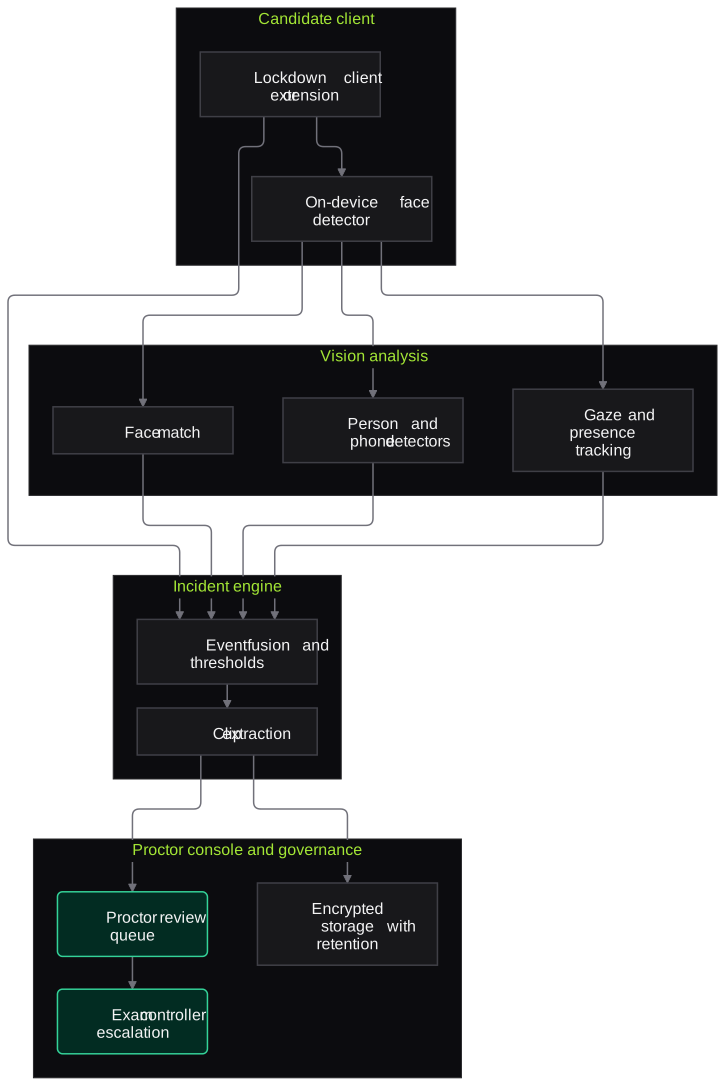
- Candidate client
- Browser extension or lockdown test client
- Webcam and screen-event capture
- On-device lightweight face detector
- Vision analysis
- Face match against the registered photo
- Person, phone and printed-material detectors
- Gaze and presence tracking
- Incident engine
- Event fusion with thresholds per test
- Clip and frame extraction
- Incident timeline builder
- Proctor console
- Incident review queue
- Decision and note capture
- Escalation to the exam controller
- Data governance
- Encrypted storage in your chosen region
- Automatic deletion after the retention period
- Access log for every clip viewed
Inputs and outputs
Inputs
- Registered candidate photo from admission or test registration
- Webcam frames and optional audio during the test
- Browser and test-client events
- Test schedule and candidate list
- Proctoring policy with thresholds agreed by the exam controller
Outputs
- Incident timeline per candidate with clips and frames
- Proctor decisions with notes
- Escalation report for the exam controller
- Test-level summary of incidents by type
- Deletion log once retention ends
Where people stay in control
A trained proctor reviews every incident before anything is recorded against a candidate, and only the exam controller can take action, after giving the candidate a chance to explain. Thresholds are tuned with the exam cell so the number of incidents stays reviewable.
Integrations
- Online test or CBT platform (via SDK or API)
- Student information system for registered photos
- Single sign-on for students and proctors
- Cloud storage in an India region
- Email or WhatsApp for candidate notices
Guardrails
- No automatic disqualification, test termination or score change
- Clear notice and consent before capture, with parental consent for minors
- Face data used only for that test's identity check, not kept as a biometric profile
- Thresholds reviewed for false flags across lighting, devices and bandwidth
- Clips deleted automatically after the agreed retention period
Compliance notes
- The DPDP Act 2023 restricts tracking and behavioural monitoring of children; proctoring for minors should be limited to the test window and purpose, with parental consent.
- For candidates in Europe, GDPR treats biometric data used for identification as special-category data, so a lawful basis and impact assessment are needed.
A typical pilot
Duration: 4 weeks
One online test series, such as a scholarship or mock test, with proctors reviewing AI incidents alongside their current method.
Deliverables
- 01Proctoring policy and thresholds agreed with the exam cell
- 02Integration with your test platform for the pilot test
- 03Proctor console with incident review
- 04False-flag analysis across devices and conditions
- 05Recommendation on roll-out, retention and staffing
What we measure
- Incidents confirmed by proctors
- Share of incidents marked warning or escalate rather than no issue.
- False flags by condition
- Incidents marked no issue, broken down by lighting, device type and bandwidth.
- Proctor review time
- Average time to review one incident, from console logs.
- Technical drop-outs
- Candidates who could not complete the test because of the client, from support tickets.
FAQs
01Will the system disqualify students automatically?
No. It only creates incidents with evidence. A proctor reviews each one, and any action is taken by the exam controller after the candidate has been heard.
02Does it work on low-end laptops and slow connections?
It is designed to. Basic face detection can run on the device, and only snapshots are uploaded when bandwidth is low. The pilot measures how many candidates face technical problems so you can set minimum requirements.
03What about bias and false flags?
Detectors can perform worse in poor lighting or with some cameras. We measure false flags across conditions during the pilot, tune thresholds with your exam cell and keep a human review on every incident.
04How long is footage kept?
As long as you decide, usually until the result appeal window closes. Deletion is automatic and logged, and access to clips is restricted and recorded.
Related use cases
- Education & Coaching
Answer Sheet and OMR Evaluation Assistance
Read OMR sheets and the marks grid on answer-booklet covers from ordinary scans or phone photos, apply the right answer key and send every doubtful mark to the exam cell.
- Education & Coaching
Safety Testing for Student-Facing AI Tutors
Red-team your AI tutor or doubt-solving bot before students use it: unsafe content, jailbreaks, confidently wrong answers, integrity bypasses and leaks of other students' data.
- Education & Coaching
Admission Document Verification
Check mark sheets, transfer and migration certificates, category certificates and ID proofs against your eligibility rules, and send applicants a precise deficiency list instead of a vague rejection.
- Fintech & Payments
Selfie-to-ID Face Match and Document Tamper Checks
Compare a live selfie with the photo on an ID, check liveness and spot edited or replayed ID images, sending borderline cases to a reviewer with highlighted evidence.

Founded by Akhilesh Mittal. 8 years building a security platform for a New Zealand company. IIT ISM Dhanbad and IMT Ghaziabad. Builds production agentic AI.
Start with one test cycle or one admission season
Tell us where the backlog is worst, whether that is test evaluation, admission documents or parent calls. We will scope a short pilot on your own data and walk you through what it found before any wider roll-out.