Validation and Security Testing of AI Tools in GxP Settings
Risk-based testing of LLM and ML tools used in quality, manufacturing or pharmacovigilance: accuracy, prompt injection, data leakage and audit-trail checks, packaged as validation evidence.
- Capability:
- AI Security & Compliance
- Industry:
- Pharma & Life Sciences
Who it is for
- Head of Computer System Validation
- Head of Quality Assurance
- Digital Quality Lead
- Chief Information Security Officer
The problem
Quality, manufacturing and safety teams are adopting AI tools: SOP assistants, deviation drafting, adverse event screening, vision inspection and AI features inside QMS or LIMS products. Traditional CSV scripts were written for deterministic software, and most teams have no method yet for testing an LLM's outputs or its exposure to prompt injection and data leakage.
Non-deterministic outputs
The same question can produce different answers, so a single passed test script does not show the tool is fit for its intended use.
A new attack surface
Documents, emails and user prompts can carry instructions that steer an LLM to leak data or ignore rules, and classic validation does not test for this.
Vendor AI features arrive by update
QMS, LIMS and document platforms add AI features through releases, and QA must assess them without access to the vendor's model.
Audit questions without evidence
Inspectors and customer auditors ask how an AI tool was validated and is controlled, and teams lack a structured evidence pack.
What we build
We run a risk-based assessment of an AI tool against its intended use. First we agree the use, risk level and acceptance criteria with QA and CSV. Then we build a test set from your own de-identified records and run it repeatedly to measure accuracy, consistency and refusal behaviour. In parallel we attack the tool: prompt injection through documents and inputs, attempts to retrieve other users' or sites' data, bypass of business rules, and checks that audit trails, access controls and electronic signatures behave as required. Findings come with reproducible evidence and fix guidance, assembled into a pack your validation team can reference.
- Intended-use and risk assessment aligned with your CSV or CSA procedure
- Task-specific test sets from your de-identified records, run repeatedly to measure consistency
- Prompt injection, jailbreak and data-leakage testing across documents, chat and API inputs
- Access-control and site-segregation tests for retrieval-based assistants
- Audit trail, electronic signature and change-control checks for the AI workflow
- Re-runnable regression suite for model, prompt or vendor version changes
How it works
- 01Define intended use and riskWith QA and CSV we document what the tool is for, who relies on it and the GxP impact of a wrong output.
- 02Build test setsWe create functional cases from your records and adversarial cases from known LLM attack patterns.
- 03Run functional testsEach case runs several times and is scored against the acceptance criteria agreed in step one.
- 04Run security testsWe attempt prompt injection, data leakage, privilege escalation and rule bypass, recording every attempt.
- 05Review findingsResults are reviewed with QA, CSV and IT, and each failure is classed as acceptable, mitigated or blocking.
- 06Deliver the evidence packA report, test logs and a regression suite are handed over for your validation file.

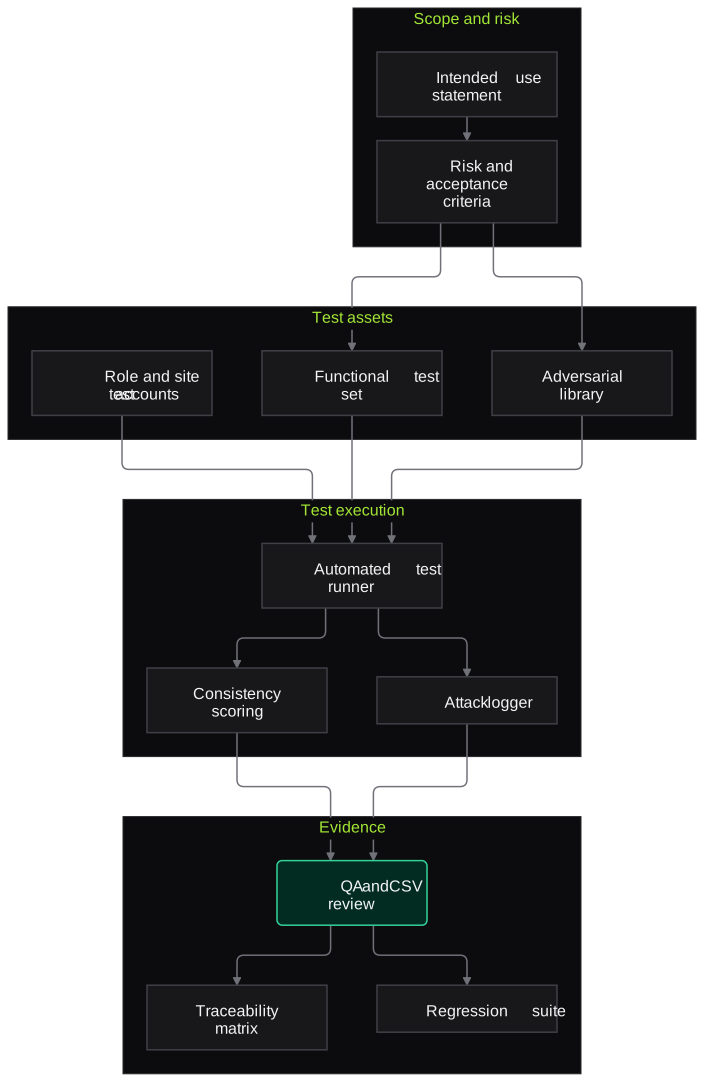
Architecture
- Scope and risk
- Intended-use statement
- Risk assessment with GxP impact
- Acceptance criteria
- Test assets
- Functional test set from de-identified records
- Adversarial prompt and document library
- Test accounts per role and site
- Test execution
- Automated test runner against UI or API
- Repeat-run consistency scoring
- Attack attempt logger
- Evidence
- Findings with reproduction steps
- Requirement-to-test traceability matrix
- Regression suite for future changes
Inputs and outputs
Inputs
- Description of the AI tool, its users and intended use
- Your CSV or CSA procedure and templates
- De-identified sample records relevant to the use
- Test environment access with role-based accounts
- Vendor documentation for third-party AI features
Outputs
- Intended-use and risk assessment
- Functional test results with repeat-run consistency
- Security findings with severity, evidence and fix guidance
- Requirement-to-test traceability matrix
- Re-runnable regression suite
Where people stay in control
QA and CSV approve the intended use, risk level and acceptance criteria before testing starts, and decide how each finding is dispositioned. We provide evidence and recommendations; the validation decision stays with your quality unit.
Integrations
- The AI tool under test (web interface, API or vendor platform)
- QMS for change control and CAPA records
- Validation document management system
- Identity provider for role-based test accounts
- CI pipeline for regression runs, where available
Guardrails
- Testing only in agreed environments under written authorisation
- De-identified or synthetic data in all test sets
- No testing against production patient or batch data
- Findings shared only with named stakeholders
- Regression suite re-run after any model, prompt or version change
Compliance notes
- Evidence is structured to support validation under 21 CFR Part 11 and EU GMP Annex 11, using risk-based approaches such as ISPE GAMP 5 and FDA's Computer Software Assurance guidance.
- EU regulators consulted in 2025 on a draft GMP Annex 22 on artificial intelligence; the pack is organised so it can be mapped to the final text.
- Security testing references the OWASP Top 10 for LLM Applications and the NIST AI RMF.
A typical pilot
Duration: 3 weeks
One AI tool with a defined GxP use, such as an SOP assistant or an adverse event screening model, tested in a non-production environment.
Deliverables
- 01Intended-use and risk assessment document
- 02Functional and adversarial test sets
- 03Test execution logs and findings report
- 04Traceability matrix
- 05Regression suite with run instructions
What we measure
- Accuracy against acceptance criteria
- Functional test cases scored by your subject matter experts or against reference answers.
- Output consistency
- Agreement of answers across repeated runs of the same test case.
- Security findings by severity
- Successful attack attempts classed on an agreed severity scale.
- Audit trail completeness
- Sampled user and system actions checked for a complete, attributable audit record.
Built on related work
LLM endpoint security scanner
Security platform (anonymised)
Workflow that scans Azure-hosted and custom HTTP LLM endpoints for prompt injection, jailbreaks and data leakage.
FAQs
01Does this replace our CSV team?
No. We bring AI-specific test methods and attack techniques, and your CSV team owns the validation approach and approvals. Deliverables are written to fit your existing templates.
02Can you test a vendor's AI feature we cannot see inside?
Yes, as a black-box test through the interface your users have. We test behaviour against your intended use and data, which is what your risk assessment needs.
03How often should testing be repeated?
After any change to the model, prompts, retrieval data or vendor version, and as part of periodic review. The regression suite makes repeat runs quick.
04Will testing touch production data?
No. We test in a non-production environment with de-identified or synthetic data, under written authorisation from your IT and QA teams.
Related use cases
- Pharma & Life Sciences
Regulatory Dossier and SOP Q&A Assistant
A question-answering assistant over your effective SOPs, specifications and CTD dossier modules that cites the exact section, respects versions and access rights, and says when it does not know.
- Pharma & Life Sciences
Batch Manufacturing Record Review
Pre-review of executed batch manufacturing and packaging records that flags blank fields, out-of-limit values, signature gaps and unlinked deviations, with page references, before QA starts.
- SaaS & AI Product Companies
RAG Data-Leakage and Access-Control Testing
Test whether your RAG pipeline leaks documents across users, roles or tenants through retrieval, caching, citations or logs, using seeded canary documents and role-based test personas.
- SaaS & AI Product Companies
EU AI Act and ISO/IEC 42001 Evidence Pack
Assemble testing records, risk assessments, oversight design and technical documentation for your AI features, mapped to EU AI Act and ISO/IEC 42001 requirements, ready for counsel and auditors.

Founded by Akhilesh Mittal. 8 years building a security platform for a New Zealand company. IIT ISM Dhanbad and IMT Ghaziabad. Builds production agentic AI.
Test one record type on your own batches
Book a discovery call to choose a narrow pilot, such as BMR pre-review for one product or COA checks for one material group, and compare the results with your QA team's own review.