Engineering Drawing and Spec Sheet Extraction
Extract title blocks, dimensions, tolerances, GD&T, materials and notes from 2D drawings and spec sheets for faster RFQ review, ballooned inspection plans and revision checks.
- Industry:
- Manufacturing
Who it is for
- Head of Engineering or Design
- Quality Engineer (PPAP and FAI)
- Estimation and RFQ Manager
- Manufacturing Engineering Lead
The problem
Every RFQ, new part introduction and engineering change starts with someone reading a drawing line by line. Estimators hunt for material, finish and tight tolerances, quality engineers balloon every characteristic for first article inspection, and changes between revisions are found by eye.
Slow RFQ turnaround
Estimators read each customer drawing to find material grade, heat treatment, surface finish and critical tolerances before they can cost the part.
Manual ballooning
Numbering every dimension and note for PPAP or first article inspection reports is slow, repetitive work in PDF tools.
Missed revision changes
A tolerance tightened between revision B and C is easy to miss, and the old value ends up in the control plan or the CNC program.
Unsearchable legacy drawings
Decades of scanned drawings sit in folders, so finding every part made from a given material or with a given thread is guesswork.
What we build
We build a drawing reader that locates the title block, views and notes on each sheet, then extracts dimensions with tolerances, GD&T feature control frames, surface finish symbols, threads, material and heat treatment notes. Each characteristic gets a balloon number and a link to its location on the drawing. The output can feed an RFQ checklist, an inspection plan template or an item master entry in your ERP. When a new revision arrives, the system compares it with the previous one and lists added, removed and changed characteristics. Engineers confirm the extraction before any of it is used.
- Reads title block fields such as part number, drawing number, revision, material and general tolerance standard
- Extracts linear and angular dimensions with tolerances, fits and thread callouts
- Detects GD&T feature control frames, datums and surface finish symbols
- Builds a ballooned characteristic list and fills your FAI or inspection report template
- Compares revisions and lists added, removed and changed characteristics
- Indexes legacy drawings so engineers can search by material, feature or note
How it works
- 01Receive drawingsDrawings arrive as PDFs, TIFF scans or exported sheets from the RFQ mailbox or PLM vault.
- 02Detect layoutA vision model finds the title block, views, tables and note areas on each sheet.
- 03Extract characteristicsOCR and an LLM read dimensions, tolerances, GD&T, threads and notes, each with a confidence score and location.
- 04Engineer verificationLow-confidence and critical characteristics are highlighted for the engineer to confirm on the drawing.
- 05Compare with previous revisionWhere an earlier revision exists, changes are listed characteristic by characteristic.
- 06Publish outputsThe verified list feeds the RFQ checklist, ballooned drawing, inspection plan or ERP item master.

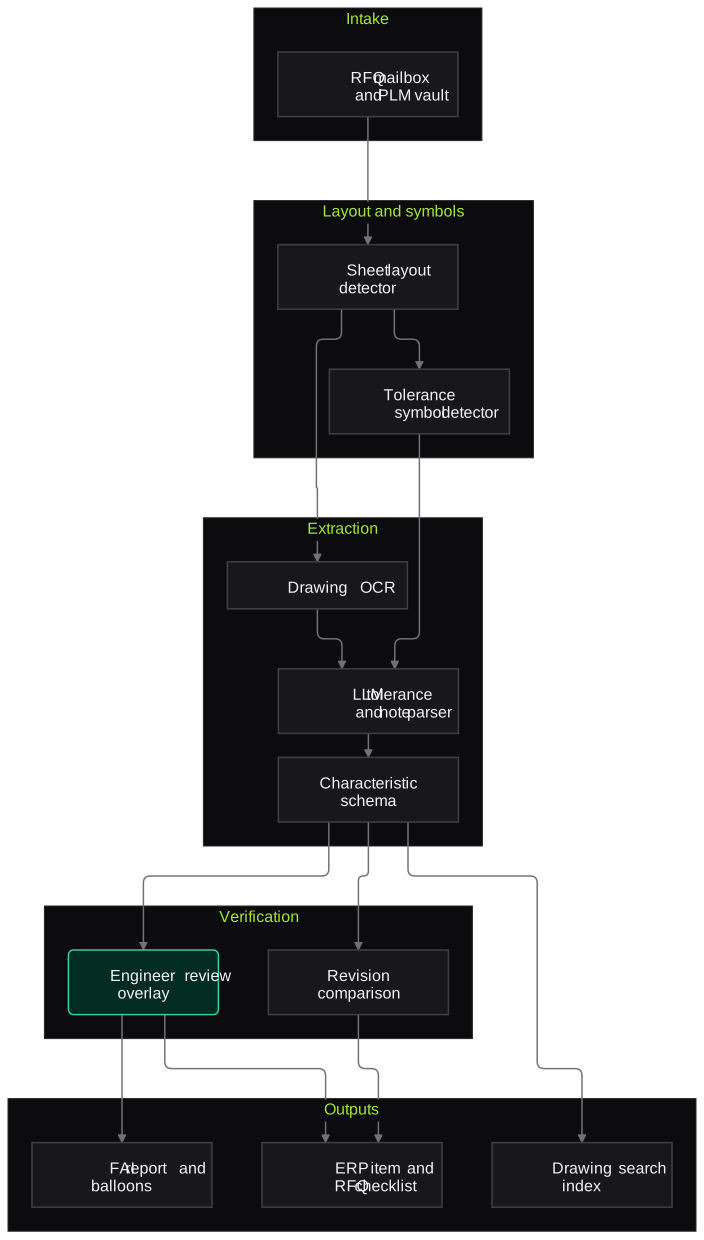
Architecture
- Intake
- RFQ mailbox and PLM or PDM vault connector
- PDF, TIFF and scanned sheet handling
- Layout and symbol detection
- Sheet layout detector for title block, views and tables
- Symbol detector for GD&T frames, finish and weld symbols
- Extraction
- OCR tuned for drawing fonts and rotated text
- LLM parser for tolerances, threads and notes
- Characteristic schema with balloon numbering
- Verification
- Engineer review screen with drawing overlay
- Revision comparison engine
- Outputs
- FAI and inspection report templates
- ERP item master and RFQ checklist export
- Searchable drawing index
Inputs and outputs
Inputs
- 2D drawings as PDF, TIFF or scanned sheets
- Customer and internal material and finish spec sheets
- Previous drawing revisions from the PLM vault or folders
- Your FAI, PPAP or inspection report templates
- RFQ emails and attachments
Outputs
- Structured title block and characteristic list per drawing
- Ballooned drawing and a filled inspection report draft
- Revision change list between drawing versions
- RFQ checklist of material, finish, critical tolerances and special processes
- Searchable index of legacy drawings
Where people stay in control
A design or quality engineer verifies every characteristic flagged as critical or low-confidence on a drawing overlay before the list is used. Nothing extracted goes into a quote, control plan or CNC program without that sign-off.
Integrations
- PLM or PDM vault such as Windchill, Teamcenter or SolidWorks PDM
- SAP or Tally item master
- Quality management or FAI software
- RFQ mailbox and CRM
- Network folders holding legacy scans
Guardrails
- Every value linked to its location on the drawing
- Critical characteristics always shown for engineer confirmation
- Drawings processed in your tenancy or on-premise to respect customer NDAs
- Only the released revision is used for outputs
- Unreadable regions reported, not guessed
Compliance notes
- Customer drawings are often under NDA or export-control terms; processing can stay on-premise and specific programmes can be excluded.
- Outputs can support PPAP and first article inspection records, including AS9102-style reports in aerospace, with engineers retaining sign-off.
A typical pilot
Duration: 4 weeks
One drawing family, such as machined or sheet-metal parts, using recent RFQ and production drawings from two or three customers.
Deliverables
- 01Characteristic schema and output templates agreed with engineering
- 02Working extraction on a set of your real drawings
- 03Engineer review overlay
- 04Accuracy report against engineer-ballooned drawings
- 05Roll-out and integration plan
What we measure
- Characteristic extraction accuracy
- Compared with characteristic lists engineers prepared for the same drawings.
- Title block field accuracy
- Part number, revision, material and tolerance standard checked against the PLM record.
- Engineer time per drawing
- Time to produce a verified balloon list or RFQ checklist, with and without the tool.
- Revision changes caught
- Changes found by the comparison engine against a manual comparison of sample revision pairs.
FAQs
01Can it read old scanned drawings with poor line quality?
Yes, within limits. Faded or skewed scans are cleaned up before reading, and any region the system cannot read with confidence is flagged rather than guessed. The pilot report separates accuracy for native PDFs and scans.
02Does it understand GD&T, or just read the text?
It detects feature control frames and reads the symbol, tolerance value, modifiers and datum references as structured fields. Interpreting what a callout means for your process stays with your engineers.
03Can we work from CAD models instead of 2D drawings?
Where you have native CAD with PMI, extracting from the model is often better, and we can discuss it. Most suppliers still receive 2D drawings with RFQs, which is where this system helps most.
04Customer drawings are confidential. Where are they processed?
In your cloud tenancy or on a server in your plant. We use model endpoints that do not retain data, and specific customers or programmes can be excluded entirely.
Related use cases
- Manufacturing
Visual Quality Inspection on Production Lines
Cameras and vision models at the inspection station flag scratches, dents, missing features and print errors, divert clear rejects and hold borderline parts for an inspector.
- Manufacturing
Supplier Quality Certificate Verification
Check mill test certificates and certificates of conformance against your material specs, tie heat numbers to GRNs, and flag out-of-spec, missing or reused certificates for IQC.
- Manufacturing
Maintenance Log and SOP Assistant
A shop-floor assistant that answers technicians' questions from breakdown history, OEM manuals and SOPs, in Hindi or English, with the source page or work order behind every answer.
- Energy, Mining & Utilities
Technical Report Search Assistant
A search assistant over geological, engineering and incident reports that answers engineers' questions with page-level citations and respects existing document permissions.

Founded by Akhilesh Mittal. 8 years building a security platform for a New Zealand company. IIT ISM Dhanbad and IMT Ghaziabad. Builds production agentic AI.
Start with one line, one document or one region
Book a discovery call and we will pick a narrow pilot with your quality, finance or sales team, run it alongside your current process and report what we measured.