Technical Report Search Assistant
A search assistant over geological, engineering and incident reports that answers engineers' questions with page-level citations and respects existing document permissions.
- Capability:
- Document Intelligence
- Industry:
- Energy, Mining & Utilities
Who it is for
- Head of Technical Services
- Reliability Engineer
- Geologist or Reservoir Engineer
- Knowledge Management Lead
The problem
Energy and mining companies hold decades of technical knowledge in reports: exploration and geotechnical studies, well completion and daily drilling reports, HAZOP studies, root cause analyses and OEM manuals. Engineers know the answer is somewhere in the archive, but keyword search over scanned PDFs and inconsistent file names rarely finds it.
Archives keyword search cannot reach
Scanned reports, drawings with embedded text and inconsistent terminology mean the right document often does not show up in search.
Repeat failures
A gearbox or pump failure investigated at one site is investigated again elsewhere because the earlier RCA is not found.
Knowledge leaves with experienced staff
Retiring engineers carry context about why a design or procedure changed, and the reports that record it go unread.
Sensitive data needs strict access
Exploration results, commercial terms and security-sensitive drawings cannot be opened to everyone just to make them searchable.
What we build
We build a question-answering assistant over your technical archive using retrieval-augmented generation. Documents from file shares, SharePoint and document management systems are OCR-processed, split into passages and tagged with site, asset, document type, revision and date. When an engineer asks a question, the assistant retrieves only passages that user is allowed to see, drafts an answer and cites the exact pages it used. If the archive does not hold enough evidence, it says so and suggests a subject expert instead of filling the gap. Superseded revisions are labelled, and every query and answer is logged for review.
- Indexes OEM manuals, RCA and incident reports, HAZOP studies, and drilling, well and geotechnical reports
- Answers with page-level citations and the quoted passage beside each claim
- Filters by site, asset, document type, revision and date range
- Applies existing folder and SharePoint permissions at retrieval time
- Says when the documents do not answer the question instead of guessing
- Lists and compares across reports, such as every RCA that mentions a given component
How it works
- 01Connect and index sourcesWe connect file shares and document systems, run OCR on scanned material and tag passages with metadata and permissions.
- 02Engineer asks a questionQuestions are asked in plain English or Hindi through a web app or Microsoft Teams.
- 03Retrieve permitted passagesHybrid keyword and semantic search retrieves passages the user may read, and a reranker orders them.
- 04Check evidenceIf the retrieved passages do not support an answer, the assistant says so and points to a subject expert.
- 05Answer with citationsThe assistant drafts a short answer with citations, and the engineer opens the cited pages to verify.
- 06Learn from feedbackRatings, corrections and expert reviews build an evaluation set used to tune retrieval.

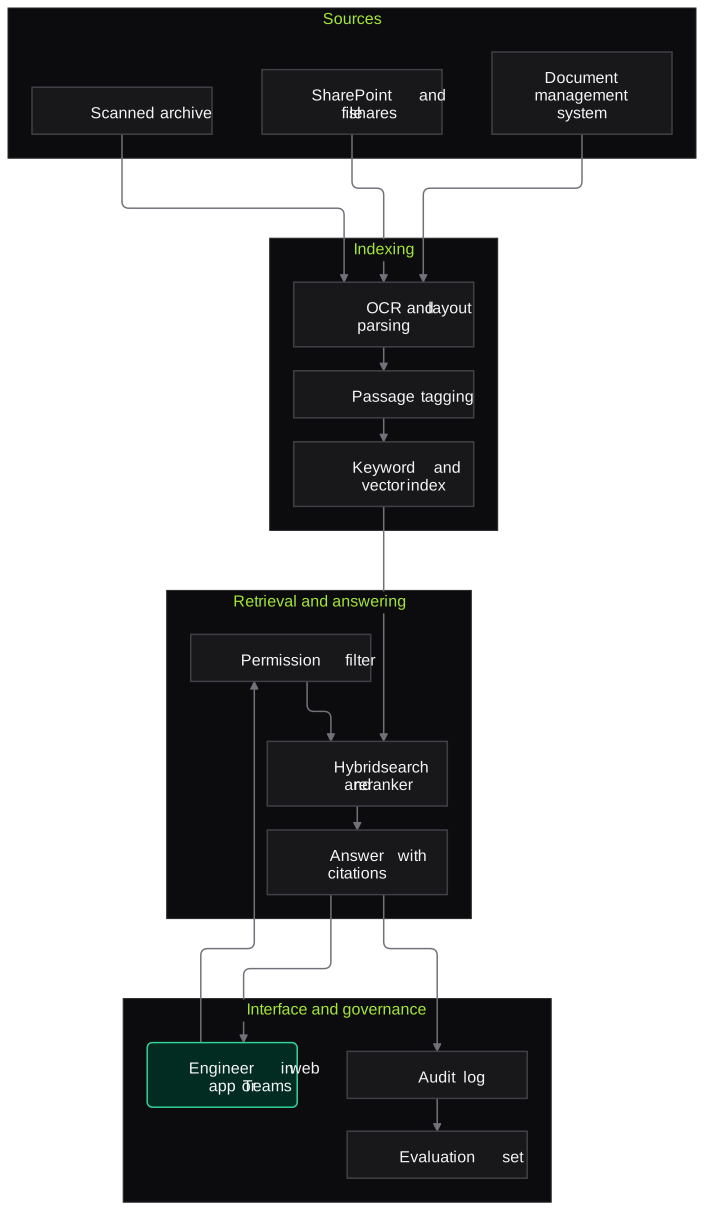
Architecture
- Sources
- File shares and SharePoint libraries
- Document management system
- Scanned report archive
- Indexing
- OCR and layout parsing
- Passage splitting with site, asset and revision tags
- Keyword and vector indexes
- Retrieval and answering
- Permission filter from the identity provider
- Hybrid search and reranker
- LLM answer generator with mandatory citations
- Interface and governance
- Web app and Microsoft Teams bot
- Query and answer audit log
- Expert feedback and evaluation set
Inputs and outputs
Inputs
- OEM operation and maintenance manuals
- Root cause analysis and incident investigation reports
- HAZOP and risk assessment studies
- Exploration, geotechnical, drilling and well reports
- Design basis documents and engineering standards
- User directory and folder permissions
Outputs
- Answers with page-level citations and quoted passages
- Lists of related documents filtered by site, asset or type
- Not-found responses with suggested subject experts
- Audit log of queries and sources used
- Evaluation reports on answer quality
Where people stay in control
Answers are research aids: engineers verify the cited pages before acting, and operating procedures are always read from the controlled document. Subject experts curate the evaluation questions and review answers flagged as wrong.
Integrations
- SharePoint, OneDrive and network file shares
- Document management systems such as OpenText or Documentum
- Microsoft Teams
- Single sign-on through Microsoft Entra ID or another identity provider
- Engineering drawing management system
Guardrails
- Permission-aware retrieval, so users only see passages from documents they can already open
- Citations are mandatory; answers without supporting passages are withheld
- Superseded revisions are labelled and ranked below current ones
- Hosted in your cloud tenancy or on-premise, with no training on your data
- Every query and answer logged for audit
Compliance notes
- Personal data in incident reports is handled under the DPDP Act 2023, with names masked in answers where your policy requires.
- Governance practices can be documented against ISO/IEC 42001 if you run an AI management system.
A typical pilot
Duration: 4 weeks
One collection, such as RCA reports and OEM manuals for a single plant or the drilling reports for one field, with a question set written by your engineers.
Deliverables
- 01Indexed pilot collection with permissions applied
- 02Web or Teams assistant for pilot users
- 03Evaluation question set agreed with subject experts
- 04Answer quality and citation report
- 05Scale-up plan covering further collections and hosting
What we measure
- Answer correctness
- Subject experts grade answers to the agreed question set.
- Citation accuracy
- Share of citations that actually support the statements they are attached to.
- Not-found correctness
- Whether the assistant correctly declines questions the archive cannot answer.
- Time to find
- Engineers time how long finding the same information takes with and without the assistant.
FAQs
01How do you stop it making things up?
The assistant can only answer from retrieved passages, must cite them, and declines when evidence is thin. We measure citation accuracy on your own question set during the pilot and tune retrieval where it falls short.
02Our exploration data is confidential. Where does it go?
It stays in your cloud tenancy or data centre. We can use models hosted in your environment or provider endpoints that do not retain or train on your data, and permissions follow your existing folder access.
03Can it handle old scanned reports and drawings?
Scanned reports are OCR-processed before indexing, and text on drawings such as title blocks and notes can be indexed. Very poor scans are listed so you can decide whether to re-scan them.
04Can it run on-premise?
Yes. Indexing, retrieval and an open-weight language model can run on your own servers where policy requires it, with some trade-off in answer quality that we measure during the pilot.
Related use cases
- Energy, Mining & Utilities
Inspection and Maintenance Report Extraction
Extract readings, observations and recommendations from test reports, NDT surveys, vendor service reports and job cards into your CMMS, with out-of-limit values flagged for engineers.
- Energy, Mining & Utilities
Permit and Compliance Document Tracking
Turn environmental clearances, consents, explosives and petroleum licences and grid approvals into an obligation register with owners, due dates, reminders and linked evidence.
- Energy, Mining & Utilities
Security Review for OT/IT AI Assistants
Adversarial testing and architecture review for AI assistants that read historian data, manuals and work orders, covering prompt injection, unsafe advice, data leakage and tool permissions.
- Manufacturing
Maintenance Log and SOP Assistant
A shop-floor assistant that answers technicians' questions from breakdown history, OEM manuals and SOPs, in Hindi or English, with the source page or work order behind every answer.

Founded by Akhilesh Mittal. 8 years building a security platform for a New Zealand company. IIT ISM Dhanbad and IMT Ghaziabad. Builds production agentic AI.
Start with one site, one camera cluster or one call queue
Book a discovery call to choose a narrow pilot on your own footage, reports or call recordings. We agree the measures with your team before any build starts.