Hearing and Meeting Transcription with Minutes
Transcribe arbitral hearings, depositions and client meetings where recording is permitted, label speakers, handle Hindi-English speech and legal terms, and draft minutes for review.
- Industry:
- Legal
Who it is for
- Arbitration Counsel
- Tribunal Secretary
- Litigation Partner
- Company Secretary (In-House Legal)
The problem
Ad hoc arbitrations in India often run without a professional stenographer, and lawyers and tribunal secretaries reconstruct proceedings from handwritten notes. Client conferences, witness preparation sessions and internal case meetings produce decisions and action items that live only in someone's notebook.
No reliable record
Without a transcript, disputes about what a witness said or what the tribunal directed are hard to settle.
Generic transcription fails
Case names, statutory references, Latin terms and Hindi-English switching produce garbled output from consumer tools.
Speakers not identified
A transcript that does not say who spoke, whether counsel, witness or arbitrator, is of limited use.
Minutes take hours
Turning a long hearing or meeting into minutes, procedural notes and action items takes associate time after a full day.
What we build
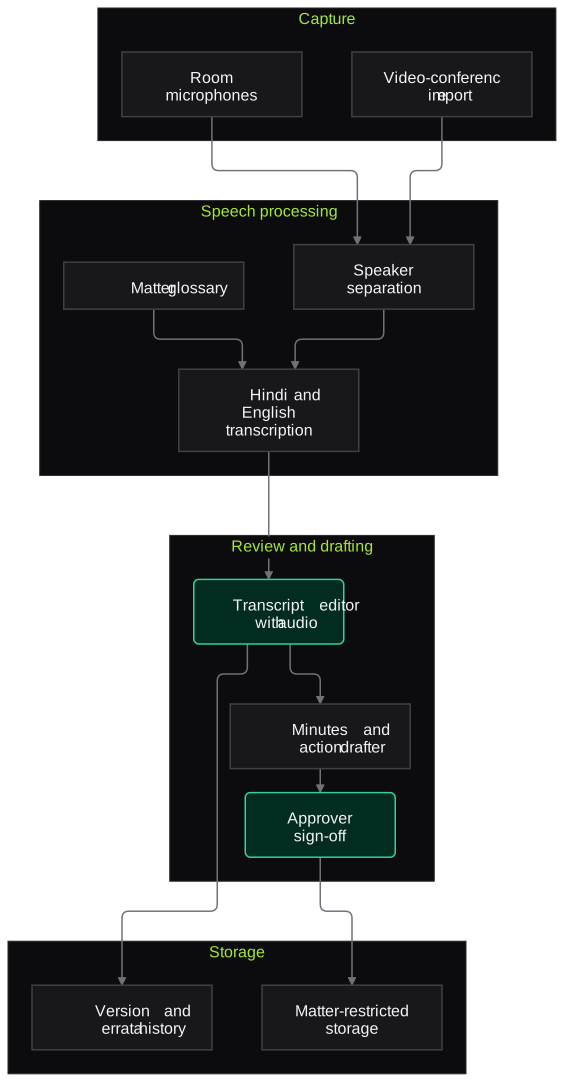
We build a transcription and minutes pipeline for proceedings where recording is permitted: arbitral hearings, depositions, virtual hearings with the tribunal's approval, and client or internal meetings with participants' consent. Audio from the hearing room or a video-conference platform is split by speaker and mapped to named participants, then transcribed with a glossary built from the matter, including party names, case citations and statutes, across Hindi, English and mixed speech. Low-confidence segments are marked for a transcript reviewer who checks them against the audio. From the reviewed transcript the system drafts minutes, a summary of directions and action items, which counsel or the tribunal secretary approve before circulation.
- Speaker separation mapped to named counsel, witnesses and arbitrators
- Matter-specific glossary for parties, citations, statutes and technical terms
- Hindi, English and code-switched transcription with time stamps
- Low-confidence segments marked for review against the audio
- Draft minutes, directions summary and action items from the reviewed transcript
- Errata workflow for parties to propose corrections
How it works
- 01Confirm permission and captureRecording proceeds only with the tribunal's or participants' permission, from room microphones or the video-conference platform.
- 02Separate and label speakersSpeech is split by speaker and mapped to the names on the appearance list.
- 03Transcribe with the glossaryAudio is transcribed using the matter glossary, with time stamps and a confidence score for each segment.
- 04Review uncertain segmentsA transcript reviewer corrects marked segments against the audio.
- 05Draft minutesMinutes, directions and action items are drafted from the reviewed transcript.
- 06Approve and circulateCounsel or the tribunal secretary approve the documents, and parties can submit errata.

Architecture
- Capture
- Hearing room microphone kit
- Video-conference recording import
- Permission and consent record
- Speech processing
- Speaker separation and labelling
- Speech-to-text for Hindi, English and mixed speech
- Matter glossary and custom vocabulary
- Review
- Transcript editor synced to audio
- Confidence highlighting
- Errata tracking
- Drafting
- Minutes and directions drafter
- Action item extractor
- Storage and access
- Matter-restricted storage
- Version history
- Retention as agreed for the proceeding
Inputs and outputs
Inputs
- Audio or video of the hearing or meeting
- Appearance list and participant names
- Matter glossary: parties, citations, statutes and technical terms
- Agenda or procedural order, if any
- Recording permission or consent record
Outputs
- Time-stamped transcript with speaker labels
- List of corrected segments and errata
- Draft minutes and directions summary
- Action items with owners and dates
- Approved, versioned records in matter storage
Where people stay in control
A transcript reviewer checks every low-confidence segment against the audio, and counsel or the tribunal secretary approve the minutes before circulation. Parties can propose errata, which the approver decides.
Integrations
- Zoom, Microsoft Teams or Google Meet recordings
- Document management system
- Matter management system
- Microsoft Word for transcripts and minutes
- Secure file sharing with parties
Guardrails
- No recording without tribunal or participant permission, and no recording of court proceedings
- Uncertain words marked, never silently filled in
- Minutes drafted only from the reviewed transcript
- Recordings and transcripts restricted to the matter team and kept for the agreed period
- Audio and transcripts not used to train models
Compliance notes
- Courts in India generally restrict recording of proceedings without permission; this service is designed for arbitral hearings, depositions and meetings where recording is agreed.
- Recordings contain participants' personal data; consent and retention are handled in line with the DPDP Act 2023.
A typical pilot
Duration: 3 weeks
Two or three recorded arbitral sessions or internal meetings, with transcripts reviewed against the audio by your team.
Deliverables
- 01Matter glossary and speaker set-up
- 02Reviewed transcripts for the pilot sessions
- 03Draft minutes and action items
- 04Accuracy report by speaker and language
- 05Roll-out plan and cost estimate
What we measure
- Word error rate
- Reviewed transcript compared with the raw output, by language and speaker.
- Speaker attribution accuracy
- Segments assigned to the correct speaker, from reviewer corrections.
- Reviewer time per hour of audio
- Time the reviewer spends correcting each recorded hour.
- Edits to draft minutes
- Extent of the changes the approver made to the draft minutes.
FAQs
01Can you transcribe court hearings?
We do not record court proceedings, which courts generally restrict without permission. The service is for arbitral hearings, depositions, virtual hearings where the tribunal permits recording, and meetings where participants agree.
02How accurate is it with Hindi and legal terms?
Accuracy improves with a matter glossary and good audio. Every low-confidence segment is marked for review, and the pilot reports error rates by language and speaker.
03Who owns the transcript?
The client or tribunal, as agreed for the proceeding. We keep it in matter-restricted storage and delete it at the end of the agreed period.
04Can the minutes include the tribunal's directions?
Yes. The drafter pulls directions and deadlines from the reviewed transcript into a summary, which counsel or the tribunal secretary approve.
Related use cases
- Legal
Case File Summarisation and Chronology
Turn a litigation file of pleadings, affidavits, exhibits and orders into an indexed list of dates and events, a party and witness index and issue summaries, each line linked to its page.
- Legal
Client Intake Voice Agent
Answer inbound enquiries in Hindi and English, record facts and parties for a conflict check, spot urgent matters for an on-call advocate and book consultations, without giving legal advice.
- Legal
Court Order and Cause List Tracking
Track daily cause lists and new orders across the Supreme Court, High Courts, district courts and tribunals for your matters, extract next dates and directions, and alert the responsible counsel.
- Accounting, Audit & Consulting
Board and Client Meeting Minutes Drafting
Turn recorded board, audit committee and client meetings, including Hinglish discussion, into draft minutes and action lists in your format for the company secretary or partner to finalise.

Founded by Akhilesh Mittal. 8 years building a security platform for a New Zealand company. IIT ISM Dhanbad and IMT Ghaziabad. Builds production agentic AI.
Bring one matter type or one contract stack
Pick a workflow that hurts, such as NDA review, cause list tracking or a diligence index. We will run a short pilot on de-identified or consented documents and go through the output with your lawyers line by line.