Case File Summarisation and Chronology
Turn a litigation file of pleadings, affidavits, exhibits and orders into an indexed list of dates and events, a party and witness index and issue summaries, each line linked to its page.
- Capability:
- Document Intelligence
- Industry:
- Legal
Who it is for
- Litigation Partner
- Senior Associate (Disputes)
- Head of Litigation (In-House)
- Advocate-on-Record
The problem
A commercial suit, arbitration or writ petition can arrive with thousands of pages: plaint, written statement, replication, affidavits of evidence, exhibits, correspondence and years of interim orders, often scanned, sometimes in Hindi, with handwritten order sheets from the district court. Before any strategy work, someone has to read it all and build the chronology.
Chronologies built by hand
Associates spend days preparing the list of dates and events, and it goes stale the moment a new affidavit is filed.
Facts without sources
Summaries that do not cite pages are hard to rely on when preparing for a hearing or a cross-examination.
Contradictions are missed
Dates, amounts and statements that differ between pleadings, affidavits and documents are easy to overlook in a large file.
Mixed scripts and poor scans
Hindi orders, handwritten notings and low-quality photocopies defeat standard search.
What we build
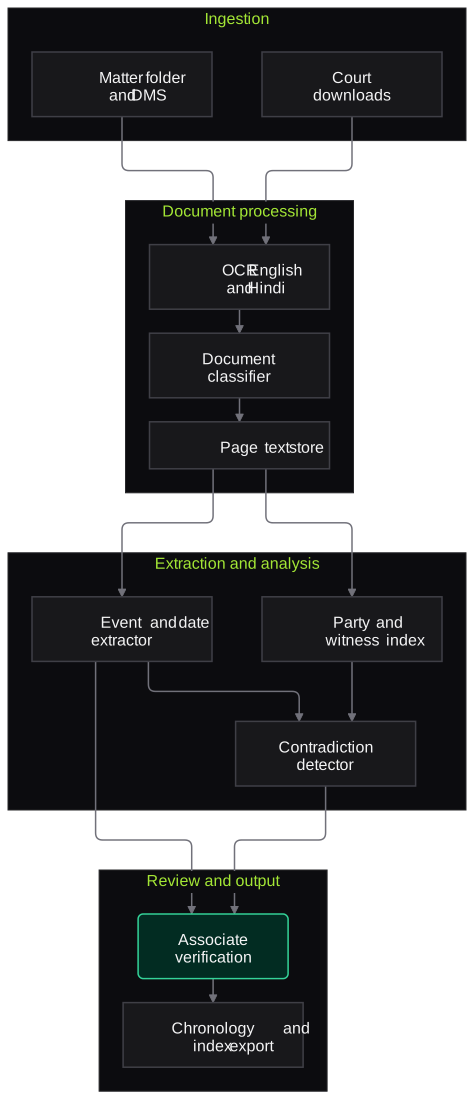
We build a case-file assistant that ingests the paper book or matter folder, runs OCR in English and Hindi, classifies each document and indexes it by type, date and filing party. It extracts dated events, amounts, parties and witnesses and builds a list of dates and events in which every entry cites the document and page. Issue-wise summaries are drafted from the pleadings and evidence, and possible contradictions are listed for counsel, such as a date in the plaint that differs from an exhibit. Associates verify entries against the source in one click, and the chronology updates when new documents are added.
- OCR for English and Hindi, including handwritten order sheets, with low-confidence text marked
- Document index by type, date, filing party and exhibit number
- List of dates and events with a document and page citation for every entry
- Party, witness and entity index across the file
- Issue-wise summaries drawn from the pleadings and evidence
- Contradiction list across pleadings, affidavits and exhibits for counsel to assess
How it works
- 01Load the fileThe paper book, matter folder or court-downloaded documents are uploaded for the matter.
- 02OCR and classifyEach document is read and classified as plaint, reply, affidavit, exhibit, order and so on.
- 03Extract events and entitiesDates, events, amounts, parties and witnesses are extracted with page references.
- 04Build the chronologyEvents are ordered into a list of dates and events, and conflicting dates are flagged.
- 05Associate verificationAn associate checks flagged entries, and a sample of the others, against the source pages.
- 06Export and updateThe verified chronology, index and summaries are exported to Word and refreshed as new filings arrive.

Architecture
- Ingestion
- Matter folder and DMS connector
- Import of court downloads
- Paper book page numbering
- Document processing
- OCR for English and Devanagari
- Classifier for pleadings, affidavits, exhibits and orders
- Page-level text store
- Extraction and analysis
- Event, date and amount extractor
- Party and witness resolver
- Contradiction detector
- Review
- Verification screen with source page view
- Associate edits and notes
- Output
- List of dates and events in Word
- Document index and issue summaries
- Version history as the file grows
Inputs and outputs
Inputs
- Pleadings: plaint or petition, written statement, replication and rejoinder
- Affidavits of evidence and witness statements
- Exhibits and correspondence
- Interim orders and order sheets
- Matter details: parties, court and case number
Outputs
- Document index with type, date and filing party
- List of dates and events with page citations
- Party, witness and entity index
- Issue-wise summaries for counsel
- Contradiction list for review
Where people stay in control
Associates verify every flagged entry, and a sample of the rest, before the chronology is used, and counsel decide what any contradiction means for the case. Summaries are working notes for lawyers, not opinions.
Integrations
- Document management system
- Matter or practice management software
- Microsoft Word for exports
- Court e-filing downloads
- Secure cloud storage per matter
Guardrails
- Every chronology entry cites a document and page
- Low-confidence OCR text visibly marked
- Contradictions presented as questions for counsel, not conclusions
- Matter-level access controls with no cross-matter retrieval
- Documents not used to train models
Compliance notes
- Case files contain personal and sometimes sensitive data of parties and witnesses; designed to support DPDP Act 2023 safeguards.
- Internal notes and drafts are stored separately from the evidence index to help protect privileged work.
A typical pilot
Duration: 3 weeks
Two or three closed or consented matters of different sizes, with chronologies compared against ones your team has already prepared.
Deliverables
- 01Document types and chronology format agreed with your litigation team
- 02Indexed files and chronologies for the pilot matters
- 03Verification screen
- 04Comparison report against your existing chronologies
- 05Roll-out plan and cost estimate
What we measure
- Event recall
- Events in your existing chronology that the system also captured.
- Citation accuracy
- Entries whose cited page actually supports the event, from associate checks.
- OCR quality on Hindi and handwritten pages
- Character error rate on a sample of pages, by script and source.
- Associate time to a usable chronology
- Time spent verifying and editing, compared with building one from scratch.
FAQs
01Can it read handwritten district court order sheets?
Often, but not always. Handwritten notings are read where legible and marked with lower confidence; illegible pages are flagged so an associate can transcribe them.
02Is the summary a legal opinion?
No. It is a working summary of what the documents say, with citations, to help counsel prepare. Analysis and advice stay with the lawyers.
03How do we handle new filings mid-case?
Add them to the matter folder. The index, chronology and contradiction list are updated, and changes since the last version are highlighted.
04Where is the data stored?
In your environment or a chosen India region, with access restricted to the matter team. Models do not train on your files.
Related use cases
- Legal
Hearing and Meeting Transcription with Minutes
Transcribe arbitral hearings, depositions and client meetings where recording is permitted, label speakers, handle Hindi-English speech and legal terms, and draft minutes for review.
- Legal
Legal Research Assistant with Citation Checking
A research assistant that answers only from retrieved judgments and statutes, quotes the passage it relies on, and checks each citation for existence, accuracy and later treatment.
- Legal
Court Order and Cause List Tracking
Track daily cause lists and new orders across the Supreme Court, High Courts, district courts and tribunals for your matters, extract next dates and directions, and alert the responsible counsel.
- Legal
Due Diligence Data Room Review
Index a virtual data room against your request list, extract issues from contracts, corporate records and licences, and draft report tables and query lists for lawyers to confirm.

Founded by Akhilesh Mittal. 8 years building a security platform for a New Zealand company. IIT ISM Dhanbad and IMT Ghaziabad. Builds production agentic AI.
Bring one matter type or one contract stack
Pick a workflow that hurts, such as NDA review, cause list tracking or a diligence index. We will run a short pilot on de-identified or consented documents and go through the output with your lawyers line by line.