Court Order and Cause List Tracking
Track daily cause lists and new orders across the Supreme Court, High Courts, district courts and tribunals for your matters, extract next dates and directions, and alert the responsible counsel.
- Capability:
- Document Intelligence
- Industry:
- Legal
Who it is for
- Litigation Manager (In-House)
- Head of Legal, Bank or NBFC
- Law Firm Litigation Partner
- Legal Operations Lead
The problem
A bank, insurer or large company may have thousands of live matters across High Courts, district courts, consumer commissions, DRTs and NCLT benches. Each forum publishes cause lists and orders on its own portal and in its own format, sometimes late in the evening, and a matter missed on the list can lead to an adverse or ex parte order.
Many portals, many formats
Cause lists arrive as PDFs and web pages with different layouts, item numbers and court-room details for each forum.
Name and number variations
Parties appear with abbreviations or misspellings, and old and new case numbers or CNR numbers do not always match the matter register.
Directions buried in orders
Deadlines such as filing a reply, paying costs or appearing in person sit inside the text of the daily order.
Manual checking by clerks
Litigation clerks search portals every evening, and the matter management system lags behind reality.
What we build
We build a tracking service that collects published cause lists, supplementary lists and orders from the court and tribunal portals relevant to your matters, within each portal's terms of use. It parses listings and matches them to your matter register by case number, CNR, party names and advocate names, with fuzzy matching for variants. New orders are downloaded and read to extract the next date, purpose of listing and directions, such as filing deadlines, costs and appearance requirements. Uncertain matches go to a litigation clerk. Confirmed updates reach the matter management system, the calendar and the responsible counsel by email or WhatsApp.
- Collects cause lists, supplementary lists and orders from multiple court and tribunal portals
- Matches listings to matters by case number, CNR, party and advocate names, including variants
- Extracts next date, purpose of listing and directions from daily orders, including Hindi orders
- Flags matters listed unexpectedly or missing from lists where they were expected
- Updates the matter management system and counsel calendars
- Sends morning alerts with item number and court room to the responsible counsel
How it works
- 01Load the matter registerCase numbers, CNR numbers, parties, forum and responsible counsel are imported from your matter system.
- 02Collect lists and ordersPublished cause lists and new orders are collected from each relevant portal on a schedule.
- 03Match listingsListings are matched to matters, with confidence scores for name and number variations.
- 04Confirm uncertain matchesA litigation clerk confirms or rejects low-confidence matches.
- 05Extract from ordersNext date, purpose and directions are extracted from each new order, with a link to the PDF.
- 06Alert and updateCounsel receive alerts, and the matter system and calendar are updated.

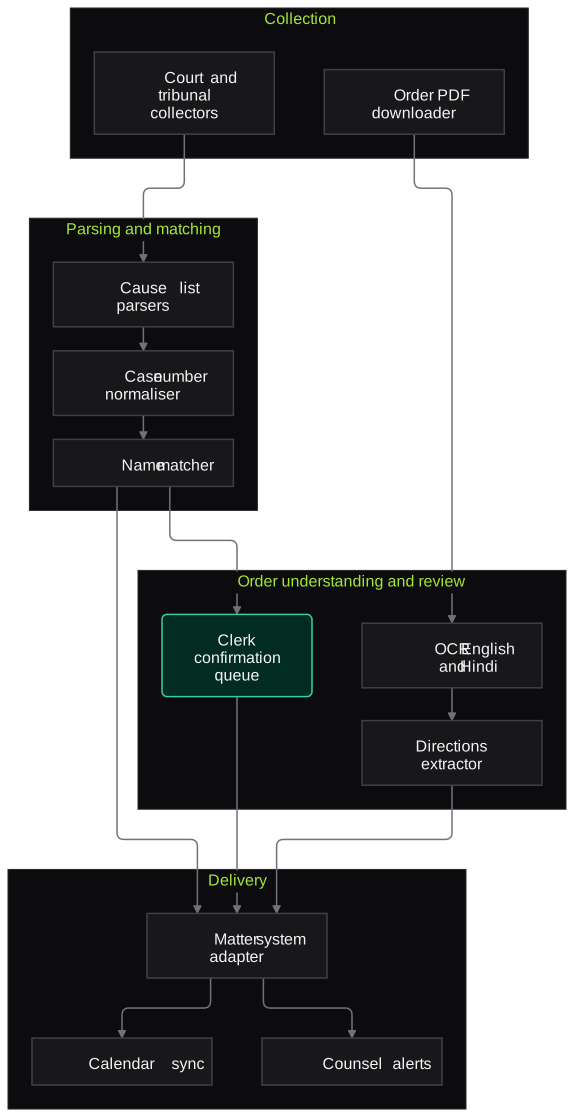
Architecture
- Collection
- Portal collectors per court and tribunal
- Schedule and change detection
- Order PDF downloader
- Parsing and matching
- Cause list parsers per format
- Case number and CNR normaliser
- Fuzzy party and advocate name matcher
- Order understanding
- OCR for English and Hindi orders
- Extractor for next date, purpose and directions
- Review
- Clerk confirmation queue
- Exception list for missing or unexpected listings
- Delivery
- Matter management system adapter
- Calendar sync
- Email and WhatsApp alerts
Inputs and outputs
Inputs
- Matter register: case numbers, CNR, parties, forum and counsel
- List of courts and tribunals to monitor
- Advocate names as they appear in listings
- Alert preferences for each counsel
- Existing matter management data
Outputs
- Daily listings matched to matters, with item number and court room
- Extracted next dates, purposes and directions with order links
- Exception list of unmatched or unexpected listings
- Updated matter system and calendars
- Morning alerts to responsible counsel
Where people stay in control
Litigation clerks confirm uncertain matches and review the exception list, and counsel read the actual order before acting on any extracted direction. The service tracks and alerts; it does not decide case strategy.
Integrations
- Supreme Court, High Court, district court (eCourts) and tribunal portals
- Matter or litigation management system
- Outlook or Google calendars
- Email and WhatsApp Business API
- Document management system for order PDFs
Guardrails
- Respects each portal's terms of use and does not bypass captchas or access controls
- Every extracted date and direction links to the source order
- Unmatched or ambiguous listings go to the exception list and are never dropped silently
- Alerts prompt counsel to read the full order
- Collection failures reported the same day so clerks can check by hand
Compliance notes
- Court records are public, but the matter register links them to clients; designed to support DPDP Act 2023 safeguards for client data.
- Where a portal requires a captcha or login, a staff member completes that step or an official channel is used.
A typical pilot
Duration: 4 weeks
A defined set of live matters in two or three forums, for example one High Court and its district courts, tracked alongside your clerks' current process.
Deliverables
- 01Collectors and parsers for the pilot forums
- 02Matching rules tuned on your matter register
- 03Clerk confirmation and exception screens
- 04Alerts and matter system updates for pilot matters
- 05Comparison report against manual tracking
What we measure
- Listing match accuracy
- Matches confirmed or corrected by clerks during the pilot.
- Missed listings
- Listings caught by clerks that the system missed, from daily reconciliation.
- Direction extraction accuracy
- Extracted next dates and directions checked against the orders by counsel.
- Alert timeliness
- Time between a list or order being published and the alert reaching counsel.
Built on related work
RERA project data aggregator
Real-estate data project (anonymised)
Playwright scraper that collects state RERA project listings and full project details into structured Excel output.
FAQs
01Which courts can you track?
Any forum that publishes cause lists or orders online, including the Supreme Court, High Courts, district courts through eCourts, and tribunals such as NCLT, DRTs and consumer commissions. We start with the forums where most of your matters sit.
02Do you get around captchas on court sites?
No. We respect each portal's terms and access controls. Where a captcha or login is needed, a staff member completes that step or an official channel is used.
03What if a party name is spelt differently?
Fuzzy matching handles common variants and abbreviations, and anything uncertain goes to a clerk to confirm. Confirmed variants are remembered for next time.
04Can it read Hindi orders from district courts?
Yes. OCR and extraction work on Hindi and English orders. Low-confidence extractions are marked so counsel check the order directly.
Related use cases
- Legal
Case File Summarisation and Chronology
Turn a litigation file of pleadings, affidavits, exhibits and orders into an indexed list of dates and events, a party and witness index and issue summaries, each line linked to its page.
- Legal
Bulk Legal Notice Drafting and Tracking
Draft demand, recall and statutory notices in bulk from advocate-approved templates, validate every field and deadline, track postal delivery and assemble filing-ready evidence packets.
- Legal
Hearing and Meeting Transcription with Minutes
Transcribe arbitral hearings, depositions and client meetings where recording is permitted, label speakers, handle Hindi-English speech and legal terms, and draft minutes for review.

Founded by Akhilesh Mittal. 8 years building a security platform for a New Zealand company. IIT ISM Dhanbad and IMT Ghaziabad. Builds production agentic AI.
Bring one matter type or one contract stack
Pick a workflow that hurts, such as NDA review, cause list tracking or a diligence index. We will run a short pilot on de-identified or consented documents and go through the output with your lawyers line by line.