Pre-Launch Security Assessment for LLM Features
Test a new chatbot, copilot or LLM feature for prompt injection, cross-customer data leakage, off-policy answers and unsafe output handling before release, with evidence and a retest.
- Capability:
- AI Security & Compliance
- Industry:
- Fintech & Payments
Who it is for
- CTO or VP Engineering
- CISO or Head of Information Security
- Product Manager for AI features
- Application Security Lead
The problem
Fintech teams are adding LLM assistants to apps and merchant dashboards: transaction search, spend summaries, support chat and dispute help. These features read customer data and sometimes call internal APIs, so a well-crafted prompt can become a data breach. Traditional penetration tests and scanners do not test how the model behaves.
Cross-customer data exposure
A model with access to a transaction API may return another user's data if authorisation is enforced in the prompt instead of the tool layer.
Indirect prompt injection
Merchant names, UPI notes, uploaded documents and email content can carry instructions that the model follows.
Off-policy answers
Assistants drift into investment advice, invented fee waivers or confident wrong statements about refunds, creating conduct and complaint risk.
No evidence for launch approval
Risk committees and partner banks ask what was tested before launch, and teams have no structured answer.
What we build
We run a time-boxed security assessment of your LLM feature in a staging environment before it reaches customers. First we map the feature: model, system prompt, retrieval sources, tools and the data each can reach. Then we test it against the OWASP Top 10 for LLM Applications with automated attack libraries and manual, multi-turn attempts written for payments: injection through transaction notes and merchant names, attempts to read other accounts, system prompt extraction, jailbreaks towards financial advice and unsafe rendering of model output in your UI. Every finding comes with the exact prompts and responses, a severity rating and a practical fix. After you fix, we retest.
- Architecture and data-flow review of prompts, retrieval sources, tools and permissions
- Automated attack runs for prompt injection, jailbreaks and system prompt extraction
- Manual multi-turn testing with payments-specific scenarios in English, Hindi and Hinglish
- Authorisation testing of every tool and API the model can call, using paired test accounts
- Output-handling checks for script injection, link injection and markdown rendering in your UI
- Findings report mapped to OWASP Top 10 for LLM Applications, followed by a retest
How it works
- 01Scope and threat modelWe agree the feature, environment, test accounts and rules of engagement, and map what data and tools the model can reach.
- 02Automated attack runsAttack libraries send large sets of injection, jailbreak and extraction prompts to the staging endpoint.
- 03Manual scenario testingTesters run multi-turn, payments-specific attacks, including indirect injection through data fields the model reads.
- 04Validate and rateEach suspected issue is reproduced, confirmed and rated by impact and likelihood.
- 05Report and briefYou receive findings with evidence and fixes, plus a briefing for engineering and risk.
- 06RetestAfter fixes, we rerun the failed cases and record which issues are closed.

Architecture
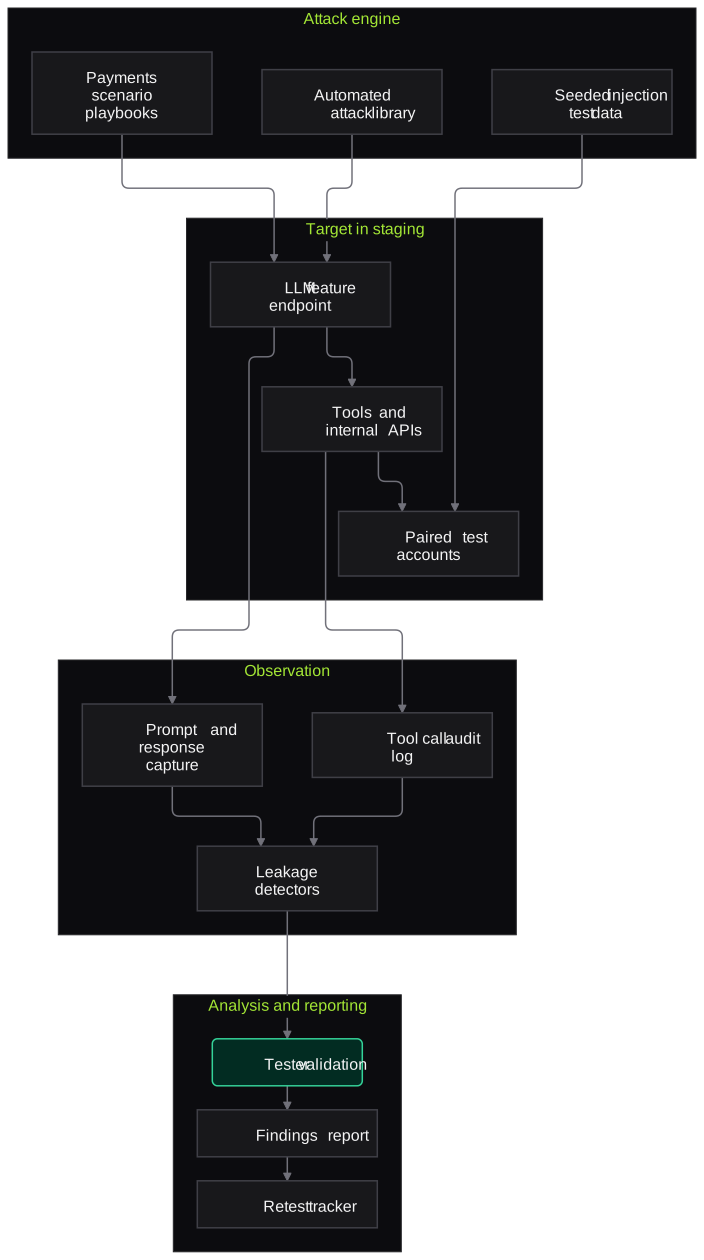
- Attack engine
- Automated prompt attack library
- Payments scenario playbooks
- Seeded indirect-injection test data
- Target in staging
- LLM feature endpoint
- Tools and internal APIs the model calls
- Paired test customer and merchant accounts
- Observation
- Prompt and response capture
- Tool-call audit logging
- Detectors for leaked account identifiers
- Analysis
- Finding reproduction and validation
- Severity rating against OWASP LLM categories
- Reporting
- Evidence report with remediation guidance
- Retest tracker
Inputs and outputs
Inputs
- Staging access to the LLM feature
- Architecture notes: model, prompts, retrieval sources and tools
- Paired test customer and merchant accounts with synthetic data
- Product policy on what the assistant may and may not say
- Rules of engagement and testing window
Outputs
- Threat model and data-flow diagram of the feature
- Findings with prompts, responses, severity and fixes
- Mapping of findings to OWASP Top 10 for LLM Applications
- Executive summary for the risk committee or partner bank
- Retest report showing closed and open issues
Where people stay in control
A human tester reproduces and rates every automated finding before it reaches the report. Your security and engineering leads decide which fixes ship and whether the feature launches.
Integrations
- Staging environment of your app or merchant dashboard
- LLM gateway or provider logs such as Azure OpenAI, OpenAI, Anthropic, Gemini or self-hosted models
- Jira or Linear for findings
- CI pipeline for optional regression tests
- Secrets manager for test credentials
Guardrails
- Testing only in staging or an agreed environment, with synthetic customer data
- Written rules of engagement covering scope, timing and stop conditions
- No real customer data extracted or kept; any accidental exposure reported at once
- Agreed rate limits to avoid cost spikes or provider throttling
- Evidence stored encrypted and deleted after the agreed period
Compliance notes
- Helps you evidence pre-deployment testing of AI systems, in line with the testing and governance recommendations of RBI's FREE-AI framework.
- Findings map to the OWASP Top 10 for LLM Applications and can feed a NIST AI RMF or ISO/IEC 42001 risk register.
A typical pilot
Duration: 2 weeks
One LLM feature, such as an in-app support assistant or a merchant dashboard copilot, tested in staging with one retest after fixes.
Deliverables
- 01Threat model and test plan
- 02Automated and manual test results
- 03Findings report with evidence and remediation guidance
- 04Briefing session for engineering and risk
- 05Retest report
What we measure
- Findings by severity and category
- Validated findings grouped by OWASP LLM category and severity.
- Tool authorisation coverage
- Model-callable tools and APIs tested with cross-account attempts, out of all tools in scope.
- Policy adherence under attack
- Adversarial scenarios where the assistant stayed within your stated policy.
- Closure at retest
- Findings confirmed closed versus still open after remediation.
Built on related work
LLM endpoint security scanner
Security platform (anonymised)
Workflow that scans Azure-hosted and custom HTTP LLM endpoints for prompt injection, jailbreaks and data leakage.
FAQs
01How is this different from our annual penetration test?
A standard pentest checks the web app, APIs and infrastructure. This assessment tests how the model behaves: whether prompts can override instructions, leak data through tools or produce unsafe output. You need both.
02Do you need access to production?
No. We test in staging with synthetic accounts. If staging differs from production in prompts, models or tools, we record that as a limitation in the report.
03Which models and providers do you cover?
Any LLM behind an HTTP endpoint, including Azure OpenAI, OpenAI, Anthropic, Google Gemini and self-hosted open-weight models. The method depends on your feature's design, not the provider.
04Can you test in Hindi and Hinglish?
Yes. Guardrails are often weaker in Indian languages and code-mixed text, so our playbooks include Hindi and Hinglish attacks by default.
Related use cases
- Fintech & Payments
AI Agent Permission and Tool-Use Security Review
Find out what your AI agents can actually do: which tools, credentials and money-moving actions they reach, where approvals sit, and whether injected text can make them misuse tools.
- Fintech & Payments
DPDP-Aligned AI Data Handling Assessment
Map where personal data flows through your AI features, prompts, logs, vector stores and vendors, and get a gap register and evidence pack against DPDP Act duties for your DPO.
- SaaS & AI Product Companies
LLM Application Penetration Test (OWASP LLM Top 10)
A scoped pentest of your LLM feature and the app around it: prompt injection, data disclosure, output handling, excessive agency and system-prompt leakage, with reproducible evidence.
- Banking
Red-Teaming for Bank Chatbots and Voice Agents
Adversarial testing of bank chatbots and voice agents for prompt injection, data leakage, account-takeover social engineering and unsafe advice, in English, Hindi and Hinglish.

Founded by Akhilesh Mittal. 8 years building a security platform for a New Zealand company. IIT ISM Dhanbad and IMT Ghaziabad. Builds production agentic AI.
Pick one queue and test it on your own data
Book a discovery call. We will choose one workflow, such as merchant KYC review or dispute evidence, and scope a short pilot that runs alongside your current process.