LLM Application Penetration Test (OWASP LLM Top 10)
A scoped pentest of your LLM feature and the app around it: prompt injection, data disclosure, output handling, excessive agency and system-prompt leakage, with reproducible evidence.
- Capability:
- AI Security & Compliance
- Industry:
- SaaS & AI Product Companies
Who it is for
- CTO or VP Engineering
- Head of Security or CISO
- AI Product Lead
- Application Security Engineer
The problem
Your product now has a chat assistant, a copilot or an AI search box, built on a hosted model with a system prompt, retrieval and perhaps a few tools. Your annual pentest covered the web app, but nobody has checked whether the model can be made to reveal its instructions, read another customer's data or pass unsafe output to the rest of your stack.
Prompt injection, direct and indirect
Users can type instructions that override the system prompt, and documents, web pages or emails the model reads can carry instructions of their own.
Sensitive data in the wrong answer
Retrieval, conversation history and tool results can expose another user's or tenant's data when access checks sit in the wrong layer.
Model output trusted downstream
Output rendered as HTML or Markdown, passed to a database or another API, or used to trigger actions recreates classic injection risks in a new form.
System prompts treated as secrets
System prompts often hold business rules, internal URLs or keys, and anything in a prompt should be assumed recoverable.
What we build
We run a scoped penetration test of your LLM feature and the application around it. Testing combines manual work by an experienced tester with automated probe sets run against your endpoint, so coverage is broad and the important findings are verified by hand. We test each OWASP Top 10 for LLM Applications category that applies, from prompt injection and sensitive information disclosure to improper output handling, excessive agency, system prompt leakage, vector and embedding weaknesses and unbounded consumption. We also test the surrounding authentication, authorisation and API layer. Every finding includes a reproducible transcript or request, a severity rating, a MITRE ATLAS mapping where relevant and a specific fix. A retest confirms remediation.
- Threat model of the LLM feature: data flows, trust boundaries, tools and retrieval sources
- Direct and indirect prompt injection testing, including content placed in retrieved documents
- Data disclosure tests across users, roles and tenants
- Output handling tests where model output reaches browsers, databases or other services
- System prompt leakage and secrets exposure checks
- Findings mapped to OWASP LLM Top 10 and MITRE ATLAS, with a retest
How it works
- 01Agree scope and rulesWe agree the feature, environments, test accounts, rate limits and stop conditions in writing.
- 02Threat modelWe map data flows, trust boundaries, retrieval sources, tools and every place model output goes.
- 03Automated probingProbe sets for each relevant OWASP LLM category run against your endpoint, and every exchange is logged.
- 04Manual testingA tester works through the feature by hand, chaining weaknesses and testing business context that automation misses.
- 05Verify and rateEach candidate issue is reproduced, false positives are removed, and severity is agreed against real impact.
- 06Report and retestYou receive findings with evidence and fixes, and we retest after remediation.

Architecture
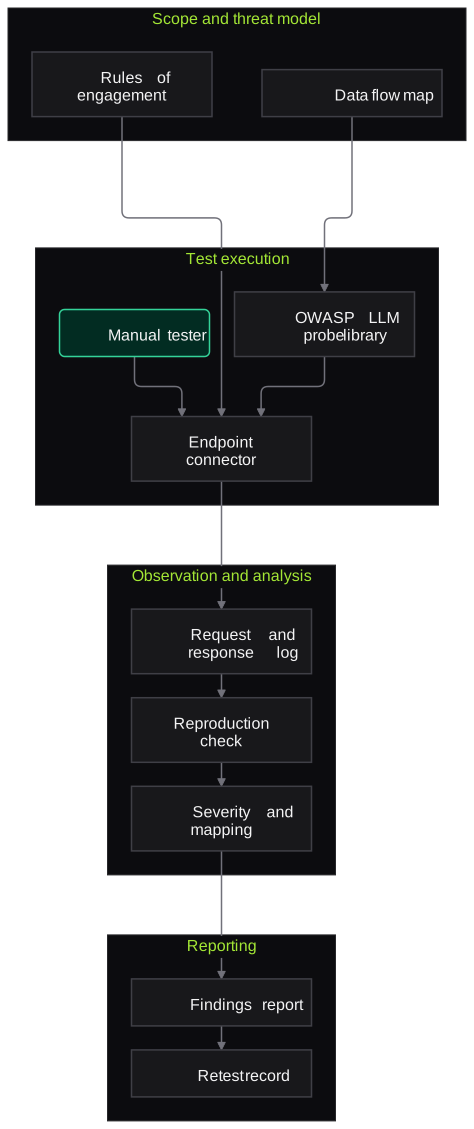
- Scope and threat model
- Rules of engagement and test accounts
- Data flow and trust boundary map
- Test execution
- Endpoint connector for chat API or UI
- OWASP LLM probe library
- Manual tester workspace
- Observation
- Full request and response logging
- Token and cost tracking for consumption tests
- Analysis
- Reproduction and false-positive check
- Severity rating with impact notes
- OWASP LLM and MITRE ATLAS mapping
- Reporting
- Findings report with transcripts
- Retest record
Inputs and outputs
Inputs
- Access to the LLM feature in staging, with test accounts per role and tenant
- Architecture notes: model provider, system prompt, retrieval sources and tools
- API documentation or OpenAPI spec
- Business rules the assistant must follow
- Previous pentest reports, if any
Outputs
- Threat model of the LLM feature
- Findings with reproducible transcripts or requests
- Severity ratings with OWASP LLM and MITRE ATLAS mapping
- Specific remediation guidance
- Retest results
Where people stay in control
An experienced tester verifies every finding by hand before it reaches the report and agrees severity with your team. Automated probes widen coverage but never decide severity on their own.
Integrations
- Your LLM gateway or chat API, on OpenAI, Azure OpenAI, Anthropic, Bedrock or self-hosted models
- Staging environment with test tenants
- Issue tracker such as Jira or Linear
- Observability tools such as Langfuse or LangSmith, read-only
- Secrets manager for test credentials
Guardrails
- Written rules of engagement with stop conditions
- Test accounts and test tenants only, with no access to real customer data
- Rate limits agreed to protect cost and availability
- Evidence stored encrypted and deleted after an agreed period
- No destructive actions without explicit approval
Compliance notes
- Findings are mapped to the OWASP Top 10 for LLM Applications and MITRE ATLAS, which many enterprise buyers ask for.
- Test records can feed risk management evidence under NIST AI RMF and ISO/IEC 42001.
A typical pilot
Duration: 2 to 3 weeks
One LLM feature, such as an in-app assistant with retrieval, plus its supporting API, tested in staging.
Deliverables
- 01Rules of engagement and threat model
- 02Findings report with evidence
- 03Executive summary for leadership and customers
- 04Remediation guidance
- 05Retest after fixes
What we measure
- Coverage of applicable OWASP LLM categories
- Categories tested against those in scope, recorded in the report.
- Verified findings by severity
- Count of reproduced findings at each severity after false positives are removed.
- Time to remediate
- Days between report and passing retest, per finding.
- Retest outcome
- Share of findings confirmed fixed at retest.
Built on related work
LLM endpoint security scanner
Security platform (anonymised)
Workflow that scans Azure-hosted and custom HTTP LLM endpoints for prompt injection, jailbreaks and data leakage.
FAQs
01Do you test the model provider itself?
No. We test your application: how you use the model, your prompts, retrieval, tools and output handling. Provider-side behaviour is noted where it affects you, but the scope is your product.
02Is automated scanning enough?
Automated probes are good for breadth and regression, but the most serious LLM findings usually come from chaining small weaknesses in your specific business context. That needs a human tester.
03Can findings be shared with our customers?
Yes. We provide a full technical report for your team and a shorter summary you can share with customers under NDA.
04How long does it take?
A typical single-feature test takes two to three weeks including reporting. Larger scopes with agents, many tools or several tenants take longer, and we agree that before starting.
Related use cases
- SaaS & AI Product Companies
AI Agent Red-Teaming (Tool Misuse and Goal Hijack)
Red-team your AI agents for goal hijacking, tool misuse, excessive agency, privilege abuse and memory poisoning, in a sandbox that records every tool call and decision.
- SaaS & AI Product Companies
RAG Data-Leakage and Access-Control Testing
Test whether your RAG pipeline leaks documents across users, roles or tenants through retrieval, caching, citations or logs, using seeded canary documents and role-based test personas.
- SaaS & AI Product Companies
Continuous AI Security Regression in CI
Run versioned prompt-injection, jailbreak and data-leakage suites in CI on every prompt, model, tool or index change, and block releases that regress past agreed severity thresholds.
- Fintech & Payments
Pre-Launch Security Assessment for LLM Features
Test a new chatbot, copilot or LLM feature for prompt injection, cross-customer data leakage, off-policy answers and unsafe output handling before release, with evidence and a retest.

Founded by Akhilesh Mittal. 8 years building a security platform for a New Zealand company. IIT ISM Dhanbad and IMT Ghaziabad. Builds production agentic AI.
Scope a first test on one AI feature
Pick the LLM feature, agent or voice bot that worries you most. We will agree a short written scope and show you verified findings with evidence.