Research Report Summarisation and Data Extraction
Extract ratings, targets, estimates and guidance from broker research and company filings, with cited summaries and revision alerts for your analysts' internal use.
- Capability:
- Document Intelligence
- Industry:
- Capital Markets & Wealth Management
Who it is for
- Head of Research
- Equity or Credit Analyst
- Fund Manager
- Research Data Lead
The problem
During results season, a buy-side team receives broker updates, exchange filings, investor presentations and earnings call transcripts for every company it covers, often within the same few days. Analysts need the numbers and the changes, such as revised estimates, new guidance and rating moves, not another stack of PDFs.
Estimates live inside PDFs
Target prices, ratings and forward estimates sit in tables in each broker's format, and someone has to key them into a tracking sheet.
Changes are what matter
Spotting that a broker cut its estimates or that management softened guidance means comparing with the previous report by hand.
Generic summaries are not trusted
Summaries without page references cannot be checked quickly, so analysts reread the source anyway.
Licensing and information barriers
Broker research is licensed to named users, and some documents must stay within restricted groups.
What we build
We build a research extraction pipeline for your internal research process. It collects broker reports from your research inbox and filings from the exchanges, parses text and tables, and extracts ratings, target prices, estimates, key financials and management guidance into a structured table per company and broker. Each extracted value is checked against the source table, and each summary statement cites its page. The pipeline compares every report with the previous one from the same source and raises alerts on revisions. Analysts can query the archive and get cited answers, with access respecting research licences and restricted groups. Investment views remain with your analysts.
- Collects broker reports from the research inbox, and results filings, transcripts and presentations from exchange and company sources
- Extracts ratings, target prices, forward estimates and key financial tables into a structured dataset
- Writes short summaries in which every statement cites its page
- Compares each report with the previous one from the same broker and flags revisions
- Answers analyst questions across the archive with citations, or says the answer was not found
- Applies entitlement-aware access for licensed research and restricted document groups
How it works
- 01Collect reports and filingsBroker research, filings, transcripts and presentations are gathered and tagged by company, source and date.
- 02Parse text and tablesDocuments are parsed with layout preserved, including tables and chart labels.
- 03Extract and compareRatings, targets, estimates and guidance are extracted and compared with the previous report from the same source.
- 04Validate numbers and citationsEach value is checked against its source cell; uncertain values and citations go to the research data team.
- 05Summarise and alertCited summaries and revision alerts are published to the research database and analyst channels.
- 06Query the archiveAnalysts ask questions across the corpus and get answers with page references.

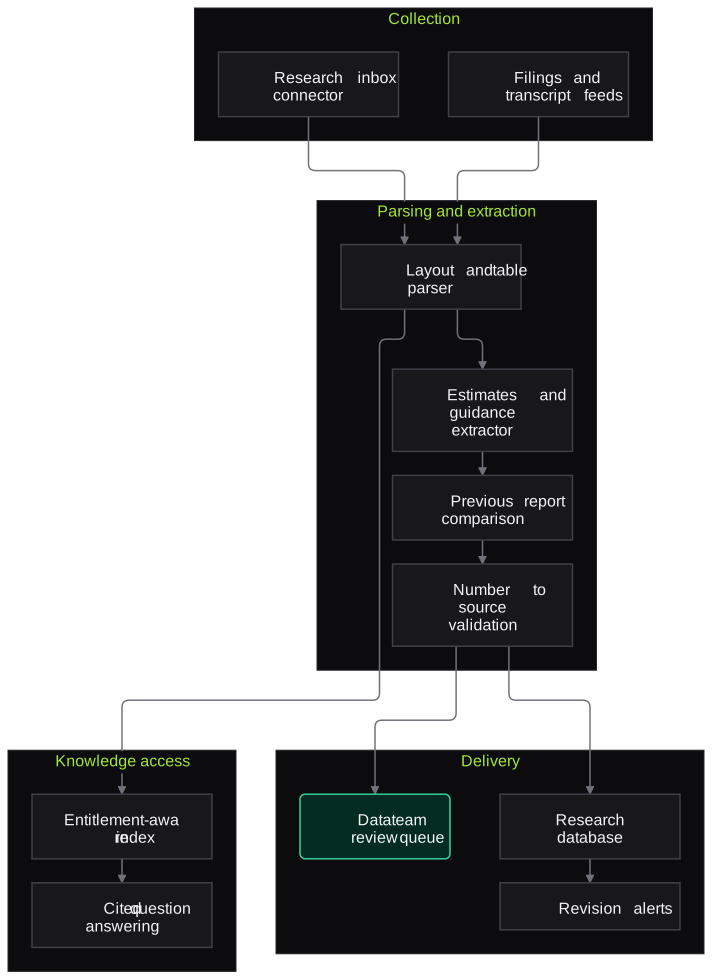
Architecture
- Collection
- Research inbox connector
- Exchange filings and transcript feeds
- Company, source and date tagging
- Parsing
- Layout-aware PDF parser
- Table and chart label extraction
- Extraction and comparison
- LLM extractor for ratings, targets and estimates
- Previous-report comparison
- Number-to-source validation
- Knowledge access
- Entitlement-aware search index
- Cited question answering
- Delivery
- Research database or Excel export
- Revision alerts to Teams or Slack
- Data team review queue
Inputs and outputs
Inputs
- Broker research reports in PDF
- Quarterly results and annual report filings
- Earnings call transcripts and investor presentations
- Credit rating rationales
- Your coverage universe and estimate tracking template
Outputs
- Structured estimates and ratings table by company and broker
- Cited summaries for each report
- Revision alerts for estimates, targets and guidance
- Cross-broker comparison view for internal use
- Searchable, entitlement-aware research archive
Where people stay in control
Analysts review flagged extractions and own every investment view and model change. Summaries and tables are internal working material and are never sent to clients as recommendations.
Integrations
- Research mailbox on Microsoft 365 or Google Workspace
- Exchange filings and announcements feeds
- Research management system or CRM
- Excel models and data warehouse
- Microsoft Teams or Slack for alerts
Guardrails
- Every number must match a source table cell or it is flagged
- Every summary statement carries a page citation
- No buy, sell or hold views generated by the system
- Access follows research licences and restricted-group rules
- Restricted documents isolated from general search
Compliance notes
- Outputs are internal research aids; any research distributed to clients must go through your SEBI Research Analyst process and disclosures.
- Access controls respect broker research licensing and internal information barriers.
A typical pilot
Duration: 3 weeks
One sector in your coverage, such as private banks, using the broker reports and filings from the most recent results season.
Deliverables
- 01Extraction schema matched to your estimate template
- 02Working pipeline on the pilot sector
- 03Revision alert feed
- 04Accuracy report against analyst-maintained data
- 05Production plan for full coverage
What we measure
- Estimate and target extraction accuracy
- Compared with the analyst-maintained tracking sheet for the same reports.
- Citation correctness
- Share of sampled summary statements whose cited page supports them.
- Analyst time to digest a results batch
- Timed on a sample of companies with and without the pipeline.
- Useful revision alerts
- Analyst rating of each alert as useful, duplicate or wrong.
FAQs
01How do you stop it making up numbers?
Every extracted number is checked against the table cell it came from, and values that cannot be matched are flagged instead of published. Summaries must cite a page for each statement.
02Can it read tables and charts?
Tables, yes, including multi-page and footnoted ones. For charts it reads titles, axis labels and data labels where present, but it does not estimate values from bar heights.
03Will it give buy or sell calls?
No. It extracts what brokers and companies have said and highlights changes. Investment views remain with your analysts and fund managers.
04How is broker research licensing handled?
Access to each document follows the entitlements you hold, so a report licensed to named users is only visible to them, including in search and question answering.
Related use cases
- Capital Markets & Wealth Management
ESG and BRSR Report Data Extraction
Extract BRSR and sustainability report indicators into a cited, unit-normalised dataset, compare years and flag gaps, inconsistencies and assurance status for ESG analysts.
- Capital Markets & Wealth Management
Data-Leakage Testing for Internal Research Copilots
Test internal research and RM copilots for leakage across information barriers, research entitlements and client data, including prompt injection through ingested documents.
- Capital Markets & Wealth Management
Private Markets Fund Document Extraction
Read capital calls, distribution notices, capital account statements and LPAs from many GPs into structured records, with roll-forward checks and wire-instruction change alerts.
- Accounting, Audit & Consulting
Financial Statement Spreading
Read audited financials, notes and schedules in Schedule III, Ind AS or IFRS layouts and map every line into your spreading template or CMA format, each figure traced to its page.

Founded by Akhilesh Mittal. 8 years building a security platform for a New Zealand company. IIT ISM Dhanbad and IMT Ghaziabad. Builds production agentic AI.
Start with one statement type, queue or chatbot
Book a discovery call and we will scope a short pilot on your de-identified documents or staging systems, with measures agreed before we start.