TDS and ITR Document Extraction for Tax Practices
Read Form 16, 26AS, AIS, capital gains statements and investment proofs, reconcile TDS and reported income, and hand preparers a draft computation with every mismatch flagged.
- Capability:
- Document Intelligence
- Industry:
- Accounting, Audit & Consulting
Who it is for
- Partner, Tax Practice
- ITR Preparation Team Lead
- TDS Compliance Manager
- Family Office Tax Adviser
The problem
In the weeks before the July filing deadline, a tax practice receives client folders full of Form 16s, 26AS and AIS downloads, broker capital gains statements, mutual fund consolidated account statements and investment proofs. Preparers re-key figures into the computation, and mismatches between what the employer deducted, what 26AS shows and what AIS reports surface late, sometimes only after filing as a processing intimation or notice.
Many document types per client
Form 16 Part A and B, Form 16A, 26AS, AIS, TIS, broker reports, CAS, interest certificates and rent receipts all arrive in different layouts.
TDS and income mismatches
TDS on a Form 16 that is missing from 26AS, or interest and dividends in AIS that the client never mentioned, are found late.
Capital gains detail is tedious
Scrip-wise transactions, holding periods and asset classes from different brokers and fund houses take hours to assemble.
Season crunch hurts review
Juniors prepare under pressure and partners review at the end, when there is little time to chase a missing certificate.
What we build
We build an extraction and reconciliation assistant for tax season. Clients or staff upload the folder, and the system classifies each document, extracts the figures a computation needs and reconciles them: salary and TDS in Form 16 against 26AS by TAN and section, interest and dividends in AIS against bank and company certificates, and capital gains from broker and mutual fund statements by asset class and holding period. The output is a pre-filled working in your computation format, with each figure linked to its source and a mismatch list the preparer must clear. The preparer and reviewing partner make every tax position, and the assistant never files a return.
- Classifies and reads Form 16 Part A and B, Form 16A, 26AS, AIS and TIS downloads
- Extracts broker capital gains reports and mutual fund CAS into transaction lists with holding periods
- Reconciles TDS by deductor TAN and section between certificates and 26AS
- Highlights AIS entries not reflected in the client's documents, such as interest, dividends or high-value transactions
- Builds a draft income computation and, on request, an old and new regime comparison for the preparer
- Produces a missing-document checklist per client for the collection workflow
How it works
- 01Receive the client folderDocuments arrive through the client portal, WhatsApp or staff upload and are grouped by PAN and assessment year.
- 02Classify and extractEach document is identified and its figures and transactions are extracted with source links.
- 03Reconcile TDS and AISTDS is matched by TAN and section, and AIS entries are compared with the client's own documents.
- 04Resolve mismatchesMismatches and low-confidence figures go to the preparer, who confirms them with the client.
- 05Draft the computationA computation working is built in the firm's format, with every figure traceable.
- 06Partner reviewThe reviewing partner checks the computation and positions before the return is filed through your usual software.

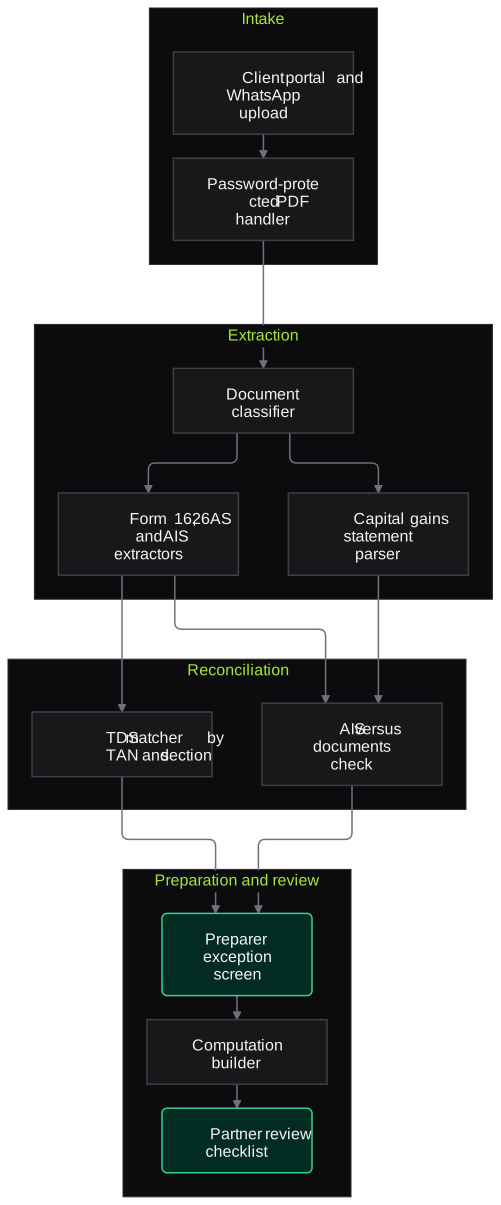
Architecture
- Intake
- Client portal and WhatsApp upload
- Practice folder sync
- Password-protected PDF handling
- Extraction
- Document classifier
- Form 16, 26AS and AIS extractors
- Capital gains and CAS parser
- Reconciliation
- TDS matcher by TAN and section
- AIS against documents comparator
- Capital gains classifier by asset class and holding period
- Preparation and review
- Computation builder in the firm's template
- Preparer exception screen
- Partner review checklist
- Audit
- Source links for every figure
- Version log of preparer and partner changes
Inputs and outputs
Inputs
- Form 16 Part A and B and Form 16A
- Form 26AS, AIS and TIS
- Broker capital gains statements and mutual fund CAS
- Bank interest and home loan interest certificates
- Investment and deduction proofs such as 80C and 80D receipts and rent receipts
- Prior-year return and computation
Outputs
- Structured tax data per client and assessment year
- TDS reconciliation by TAN and section
- AIS mismatch list
- Draft computation of income
- Missing-document list per client
Where people stay in control
Preparers clear every mismatch and confirm low-confidence figures with the client. The reviewing partner approves the computation and the choice of tax regime before the return is filed on the income-tax portal or through the firm's filing software.
Integrations
- Tax computation and filing software used by the practice (Excel or JSON import)
- Income-tax portal downloads for 26AS and AIS
- Client portal or WhatsApp Business API
- Google Drive, OneDrive or the practice's document store
Guardrails
- PAN masked in logs, and Aadhaar handled per UIDAI rules with only masked numbers kept
- Document passwords used to open files and never stored
- Every figure linked to its source page
- No filing or submission by the system
- Client data segregated by PAN and engagement
Compliance notes
- Client PAN, income and bank data are personal data; processing is designed to support DPDP Act 2023 consent, purpose limitation and retention requirements.
- Tax positions and return filing remain the responsibility of the taxpayer and the signing professional.
A typical pilot
Duration: 3 weeks
A sample of salaried and capital gains clients from last season's completed returns, comparing system drafts with the filed computations.
Deliverables
- 01Extraction schemas for the pilot document types
- 02Working pipeline with TDS and AIS reconciliation
- 03Draft computations in your format
- 04Accuracy report against filed computations
- 05Roll-out plan for the next season
What we measure
- Figure extraction accuracy
- Extracted values compared with the figures in last season's filed computations.
- Mismatches caught
- TDS and AIS differences flagged, as validated by preparers.
- Preparer time per client
- Hands-on time to a reviewable draft, compared with the previous season.
- Missing-document identification
- Documents flagged as missing compared with what preparers eventually had to chase.
FAQs
01Can it read password-protected Form 16s and statements?
Yes, when the client or preparer supplies the password, which for many documents follows a pattern based on PAN or date of birth. Passwords are used only to open the file and are not stored.
02Does it handle capital gains from shares and mutual funds?
Yes. It reads broker capital gains reports and mutual fund consolidated account statements into transaction lists with acquisition and sale dates, so holding periods and asset classes can be checked. Complex items such as ESOPs, foreign assets or business income are extracted for the preparer rather than computed by default.
03Will it file the return?
No. It prepares data and a draft computation. The preparer and partner review, choose positions and file through your usual software or the income-tax portal.
04Can clients upload documents on WhatsApp?
Yes, through the firm's WhatsApp Business number or a client portal. Documents land in the client's folder in your storage, not on staff phones.
Related use cases
- Accounting, Audit & Consulting
Client Document Collection and Follow-Up Agent
A WhatsApp and email agent that sends each client their pending-document list, recognises what they upload, follows up on schedule and shows the team exactly what is still missing.
- Accounting, Audit & Consulting
GST Return Reconciliation (GSTR-2B vs Books)
Match GSTR-2B and 2A data against the purchase register invoice by invoice, find ITC at risk before GSTR-3B is filed, and draft supplier follow-ups for approval.
- Accounting, Audit & Consulting
Bank and Ledger Reconciliation
Match bank statements in any format against the cash book or ledger, explain unmatched items and produce a BRS the reviewer can tick through, with ambiguous matches held for a person.

Founded by Akhilesh Mittal. 8 years building a security platform for a New Zealand company. IIT ISM Dhanbad and IMT Ghaziabad. Builds production agentic AI.
Start with one engagement
Pick one reconciliation, one audit area or one tax-season workflow. We will scope a short pilot on your own documents and show the results against work your team has already done.