Client Document Collection and Follow-Up Agent
A WhatsApp and email agent that sends each client their pending-document list, recognises what they upload, follows up on schedule and shows the team exactly what is still missing.
- Industry:
- Accounting, Audit & Consulting
Who it is for
- Practice Manager
- Audit Manager
- Client Service Lead, Outsourced Accounting
- Partner, Tax Practice
The problem
Many delays in a CA practice come from waiting for the client. PBC lists for audits, monthly purchase bills for GST, bank statements for bookkeeping and Form 16s for ITR are requested by email, then chased by phone and WhatsApp from staff members' personal numbers, with no single view of what has arrived.
Chasing eats staff time
Seniors and articled assistants spend hours each week sending the same reminders and checking inboxes for replies.
Clients send the wrong thing
Wrong period, wrong entity, half-page photos and password-protected PDFs without the password all need another round.
No status view
Partners learn which client is blocking which engagement only when a deadline is close.
History on personal phones
When an article leaves, the client conversation and documents on their WhatsApp leave with them.
What we build
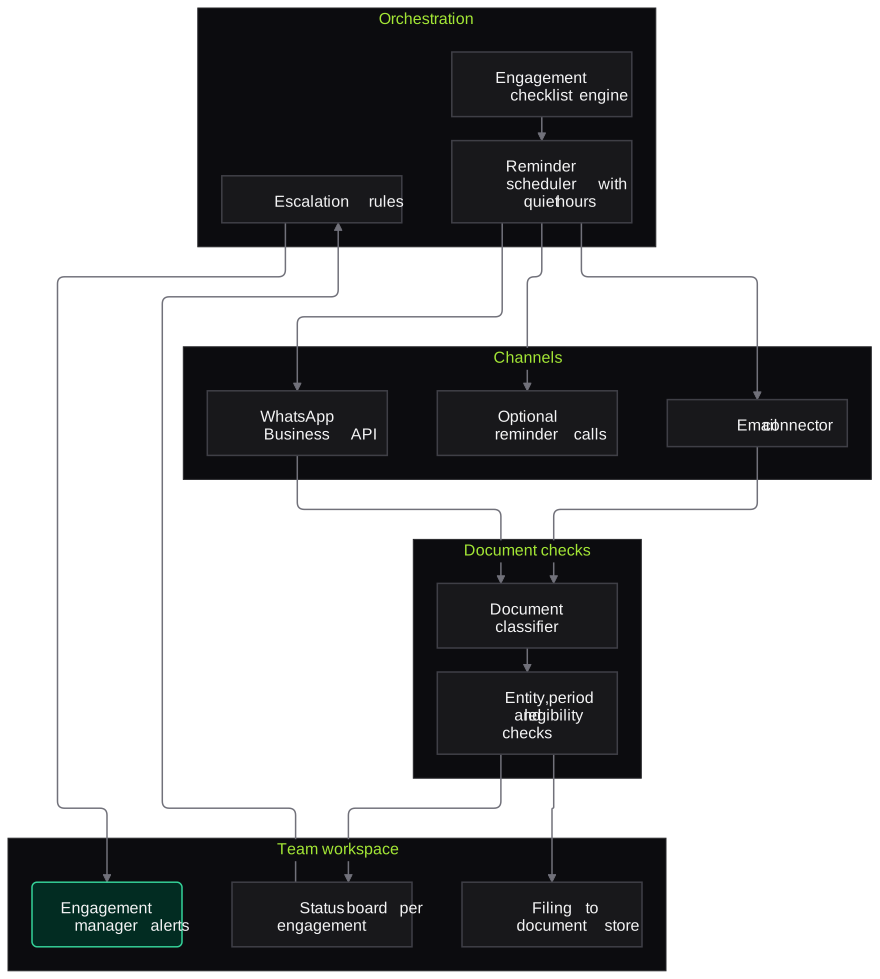
We build a collection agent that works from the checklist for each engagement, such as the audit PBC list, the monthly GST and bookkeeping set or the ITR document list, and runs follow-ups on the firm's WhatsApp Business number and email. Each client contact gets a short message listing exactly what is pending, in English or Hindi. When documents arrive, the agent classifies them, checks the basics, such as entity, period, legibility and password, and ticks them off or asks for a correction. Reminders follow a schedule the partner sets, escalating to the engagement manager as a deadline nears. The team sees one status board per engagement.
- Engagement checklists for audit PBC, monthly GST and bookkeeping, TDS and ITR seasons
- WhatsApp Business and email messaging from the firm's number, in English and Hindi
- Document recognition and basic checks for type, entity, period, legibility and password
- Scheduled reminders with quiet hours and escalation rules set by the partner
- Optional reminder call by a voice agent for clients who do not respond to messages
- Status board per client and engagement, with files saved to the right folder
How it works
- 01Load the checklistThe engagement checklist, client contacts, preferred language and deadlines are set up.
- 02Send the pending listEach contact receives an approved message listing exactly what is outstanding.
- 03Receive and check documentsUploads are classified and checked for entity, period, legibility and password.
- 04Ask for correctionsDocuments that fail a check trigger a specific request back to the client.
- 05Remind and escalateReminders continue on the partner's schedule, and items still pending near a deadline go to the engagement manager.
- 06Update the status boardAccepted documents are filed and the board shows what is complete and what is blocking work.

Architecture
- Channels
- WhatsApp Business API
- Email connector
- Optional outbound reminder calls
- Orchestration
- Checklist engine per engagement
- Reminder scheduler with quiet hours
- Escalation rules
- Document checks
- Document classifier
- Entity, period, legibility and password checks
- Team workspace
- Status board per engagement
- Filing to the firm's document store
- Log of messages and receipts
Inputs and outputs
Inputs
- Engagement checklists such as PBC, GST and ITR lists
- Client contacts and preferred language
- Statutory and engagement deadlines
- Documents uploaded by clients
- Message templates approved by the partner
Outputs
- Pending list per client and engagement
- Documents filed in the correct folders
- Status board across engagements
- Escalation alerts for the engagement manager
- Log of messages sent and documents received
Where people stay in control
Partners approve message templates, reminder frequency and escalation rules before anything is sent. Any client reply that is not a document, such as a question, a complaint or a fee discussion, is handed to the assigned staff member instead of being answered by the agent.
Integrations
- WhatsApp Business API (Meta Cloud API)
- Gmail or Outlook
- Practice management software
- Google Drive, OneDrive or the firm's document management system
- Calendar for deadlines
Guardrails
- Only partner-approved templates for business-initiated messages
- Opt-outs honoured immediately
- Quiet hours and reminder caps per client
- The agent never gives tax advice or discusses fees
- Documents stored in firm storage, not on personal phones
Compliance notes
- Business-initiated WhatsApp messages use approved templates and require the client's opt-in under Meta's platform policies.
- Client documents contain personal data; storage and retention are designed to support DPDP Act 2023 obligations.
A typical pilot
Duration: 3 weeks
One engagement type, such as monthly GST document collection, for a group of willing clients on the firm's WhatsApp Business number.
Deliverables
- 01Checklist and template set for the pilot engagement type
- 02Working agent on WhatsApp and email
- 03Status board for the pilot clients
- 04Pilot report with client and staff feedback
- 05Roll-out plan and cost estimate
What we measure
- Time to a complete document set
- Days from first request to all items received, compared with recent periods.
- Reminders per complete set
- Messages sent before each client's set was complete.
- First-check rejections
- Uploads rejected at the first check, by reason, to tune instructions to clients.
- Staff time on follow-ups
- Time logged by staff on chasing, before and during the pilot.
FAQs
01Will clients find automated reminders annoying?
The partner sets the cadence, quiet hours and tone, and each message lists exactly what is pending rather than sending generic nudges. Clients can reply to reach a person at any time, and opt-outs are respected.
02Can we use our existing WhatsApp number?
A number used on the regular WhatsApp app has to be moved to the WhatsApp Business Platform, or you can register a new number for the firm. We help with the template approvals Meta requires.
03Which languages does it use?
English and Hindi by default, with templates in other languages if your clients prefer. Each template is approved by the partner before use.
04What happens if a client asks a tax question?
The agent does not answer it. Any message that is not a document upload is passed to the assigned staff member with the conversation history.
Related use cases
- Accounting, Audit & Consulting
TDS and ITR Document Extraction for Tax Practices
Read Form 16, 26AS, AIS, capital gains statements and investment proofs, reconcile TDS and reported income, and hand preparers a draft computation with every mismatch flagged.
- Accounting, Audit & Consulting
Audit Sampling and Vouching from Invoices
Select samples from the ledger, pull invoices, GRNs and payment proofs, and check each voucher against the entry, with every exception sent to the audit senior.
- Accounting, Audit & Consulting
GST Return Reconciliation (GSTR-2B vs Books)
Match GSTR-2B and 2A data against the purchase register invoice by invoice, find ITC at risk before GSTR-3B is filed, and draft supplier follow-ups for approval.

Founded by Akhilesh Mittal. 8 years building a security platform for a New Zealand company. IIT ISM Dhanbad and IMT Ghaziabad. Builds production agentic AI.
Start with one engagement
Pick one reconciliation, one audit area or one tax-season workflow. We will scope a short pilot on your own documents and show the results against work your team has already done.