Forensic Review of Expense Claims
Review every expense claim, not a sample: read the receipts, check them against travel, leave and policy data, and rank suspicious patterns for forensic investigators.
- Capability:
- Document Intelligence
- Industry:
- Accounting, Audit & Consulting
Who it is for
- Forensic Services Partner
- Head of Internal Audit
- Chief Financial Officer
- Ethics and Compliance Officer
The problem
Travel and expense fraud rarely shows up in a single claim. It shows up as the same hotel bill submitted by two employees, restaurant bills produced from online templates, claims split to stay under an approval limit, or fuel bills on days the employee was on leave. Forensic and internal audit teams usually test a sample, because opening every receipt across a year of claims is not practical by hand.
Sampling misses patterns
The signal often lies in relationships across claims and employees, which a sample of individual claims cannot reveal.
The system holds what was typed
Expense tools store the amounts and dates employees entered, not what the receipt actually says.
Fabricated and altered receipts
Template-generated bills, edited dates and amounts, and the same image reused across months look normal one at a time.
Findings must stand up
Every indicator raised against an employee needs clear evidence, careful wording and a trail that survives challenge.
What we build
We build a forensic review pipeline that ingests a period's expense claims from the expense or ERP system together with the receipt images and PDFs. It reads each receipt independently of what the employee typed, then runs tests across the full population: duplicate and near-duplicate receipts across employees, signs of edited amounts or dates, vendor invoice numbers out of sequence, invalid GSTINs, claims on leave days or outside travel dates, splits below approval limits, and policy breaches by grade and city. Each claim gets a list of triggered tests with the evidence behind them. Investigators work a ranked queue, and the system never labels anyone as having committed fraud.
- Reads receipts, hotel folios, cab and fuel bills, and compares them with the claimed values
- Near-duplicate detection using image similarity and extracted fields across employees and periods
- Alteration indicators such as inconsistent totals, edited dates and repeated bill templates
- Cross-checks with travel bookings, leave and attendance records, and policy limits by grade and city
- Pattern tests for split claims under approval limits, round-sum amounts and holiday claims
- Ranked case queue with an evidence pack for each flagged claim
How it works
- 01Extract claims and receiptsClaims, line items and receipt files for the review period are exported from the expense or ERP system.
- 02Read receipts independentlyOCR and an LLM read each receipt so its values can be compared with what was claimed.
- 03Join reference dataLeave, attendance, travel bookings, corporate card data and policy limits are linked to each claim.
- 04Run forensic testsDuplicate, alteration, policy and pattern tests run across the whole population.
- 05Investigate ranked casesClaims above the risk threshold go to investigators, who decide what to examine and what any finding is.
- 06Assemble evidenceConfirmed findings get an evidence pack for the investigation report; cleared claims keep their test results.

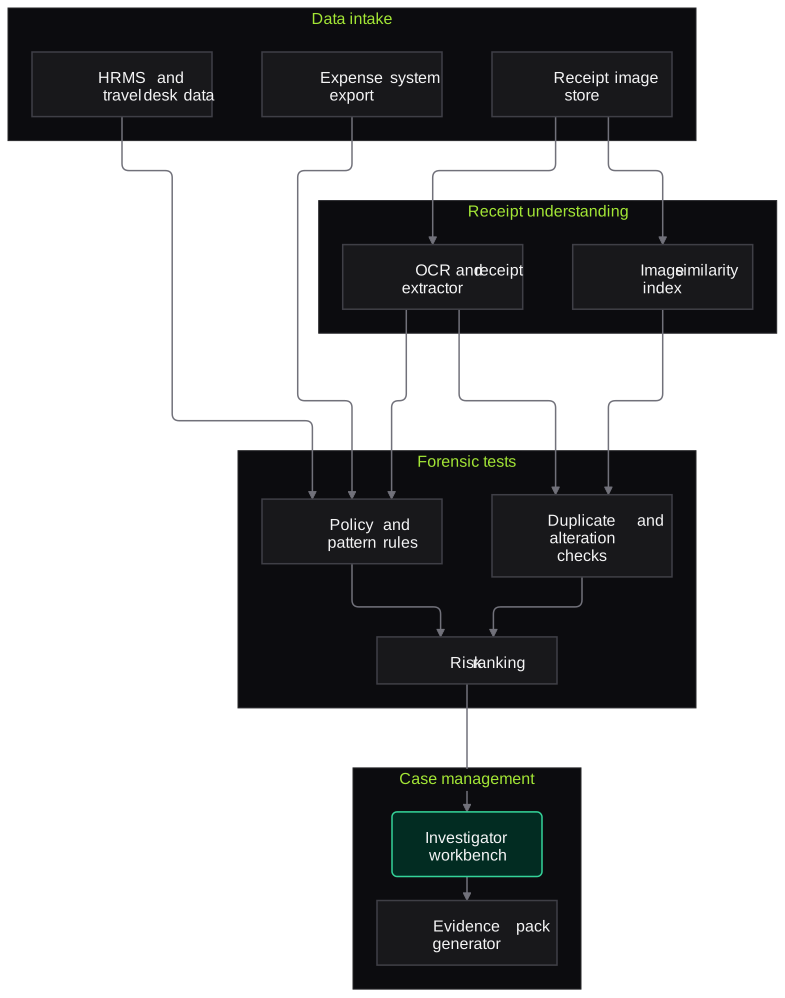
Architecture
- Data intake
- Expense system export
- Receipt image store
- HRMS leave and attendance data
- Travel desk and corporate card data
- Receipt understanding
- OCR and receipt field extractor
- Image similarity index
- Forensic tests
- Duplicate and near-duplicate detector
- Alteration indicator checks
- Policy and pattern rule engine
- Case management
- Risk ranking
- Investigator workbench
- Evidence pack generator
Inputs and outputs
Inputs
- Expense claim export with line items
- Receipt images and PDFs
- Travel policy and approval matrix
- HRMS leave and attendance records
- Travel desk bookings and corporate card transactions
- Vendor master
Outputs
- Ranked case list
- Triggered tests and evidence for each flagged claim
- Duplicate clusters across employees and periods
- Policy breach summary by department and grade
- Evidence packs for the investigation report
Where people stay in control
Investigators decide which cases to pursue and what any finding is. Employee interviews, conclusions and any disciplinary step remain with the forensic team, HR and management; system outputs are leads, not findings.
Integrations
- SAP Concur, Zoho Expense or ERP travel and expense modules
- HRMS such as SAP SuccessFactors, Darwinbox or Keka
- Corporate card and travel desk data feeds
- Case management tool or the firm's investigation workbooks
Guardrails
- Outputs describe indicators, never fraud or guilt
- Access limited to named investigators on a need-to-know basis
- Every test result reproducible from stored inputs
- Only the fields needed for the tests are processed
- No automatic action against any employee
Compliance notes
- Employee personal data is processed for a defined investigation purpose, designed to support DPDP Act 2023 obligations on purpose limitation and security safeguards.
- Evidence handling follows the firm's chain-of-custody approach for forensic engagements.
A typical pilot
Duration: 4 weeks
One quarter of claims for one business unit, run alongside or after a manual review so the results can be compared.
Deliverables
- 01Test library configured to the client's policy
- 02Ranked case list for the pilot period
- 03Investigator workbench with evidence packs
- 04Comparison with the manual review
- 05Roll-out plan and cost estimate
What we measure
- Receipt extraction accuracy
- Extracted values compared with a manually verified sample of receipts.
- Investigator agreement
- Share of flagged cases investigators judged worth examining.
- Patterns missed by sampling
- Confirmed issues found outside the manual review sample.
- Investigator time per case
- Time from opening a case to a decision, with the evidence pack compared with manual assembly.
FAQs
01Will the system accuse employees of fraud?
No. It reports indicators, such as a duplicate receipt or a claim on a leave day, with the evidence behind each one. Investigators decide what to examine and what any finding is, and many indicators turn out to have innocent explanations.
02Can it detect receipts made with online bill generators?
It looks for signs associated with them, such as repeated templates, inconsistent tax details or invalid GSTINs, and flags them for review. These are indicators, not proof, and the investigator confirms them with the vendor or other evidence.
03Which expense systems does it work with?
Exports from SAP Concur, Zoho Expense, ERP travel and expense modules or in-house tools, plus the receipt images they store. HR and travel desk data is joined through exports agreed with the client.
04How is confidentiality maintained during an investigation?
Processing runs in an isolated environment for the engagement, access is limited to named investigators, and every action is logged. Data is retained or deleted according to the engagement terms.
Related use cases
- Accounting, Audit & Consulting
Audit Sampling and Vouching from Invoices
Select samples from the ledger, pull invoices, GRNs and payment proofs, and check each voucher against the entry, with every exception sent to the audit senior.
- Insurance
Tampered and Fraudulent Document Detection
Score claim documents for signs of editing, fabrication and reuse, explain each signal, and route high-risk files to your investigation team instead of labelling anyone a fraudster.
- Accounting, Audit & Consulting
GST Return Reconciliation (GSTR-2B vs Books)
Match GSTR-2B and 2A data against the purchase register invoice by invoice, find ITC at risk before GSTR-3B is filed, and draft supplier follow-ups for approval.
- Accounting, Audit & Consulting
Bank and Ledger Reconciliation
Match bank statements in any format against the cash book or ledger, explain unmatched items and produce a BRS the reviewer can tick through, with ambiguous matches held for a person.

Founded by Akhilesh Mittal. 8 years building a security platform for a New Zealand company. IIT ISM Dhanbad and IMT Ghaziabad. Builds production agentic AI.
Start with one engagement
Pick one reconciliation, one audit area or one tax-season workflow. We will scope a short pilot on your own documents and show the results against work your team has already done.