Outbound SDR Research and Personalisation Agent
An agent that researches target accounts from public sources, writes cited account briefs and draft first lines for SDRs, and syncs to your CRM, with a person approving every message.
- Capability:
- AI Sales & Marketing Automation
- Industry:
- SaaS & AI Product Companies
Who it is for
- Head of Sales or Revenue
- SDR Manager
- Founder running founder-led sales
- Revenue Operations Lead
The problem
Good outbound starts with research: what the company does, what changed recently, who owns the problem and why now. SDRs spend much of their day on that research, or skip it and send generic messages that buyers ignore. AI writing tools help with wording but often invent facts that damage credibility.
Research takes too long
Reading the website, job posts, news and product pages for each account leaves little time for actual outreach.
Generic messages
Without real context, sequences fall back on templates that sound like everyone else's.
Invented facts
AI-written lines can mention funding, hires or launches that never happened, which ends the conversation.
Research lost after the email
Notes stay in an SDR's head or a browser tab, not in the CRM where the account executive needs them.
What we build
We build a research agent that works through your target account list. For each account it reads permitted public sources: company website, product and pricing pages, careers pages, press releases, news and public filings where relevant. It checks fit against your ideal customer profile, identifies likely triggers such as a new product line, hiring for a role your product supports or a market expansion, and suggests relevant personas. It writes a short account brief in which every claim links to its source, and drafts first lines and talking points in your tone. SDRs review, edit and approve before anything is sent. Briefs and sources are saved to the CRM account record.
- Account research from permitted public sources such as websites, careers pages and news
- Ideal customer profile fit scoring with reasons
- Trigger detection such as relevant hiring, launches or expansion
- Account briefs in which every claim links to a source
- Draft first lines and talking points in your tone, for SDR approval
- CRM sync of briefs, sources and fit scores
How it works
- 01Load the target listAccounts come from your CRM, a list upload or an enrichment tool you already licence.
- 02Research each accountThe agent reads permitted public sources and records each fact with its source link.
- 03Score fit and triggersIt scores fit against your ideal customer profile and notes any relevant triggers.
- 04Draft the brief and linesIt writes a cited account brief and draft first lines for the chosen persona.
- 05SDR reviewThe SDR checks facts, edits the message and approves or rejects it.
- 06Sync and sequenceApproved messages go into your sequencing tool, and the brief is saved to the CRM.

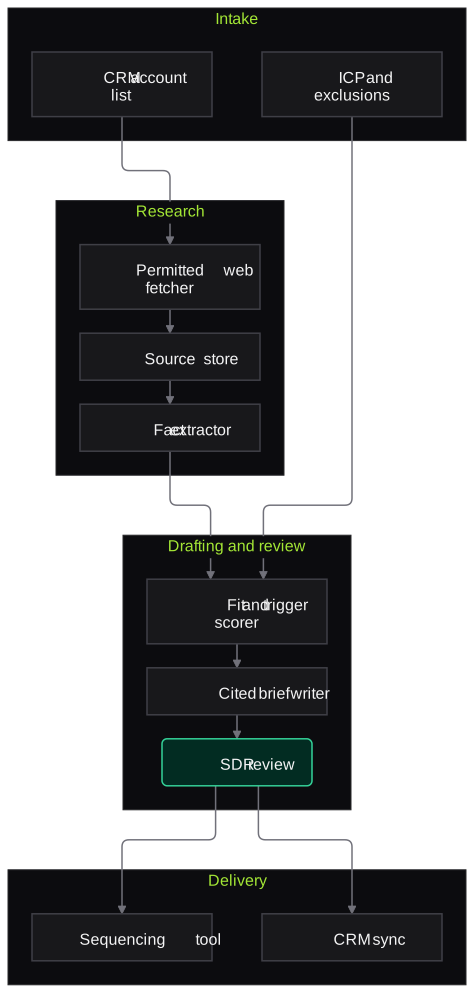
Architecture
- Account intake
- CRM account list connector
- ICP definition and exclusion lists
- Research
- Web fetcher limited to permitted sources
- Source store with timestamps
- Fact extractor
- Reasoning and drafting
- Fit and trigger scorer
- Brief writer with citation enforcement
- Tone and style guide
- Review
- SDR review screen
- Edit capture for tuning
- Delivery
- Sequencing tool integration
- CRM sync of brief and sources
Inputs and outputs
Inputs
- Target account list
- Ideal customer profile and persona definitions
- Product messaging and tone guide
- Suppression and do-not-contact lists
- List of permitted sources
Outputs
- Cited account briefs
- ICP fit scores with reasons
- Draft first lines and talking points
- Parked accounts with reasons
- CRM records updated with briefs and sources
Where people stay in control
SDRs check every fact and approve every message before it enters a sequence. The agent never sends email or social messages on its own.
Integrations
- CRM such as HubSpot or Salesforce
- Sequencing tools such as Outreach, Salesloft, Apollo or Lemlist
- Enrichment providers you already licence
- Slack for review notifications
- Your website and product documentation as messaging sources
Guardrails
- Every claim in a brief must link to a source; unsupported claims are removed
- Only permitted sources fetched, respecting site terms and robots rules
- Suppression and do-not-contact lists checked before drafting
- No sending without SDR approval
- No inferences about protected personal characteristics
Compliance notes
- Outreach to EU contacts needs a lawful basis and opt-out handling under GDPR and ePrivacy rules; recorded sources support that assessment.
- For Indian contacts, personal data handling follows DPDP Act 2023 principles, and calls or SMS follow TRAI rules.
A typical pilot
Duration: 3 weeks
One segment of a few hundred target accounts, with two or three SDRs reviewing briefs and drafts.
Deliverables
- 01ICP and persona configuration
- 02Research agent producing cited briefs
- 03SDR review screen
- 04CRM and sequencing integration
- 05Pilot report
What we measure
- Fact accuracy
- SDRs mark each brief claim as correct, wrong or unsupported against its source.
- Draft acceptance
- Share of drafts approved with no or minor edits.
- Research time per account
- SDR time per account with and without the agent, on a sample.
- Reply quality
- Replies from agent-assisted sequences compared with existing sequences, reviewed by the SDR manager.
FAQs
01Will it invent facts about prospects?
It is built to avoid that. Every claim must link to a source, unsupported claims are removed, and SDRs check facts before approving.
02Does it scrape LinkedIn?
No. It uses permitted public sources and data providers you already licence, within their terms.
03Does it send emails automatically?
No. It drafts; your SDRs approve and send through your existing sequencing tool.
04Can it match our tone?
Yes. We configure it with your tone guide and examples of messages your team likes, and SDR edits help refine the drafts over time.
Related use cases
- SaaS & AI Product Companies
Security Questionnaire Answering Assistant
Draft answers to security and AI due-diligence questionnaires from your own policies, reports and past answers, with citations, confidence and owner approval before anything goes to a customer.
- SaaS & AI Product Companies
Document Extraction Module for Your SaaS Product
An embeddable extraction service for your SaaS product: schemas per document type, per-tenant fields, confidence and source boxes, a review component and webhooks, running in your cloud.
- Banking
Cross-Sell Lead Scoring and Personalised Outreach
Score existing customers for products they are likely to need from consented banking data, and draft compliant, personalised outreach that relationship managers review before sending.
- Logistics & Supply Chain
Shipper Lead Qualification and Quote Automation
Qualify inbound shipper enquiries from web, email and WhatsApp, collect lane, volume and cargo details, and draft quotes from your rate cards for a salesperson to approve.

Founded by Akhilesh Mittal. 8 years building a security platform for a New Zealand company. IIT ISM Dhanbad and IMT Ghaziabad. Builds production agentic AI.
Scope a first test on one AI feature
Pick the LLM feature, agent or voice bot that worries you most. We will agree a short written scope and show you verified findings with evidence.