Construction Progress Monitoring from Site Photos
Turn geotagged site photos, drone images and time-lapse cameras into tower-by-tower progress status against the schedule, with photo evidence a site engineer confirms.
- Capability:
- Computer Vision
- Industry:
- Real Estate & Construction
Who it is for
- Project Director
- Planning and Monitoring Manager
- Lender's Independent Engineer
- CRM Head for buyer updates
The problem
Progress on a residential project is reported through weekly site reports, WhatsApp photos and planning spreadsheets, each prepared by a different person. Management, lenders, the RERA quarterly update and buyers all ask how far along each tower is, and they get slightly different answers.
Reports that depend on who writes them
Floor and activity status is typed by site engineers from memory and photos, so the same tower can be reported at different stages by different teams.
Photos without structure
Thousands of photos sit in WhatsApp groups and phones with no link to a tower, floor or activity, and old photos get reused.
Late view of slippage
Slab cycle delays and stalled finishing on some floors show up in the schedule only at a month-end review.
Evidence requests from every direction
Lenders, auditors, the RERA update and buyer communication each need photo evidence, and the planning team assembles it by hand every time.
What we build
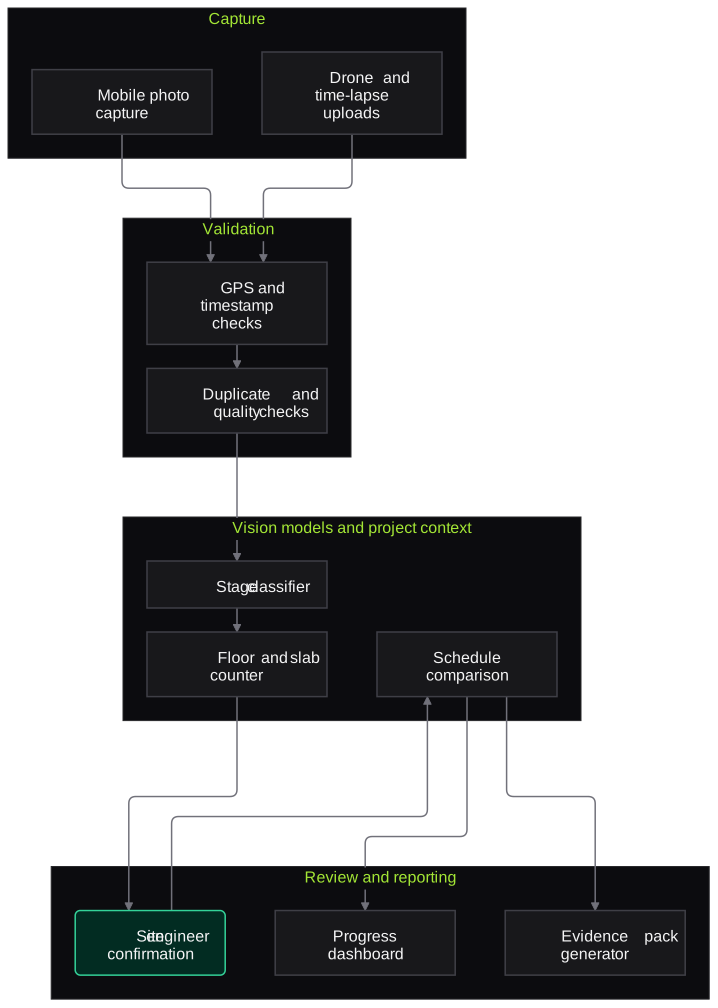
We build a progress monitoring system around a fixed set of photo points per tower, plus drone flights or time-lapse cameras where you have them. Site staff capture photos through a simple mobile flow that records GPS and time. Vision models identify the construction stage visible at each point, such as excavation, raft, columns, slab cast, blockwork, plaster, windows or facade, and count floors where the view allows. Results are mapped to your tower and floor structure and compared with the planned schedule. The site engineer confirms any change of stage before it reaches a report. Confirmed status and photos then feed management dashboards, lender reports and draft progress notes.
- Mobile capture flow with fixed photo points, GPS and timestamp checks
- Stage recognition for structure, masonry, plaster, MEP rough-in and facade work
- Floor and slab counting from elevation photos and drone images
- Comparison of observed stage with the planned schedule per tower and floor
- Detection of reused or out-of-location photos
- Dated photo evidence packs for lenders, audits and buyer updates
How it works
- 01Set up photo pointsWe agree fixed capture points and angles per tower with the planning team and map them to towers, floors and activities.
- 02Capture on scheduleSite staff capture photos weekly, or drones and time-lapse cameras upload automatically, with GPS and time recorded.
- 03Check photo validityLocation, timestamp and duplicate checks reject reused, blurred or out-of-place images and ask for a recapture.
- 04Recognise stageVision models classify the stage at each point and count floors or slabs where visible, with a confidence score.
- 05Engineer confirmationStage changes and low-confidence results are confirmed or corrected by the site engineer.
- 06Compare with scheduleConfirmed status is compared with the baseline schedule, and slippage is flagged per tower and activity.
- 07Publish reports and evidenceDashboards update and dated evidence packs are prepared for management, lenders and buyer communication.

Architecture
- Capture
- Mobile capture app with photo point guidance
- Drone image upload
- Time-lapse camera feeds
- Validation
- GPS and timestamp checks
- Duplicate and reuse detection
- Image quality scoring
- Vision models
- Construction stage classifier
- Floor and slab counter
- Change detection between captures
- Project context
- Tower, floor and activity map
- Baseline schedule from Primavera or MS Project
- Review and reporting
- Site engineer confirmation screen
- Progress dashboard
- Evidence pack generator
Inputs and outputs
Inputs
- Geotagged photos from fixed capture points
- Drone images or orthomosaics where available
- Time-lapse camera feeds
- Tower, floor and activity structure
- Baseline and current schedule from Primavera, MS Project or Excel
Outputs
- Stage status per tower, floor and activity
- Slippage flags against the schedule
- Dated, location-checked photo evidence packs
- Weekly progress dashboard
- Engineer confirmation log
Where people stay in control
The site engineer confirms every change in stage and any low-confidence result before it reaches a report. Stage completion certificates for RERA, lenders or demand letters remain the responsibility of the project's architect and engineer.
Integrations
- Primavera P6, MS Project or Excel schedules
- Drone survey providers' image exports
- Time-lapse camera platforms
- Real estate CRM for buyer progress updates
- Power BI or a web dashboard
Guardrails
- No automatic stage completion certificates or demand triggers
- Photos rejected when GPS, time or location do not match the capture point
- Confidence shown on every stage result
- People in photos are not identified, and faces can be blurred in shared evidence
- Model performance reviewed per tower as construction changes the view
Compliance notes
- Helps the promoter and its professionals evidence progress shown in RERA quarterly updates; certification stays with the architect and engineer.
- Site photos may show workers, so storage and sharing follow DPDP Act 2023 principles of minimisation.
A typical pilot
Duration: 4 weeks
Two towers at one site, with fixed photo points captured weekly and results compared with the site team's own progress reports.
Deliverables
- 01Photo point plan and capture flow
- 02Stage recognition tuned on your site's photos
- 03Weekly progress view for the two towers
- 04Comparison with site reports
- 05Plan and estimate for full site roll-out
What we measure
- Stage recognition accuracy
- Model output compared with the site engineer's confirmed stage at each photo point.
- Photo rejections and reasons
- Count of photos rejected for GPS, time, quality or duplication, by reason.
- Agreement with site reports
- Differences between confirmed status and the weekly site report, reviewed with the planning team.
- Time to assemble evidence
- Time to produce a lender or management evidence pack with and without the system.
FAQs
01Do we need drones?
No. A disciplined set of fixed photo points from phones is enough for structure and facade stages. Drones help with large plotted developments and earthworks, and time-lapse cameras help with tall towers.
02Can it see internal finishing work?
Partly. Internal stages need photos from inside agreed flats or floors, so the photo plan includes sample internal points. External views cannot show internal finishing, and the report says so.
03Can the result trigger demand letters automatically?
We do not recommend it. The system can tell the CRM team that a slab looks complete, but the demand should follow the engineer's or architect's certificate as your agreement requires.
04What about photos taken in poor light or during the monsoon?
Quality checks reject very dark or blurred images and ask for a recapture. Results carry a confidence score, and difficult photos go to the engineer rather than being guessed.
Related use cases
- Real Estate & Construction
Construction Site Safety Compliance
Use site cameras and safety walk photos to spot missing helmets, unguarded edges, people in crane and hoist zones and poor housekeeping, with each observation verified by the safety officer.
- Real Estate & Construction
Contractor Bill Verification Against BOQ
Check every RA bill line against the work order BOQ, measurement records, previous bills and recovery rules, so billing engineers certify from a verified sheet instead of re-adding.
- Real Estate & Construction
RERA and Project Document Data Extraction
Collect project listings, unit inventory and filed documents from state RERA portals into a clean, comparable dataset, with quarter-on-quarter changes flagged for analysts.
- Real Estate & Construction
Personalised Nurture Campaigns for Home Buyers
Keep undecided buyers engaged with WhatsApp and email updates matched to their stage, budget and objections, built from approved project facts, and alert sales when interest returns.

Founded by Akhilesh Mittal. 8 years building a security platform for a New Zealand company. IIT ISM Dhanbad and IMT Ghaziabad. Builds production agentic AI.
Pick one project and one painful workflow
Book a discovery call and we will scope a short pilot on one project, such as RA bill checks for a single contractor or lead qualification for one launch, run in parallel with your current process.