Doctor Engagement and Sample Request Automation
Consent-based WhatsApp and email journeys that send MLR-approved content to doctors, capture sample and literature requests, and route each one to the right MR or team with a full record.
- Capability:
- AI Sales & Marketing Automation
- Industry:
- Pharma & Life Sciences
Who it is for
- Head of Marketing
- Brand Manager
- Commercial Excellence Head
- Medical Affairs Lead
The problem
Doctors now expect to hear from pharma companies on WhatsApp and email between MR visits, but much of that contact is ad hoc forwards from reps' personal phones. Brand teams cannot see what was sent, medical review is bypassed, and sample or literature requests made in a chat get lost.
Unapproved content in circulation
Reps forward PDFs and images from personal phones, and nobody can confirm the material passed medical, legal and regulatory review.
Requests lost in chats
A doctor's request for samples, a product monograph or a published paper sits in one MR's WhatsApp and is never tracked.
No consent record
Companies struggle to show that a doctor agreed to receive messages, or to honour an opt-out across every channel.
No view of engagement
Brand teams cannot tell which content doctors opened or which topics led to requests, so planning relies on anecdotes.
What we build
We build an engagement layer on the WhatsApp Business API and email that sends only content approved in your medical, legal and regulatory (MLR) review, and only to doctors who have given consent. Journeys are triggered by MR visits, the campaign calendar or doctor requests. Doctors can ask for samples, literature or a rep visit from the chat; the system logs the request, checks it against sample policy and routes it to the territory MR with a due date. Clinical questions go to medical information, never to an AI answer. Possible adverse event mentions go to pharmacovigilance, and every message is recorded against the doctor.
- Records and honours doctor consent and opt-outs across WhatsApp and email
- Sends only content tagged as MLR-approved and unexpired
- Captures sample, literature and visit requests from chat buttons or free text
- Checks sample requests against policy and routes them to the territory MR
- Routes clinical questions to medical information and possible adverse events to PV
- Reports engagement by brand, content piece, specialty and territory
How it works
- 01Capture consentDoctors opt in during an MR visit, through a QR code or on a web form, and consent is stored with time and channel.
- 02Plan the journeyThe brand team selects approved content and sets triggers such as a post-visit follow-up or a new publication.
- 03Send and trackMessages go out on WhatsApp or email, and opens, clicks and replies are logged.
- 04Classify repliesReplies are classified as sample request, literature request, visit request, clinical question, safety mention or opt-out.
- 05Route requestsRequests are checked against policy and routed to the MR, medical information or PV, each with a due date.
- 06Close the loopThe MR or team confirms fulfilment, and the doctor gets an update in the same channel.

Architecture
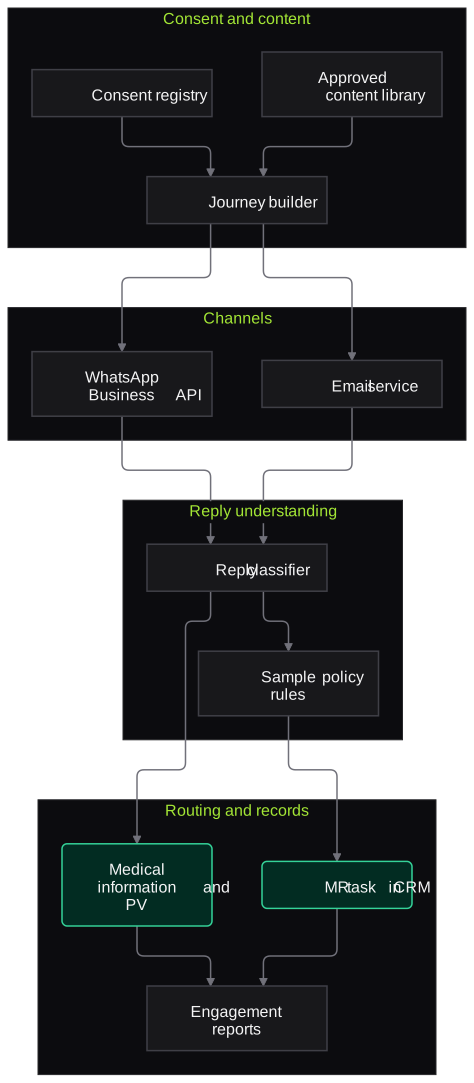
- Consent and content
- Consent registry with channel and timestamp
- Approved content library synced from MLR review
- Journey builder for brand teams
- Channels
- WhatsApp Business API with approved templates
- Email delivery service
- Reply understanding
- Reply classifier for requests, questions and safety mentions
- Sample policy rules
- Routing and records
- MR tasks via CRM
- Medical information and PV queues
- Engagement and request reports
Inputs and outputs
Inputs
- Doctor master with specialty, territory and consent status
- Approved content with MLR approval and expiry dates
- MR visit records from the CRM
- Sample policy and allocations by brand
- Campaign calendar
Outputs
- Consent and opt-out records
- Tracked sample, literature and visit requests
- Routed clinical questions and safety mentions
- Engagement reports by brand, content and territory
- Doctor-level activity history for the MR
Where people stay in control
MLR reviewers approve every content piece before it can be sent. MRs fulfil sample and visit requests, medical information answers clinical questions, and PV assesses any flagged safety mention; the system gives no medical answers.
Integrations
- WhatsApp Business API provider
- Pharma CRM such as Veeva CRM or Salesforce
- Content approval system such as Veeva PromoMats or your MLR tool
- Sample management system or ERP
- Pharmacovigilance intake queue
Guardrails
- No message without recorded consent; opt-outs applied across channels at once
- Only MLR-approved, unexpired content can be sent
- No AI-generated medical claims or answers to clinical questions
- Sample requests checked against policy before routing
- Possible adverse events always routed to PV
Compliance notes
- Designed to keep the records on promotional material, samples and HCP interactions expected under UCPMP 2024.
- Doctor personal data and consent are handled in line with the DPDP Act 2023 and WhatsApp Business messaging policies.
- Promotion rules differ by country, so content approval stays within your MLR process for each market.
A typical pilot
Duration: 4 weeks
One brand and one specialty in a few territories, with consenting doctors and a small set of approved content pieces.
Deliverables
- 01Consent capture flow and registry
- 02Journey for the pilot brand with approved templates
- 03Reply classification and routing to MRs, medical information and PV
- 04Engagement and request dashboard
- 05Roll-out plan for other brands
What we measure
- Request capture and routing
- Requests made in chat compared with tasks created and fulfilled in the CRM.
- Reply classification accuracy
- Sampled replies reviewed by brand and medical teams for correct routing.
- Fulfilment time
- Time from doctor request to MR confirmation, from task logs.
- Opt-out handling
- Opt-out requests checked for an immediate stop across channels.
FAQs
01Can the AI answer doctors' clinical questions?
No. Clinical and product questions go to your medical information team, who answer from approved responses. The system only classifies and routes them.
02How do you handle WhatsApp template approvals?
Messages sent outside a doctor's reply window use WhatsApp-approved templates, which we prepare with your brand team. The content inside templates still goes through your MLR process.
03Does this replace MRs?
No. It gives MRs a tracked list of requests from their doctors and keeps contact going between visits. Visits and relationships stay with the field force.
04Which CRM do you integrate with?
We connect through your CRM's API, for example Veeva CRM, Salesforce or an Indian SFA product. If CRM integration needs more time, the pilot can start with a simple task list.
Related use cases
- Pharma & Life Sciences
Medical Rep Call Reporting by Voice
Medical representatives speak a short note in Hindi, English or a regional language after each doctor visit, and the agent drafts the call report, sample entries and follow-ups for them to confirm.
- Pharma & Life Sciences
Adverse Event Intake from Emails and Calls
Spot possible adverse events in emails, call recordings and field reports, extract the minimum case criteria and draft an intake record for your pharmacovigilance team to verify.
- Pharma & Life Sciences
Distributor and Stockist Order-Taking Voice Agent
A voice and WhatsApp agent that takes orders from stockists and chemists by brand and pack, checks stock, schemes and credit, reads the order back and posts it to your ERP or DMS.
- Healthcare & Hospitals
Patient Enquiry Follow-Up Automation
Bring patient enquiries from web forms, WhatsApp, ads and missed calls into one queue, reply promptly with approved information, collect reports and route each enquiry to the right counsellor.

Founded by Akhilesh Mittal. 8 years building a security platform for a New Zealand company. IIT ISM Dhanbad and IMT Ghaziabad. Builds production agentic AI.
Test one record type on your own batches
Book a discovery call to choose a narrow pilot, such as BMR pre-review for one product or COA checks for one material group, and compare the results with your QA team's own review.