Housekeeping Room Inspection from Photos
Check each cleaned room from attendant photos against your room standard: bed, bathroom, amenities, minibar and visible damage, with supervisors confirming before the room is released.
- Capability:
- Computer Vision
- Industry:
- Hospitality & Travel
Who it is for
- Executive Housekeeper
- Housekeeping Supervisor
- Rooms Division Manager
- Quality Manager for hotel groups
The problem
Every departure room should be inspected before it is released for sale, but on a day with many check-outs and early arrivals, supervisors cannot walk every room. A missing towel, a used glass, hair in the shower or a stain on the linen then reaches a guest, and often a review.
Too many rooms to inspect
Supervisors cover several floors and prioritise early arrivals, so many rooms are released on the attendant's word.
Standards that vary by attendant
New and temporary staff set amenities and fold towels differently from the standard, especially in peak season.
Damage found by the next guest
Broken fittings, stained carpets or missing items are discovered after check-in rather than reported to maintenance.
No record of what was checked
When a guest complains, there is no evidence of the room's condition at release.
What we build
We build a room inspection flow in a phone app that housekeeping already carries. After cleaning, the attendant takes photos from a short set of fixed angles for the room type: bed, bathroom, vanity, amenities tray, minibar and floor. Vision models check each photo against your standard, for example bed made with the correct linen and cushions, towels and amenities present and placed, no visible stains or litter, minibar stocked and nothing left behind. Rooms that pass with high confidence get a light supervisor check; failures and uncertain photos go to the supervisor with the exact issue marked. Damage creates a maintenance ticket, and the PMS room status changes only after supervisor sign-off.
- Guided photo capture per room type with fixed angles
- Checks for bed making, towels, amenities placement and minibar stock
- Detection of visible stains, litter, used items and items left behind
- Damage spotting for fittings, furniture and soft furnishings, with maintenance tickets
- Supervisor queue prioritised by failures, uncertainty and arrival times
- Room condition record at release for complaint handling and coaching
How it works
- 01Capture after cleaningThe attendant photographs the room from the fixed angles defined for that room type.
- 02Check against the standardVision models compare each photo with the room standard and score each item.
- 03Decide the routePassing rooms go to a light check, and failed or uncertain items go to the supervisor with the issue marked.
- 04Supervisor inspectionThe supervisor confirms or corrects the result, physically for flagged rooms, and the attendant fixes any issues.
- 05Release and logAfter sign-off the PMS room status updates to inspected, and photos are stored with the room record.
- 06Report and coachWeekly reports show recurring misses by item and floor for training.

Architecture
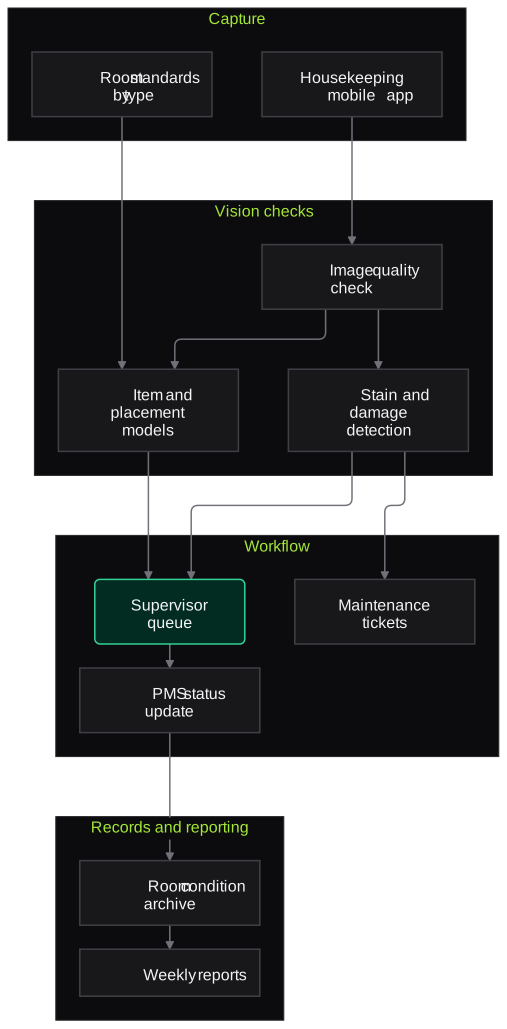
- Capture
- Housekeeping mobile app with angle guides
- Room type standards and reference photos
- Vision checks
- Item presence and placement models
- Stain, litter and damage detection
- Image quality checks
- Workflow
- Supervisor priority queue
- Maintenance ticket creation
- PMS room status update after sign-off
- Records and reporting
- Room condition photo archive
- Weekly item and floor reports
Inputs and outputs
Inputs
- Photos from fixed angles after cleaning
- Room standards and reference photos per room type
- Room status and arrivals list from the PMS
- Amenity and minibar checklists
- Maintenance categories
Outputs
- Item-by-item result per room with photo evidence
- Supervisor queue of flagged rooms
- Maintenance tickets for damage
- PMS room status updates after sign-off
- Weekly misses by item, floor and shift
Where people stay in control
Supervisors sign off every room before it is released and physically inspect all flagged rooms. Results are used for coaching, and any disciplinary step stays with the executive housekeeper and HR.
Integrations
- Hotel PMS for room status and arrivals
- Maintenance or work order system
- Housekeeping apps or WhatsApp for task alerts
- Cloud storage for room photos
- Quality audit dashboards for hotel groups
Guardrails
- Photos taken only in vacant rooms after check-out, never with guests or their belongings in frame
- Room status changes only after supervisor sign-off
- Confidence shown for each item, and uncertain items never auto-pass
- Results not used for automatic penalties
- Reference standards updated whenever room design or amenities change
Compliance notes
- Photo capture is limited to vacant rooms so guest privacy is not affected.
- Staff are told how photos and results are used, in line with DPDP Act 2023 notice and purpose principles.
A typical pilot
Duration: 4 weeks
Departure rooms of one or two room types on selected floors of one property, with supervisors inspecting every room as usual so results can be compared.
Deliverables
- 01Room standards and capture angles for the pilot room types
- 02Models tuned on your rooms and amenities
- 03Supervisor queue and PMS status flow
- 04Pilot comparison with supervisor inspections
- 05Roll-out plan and estimate
What we measure
- Item-level agreement with supervisors
- Model results compared with the supervisor's physical inspection of the same rooms.
- Missed issues
- Issues found by supervisors or guests in rooms the model passed.
- Supervisor time per room
- Inspection time for passed and flagged rooms, compared with inspections before the pilot.
- Recurring misses
- Count of repeat issues by item and floor across the pilot weeks.
FAQs
01Will this replace supervisors?
No. It helps supervisors focus on the rooms and items that need attention and gives them evidence. Every room is still signed off by a supervisor.
02Do attendants need new devices?
Usually not. The app runs on the phones or shared devices housekeeping already uses, and capture takes a short sequence of photos per room.
03Can it spot hair or small stains?
Larger stains, litter, missing items and misplaced amenities are detected more reliably than single hairs. Small-detail checks such as hair in the shower stay on the supervisor's checklist for flagged and sampled rooms.
04What about stayover rooms?
We recommend starting with departure rooms. Stayover rooms contain guests' belongings, so photo capture there needs a separate policy and is usually limited or excluded.
Related use cases
- Hospitality & Travel
Kitchen Hygiene Monitoring
Monitor kitchen cameras for missing caps and gloves, uncovered food, open bins, spills and pests at night, with alerts and daily hygiene summaries reviewed by the chef and hygiene lead.
- Hospitality & Travel
Review Response and Reputation Automation
Collect reviews from Google, OTAs and Tripadvisor, draft specific replies in your voice, route complaints to the GM and turn recurring themes into weekly actions for each department.
- Hospitality & Travel
Guest ID and Check-In Document Capture
Capture guest IDs and passports at check-in or before arrival, fill the guest register and prepare Form C data for foreign nationals, with masked Aadhaar and front desk verification.
- Manufacturing
Visual Quality Inspection on Production Lines
Cameras and vision models at the inspection station flag scratches, dents, missing features and print errors, divert clear rejects and hold borderline parts for an inspector.

Founded by Akhilesh Mittal. 8 years building a security platform for a New Zealand company. IIT ISM Dhanbad and IMT Ghaziabad. Builds production agentic AI.
Start with the enquiries you are missing
Book a discovery call and we will scope a short pilot for one property and one channel, such as WhatsApp bookings or after-hours calls, measured against how you work today.