Permit and Compliance Document Tracking
Turn environmental clearances, consents, explosives and petroleum licences and grid approvals into an obligation register with owners, due dates, reminders and linked evidence.
- Capability:
- Document Intelligence
- Industry:
- Energy, Mining & Utilities
Who it is for
- Head of Environment and Compliance
- Mine Manager or Plant Head
- Regulatory Affairs Manager
- Project Development Lead, Renewables
The problem
A single mine, power plant or solar park operates under a stack of approvals: environmental clearance, consent to establish and consent to operate, forest clearance, explosives and petroleum storage licences, mine plan approvals, grid connectivity and electrical inspector approvals. Each carries its own validity, conditions and reporting duties, often spread across long letters in different formats.
Conditions buried in approval letters
Specific and general conditions run across pages, and recurring duties such as monitoring and periodic compliance reports are easy to lose.
Renewals tracked in spreadsheets
Expiry dates live in personal trackers, so a change of staff can leave a licence renewal unnoticed.
Evidence scattered across teams
Monitoring results, plantation records and fee receipts sit with different departments when the compliance report falls due.
Portfolios with varied formats
Multi-site operators deal with approvals from several states and authorities, each with its own layout and language.
What we build
We build an obligation tracker fed by your permits and licences. Documents are uploaded or pulled from your document system, read by OCR and a language model, and split into structured records: permit type, issuing authority, reference number, validity, and each condition with any recurring duty it creates. A compliance officer corrects flagged fields and approves the condition list before anything enters the register. Each obligation then gets an owner, a due date and reminders by email, Teams or WhatsApp, with escalation to the site head if evidence is missing. Evidence such as monitoring reports and photos is linked to the condition it supports, and the tracker drafts compliance status tables for sign-off.
- Extracts permit type, issuing authority, reference number and validity from licences and consents
- Splits approval letters into individual conditions and identifies recurring duties
- Builds an obligation calendar with owners, due dates and escalation rules
- Sends reminders by email, Microsoft Teams or WhatsApp to site owners
- Links evidence such as monitoring reports, photos and receipts to each condition
- Drafts compliance status tables in the structure your reports follow, for review
How it works
- 01Load the permit setPermits, licences and approval letters are uploaded or synced, including scanned and regional-language documents.
- 02Extract dates and conditionsOCR and an LLM capture metadata and split each document into conditions, keeping the original wording of every condition.
- 03Verify and approveThe compliance officer corrects any low-confidence fields and approves each permit's condition list.
- 04Assign owners and due datesEvery obligation gets an owner, a due date and an escalation path.
- 05Remind and collect evidenceOwners receive reminders and upload evidence; missing evidence near the due date escalates to the site head.
- 06Draft the status reportThe tracker drafts a compliance status table for review and sign-off before anything is submitted.

Architecture
- Intake
- Upload portal and email intake
- Document management system sync
- Site and entity master data
- Extraction
- OCR with multilingual support
- Permit type classifier
- LLM condition splitter with schemas
- Obligation management
- Obligation register
- Calendar and reminder engine
- Evidence store linked to conditions
- Review and reporting
- Compliance officer review screen
- Status report drafts
- Change history and audit trail
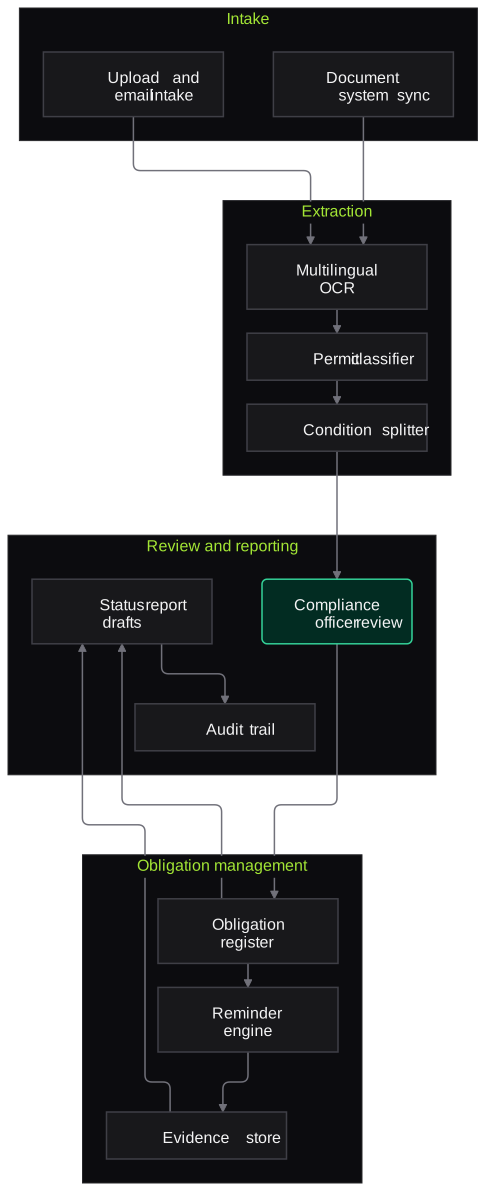
Inputs and outputs
Inputs
- Environmental clearance letters and their conditions
- Consent to establish and consent to operate orders
- Explosives, petroleum storage and other licences
- Mining lease, mine plan and forest clearance approvals
- Grid connectivity, electrical inspector and other plant approvals
- Monitoring reports, photos and receipts used as evidence
Outputs
- Verified obligation register with owners and due dates
- Renewal and reporting calendar across sites
- Condition-wise status with linked evidence
- Draft compliance status tables for sign-off
- Audit trail of changes and approvals
Where people stay in control
The compliance officer corrects flagged fields and approves each permit's condition list before it enters the register. Interpretation of conditions, legal positions and all submissions to authorities stay with your team.
Integrations
- SharePoint or a document management system
- Email and Microsoft Teams
- WhatsApp Business API for site reminders
- ERP or project management tools for owner and site data
- Environmental monitoring data portals or CEMS exports, where used
Guardrails
- Conditions are always shown in their original wording beside any summary
- Validity and due dates checked against the source and confirmed by a person
- Nothing is submitted to any authority automatically
- Not positioned or used as legal advice
- Every change to the register is versioned and attributable
Compliance notes
- Helps permit holders track conditions of environmental clearances and of consents issued under India's Air and Water Acts; responsibility for compliance stays with the permit holder.
- Not legal advice; your compliance and legal teams interpret obligations.
A typical pilot
Duration: 3 weeks
The complete permit set for one site, including recurring reporting duties, loaded and verified with the site's compliance officer.
Deliverables
- 01Obligation schema agreed with your compliance team
- 02Verified register for the pilot site
- 03Reminder and escalation flow
- 04Draft status table for one upcoming compliance report
- 05Multi-site roll-out plan
What we measure
- Condition capture completeness
- Extracted conditions compared with the compliance officer's own list for the same permits.
- Date accuracy
- Validity and due dates checked against the source documents.
- Reviewer corrections
- Number and type of edits the compliance officer makes per permit.
- Report preparation effort
- Time to assemble a compliance status table with and without the tracker.
FAQs
01Can it read permits in Hindi or regional languages?
Yes. Multilingual OCR and the language model handle Hindi and common regional-language documents, and the original wording is kept beside the English summary so reviewers can check the meaning.
02Is this legal advice?
No. The tracker organises what the documents say, who owns each duty and when it falls due. Interpretation and any position taken with an authority stay with your compliance and legal teams.
03We run sites in several states. Does it cope with different formats?
Yes. Extraction works from the content rather than fixed templates, so different authorities' layouts are handled. We test samples from each state during the pilot.
04Can it work alongside our existing compliance software?
Yes. It can act as the extraction and evidence layer and push verified obligations into the tool you already use, through an API or a structured export.
Related use cases
- Energy, Mining & Utilities
Technical Report Search Assistant
A search assistant over geological, engineering and incident reports that answers engineers' questions with page-level citations and respects existing document permissions.
- Energy, Mining & Utilities
Inspection and Maintenance Report Extraction
Extract readings, observations and recommendations from test reports, NDT surveys, vendor service reports and job cards into your CMMS, with out-of-limit values flagged for engineers.
- Legal
Contract Clause Extraction and Risk Flags
Extract key clauses, dates and obligations from executed and incoming contracts, compare them with your playbook and flag deviations, with every item linked to the clause it came from.
- Real Estate & Construction
RERA and Project Document Data Extraction
Collect project listings, unit inventory and filed documents from state RERA portals into a clean, comparable dataset, with quarter-on-quarter changes flagged for analysts.

Founded by Akhilesh Mittal. 8 years building a security platform for a New Zealand company. IIT ISM Dhanbad and IMT Ghaziabad. Builds production agentic AI.
Start with one site, one camera cluster or one call queue
Book a discovery call to choose a narrow pilot on your own footage, reports or call recordings. We agree the measures with your team before any build starts.