Meter Reading from Photos
Read kWh, kVAh and demand values from meter photos taken by readers or consumers, check them against what was keyed in, and route mismatches to billing staff before bills go out.
- Capability:
- Computer Vision
- Industry:
- Energy, Mining & Utilities
Who it is for
- Head of Revenue and Billing
- Commercial or Billing Manager at a DISCOM
- Meter Reading Agency Supervisor
- Energy Audit and Vigilance Officer
The problem
Where smart meters have not yet reached, meter readers visit each premises, key a reading into a spot billing app and take a photo of the display. Billing teams rarely have time to look at those photos, so wrong entries, reused images and provisional readings turn into disputed bills and complaint calls.
Keyed readings that do not match the photo
A misread digit or a value from the wrong register produces a bill the consumer disputes and the utility later revises.
Unusable and reused photos
Blurred, glare-covered or recycled photos mean nobody can check the reading when a complaint arrives.
Provisional billing builds disputes
Door-locked and meter-not-accessible codes lead to average bills, which pile up into large corrections later.
Tamper signs missed
Broken seals, burnt terminals and loose connections appear in photos but go unseen in high-volume billing cycles.
What we build
We build a photo verification service that sits between the meter reading app and the billing system. For each photo it locates the meter, reads the display or mechanical register, identifies which register is shown, such as kWh, kVAh or maximum demand, and reads the meter serial number. It checks timestamp and location against the consumer record, detects reused images and compares the reading with what the reader keyed in and with consumption history. Matching readings go to billing; mismatches and unreadable photos go to a supervisor queue. Visible tamper cues are passed to vigilance as leads for inspection, never as findings.
- Reads seven-segment LCD and LED displays and mechanical drum registers
- Identifies the register shown, such as kWh, kVAh or maximum demand, on meters that cycle displays
- Reads the meter serial number and matches it to the consumer master
- Detects reused or duplicate photos and checks timestamp and geotag
- Compares readings with the reader's entry and the consumer's consumption pattern
- Lists visible tamper cues such as broken seals, damaged glass or burn marks for vigilance follow-up
How it works
- 01Photo arrives from the reading appThe reader's app sends the photo, keyed reading, status code, timestamp and GPS location.
- 02Check photo quality and authenticityThe service checks focus and glare, compares location with the consumer address and tests whether the image has been used before.
- 03Read register and serialThe display value, register type and serial number are read, each with a confidence score.
- 04Compare and decideThe reading is compared with the keyed value and consumption history, and matches above threshold are released.
- 05Supervisor reviewBilling supervisors review mismatches, unreadable photos and tamper cues with the image beside the record.
- 06Release or revisitConfirmed readings go to billing; the rest go to a revisit list or a vigilance inspection queue.

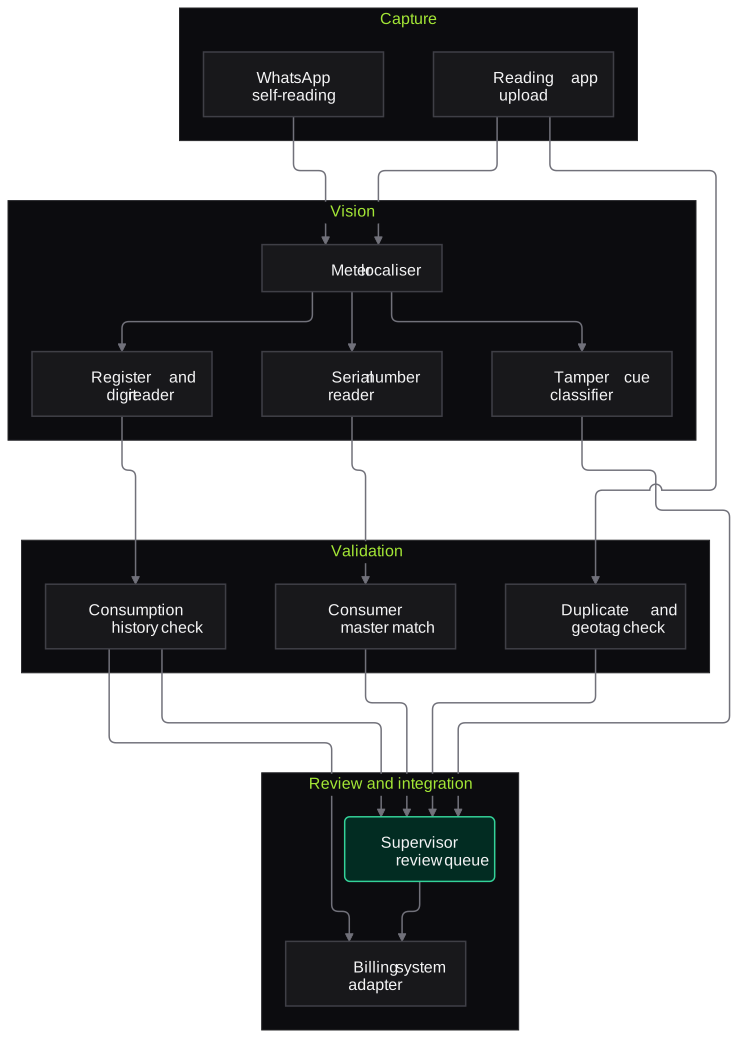
Architecture
- Capture
- Spot billing app photo upload API
- WhatsApp self-reading channel for consumers
- Vision
- Meter localiser
- Register and digit reader
- Serial number reader
- Tamper cue classifier
- Validation
- Consumer master match
- Consumption history check
- Duplicate image and geotag check
- Review and integration
- Supervisor review queue
- Billing system adapter
- Reader quality and revisit reports
Inputs and outputs
Inputs
- Meter photos with timestamp and GPS from the reading app
- Reader-entered reading and status code
- Consumer master with meter serial, category and location
- Consumption history for each consumer
- List of meter makes and display types in the field
Outputs
- Machine-read value and register type with confidence
- Mismatch and unreadable-photo flags for billing staff
- Revisit list for meter readers
- Tamper-cue leads for vigilance inspection
- Reader and agency quality reports
Where people stay in control
Billing supervisors decide every mismatch before a bill is generated. Tamper cues go to authorised inspection staff as leads; the system never raises an assessment or penalty on its own.
Integrations
- Spot billing or meter reading mobile app
- Billing or CIS system such as SAP IS-U or an in-house platform
- Consumer master and GIS data
- WhatsApp Business API for consumer self-reading
- Meter data management system where smart meters coexist
Guardrails
- The reader's entry is never overwritten silently; differences always go to review
- Tamper cues are leads for inspection, not evidence
- Confidence thresholds set per meter type and display
- Photos and location data retained only for the period your policy sets
- Agency performance reports reviewed by managers before any action
Compliance notes
- Consumer names, addresses and location data handled in line with the DPDP Act 2023.
- Supports the accurate metering and billing expected under state supply codes and the Electricity (Rights of Consumers) Rules, 2020.
A typical pilot
Duration: 3 weeks
Photos from one subdivision's billing cycle, processed in parallel with the current process so that no bill depends on the pilot.
Deliverables
- 01Reader model tuned on your meter makes
- 02Validation rules agreed with the billing team
- 03Supervisor review screen
- 04Accuracy report against verified readings
- 05Integration plan for the billing system
What we measure
- Reading accuracy
- Machine-read values compared with supervisor-verified readings on a sample.
- Mismatch confirmation
- Share of flagged mismatches that supervisors confirm as genuine reading errors.
- Unreadable photo share
- Photos the model could not read, broken down by reader and meter type.
- Billing team effort
- Time spent per flagged case in the review queue.
FAQs
01Which meter types can it read?
Common single-phase and three-phase electronic meters with LCD or LED displays, older electromechanical meters with drum registers, and water and gas meters with dials or counters. During the pilot we tune on the makes and models in your service area.
02What happens with poor photos?
Photos that are blurred, covered in glare or show the wrong object are flagged as unreadable instead of guessed. Reports by reader show where photo practice needs attention.
03Can consumers submit their own readings?
Yes. A WhatsApp self-reading flow can accept a meter photo, read it and confirm the value back to the consumer, with the same checks before it reaches billing.
04Do we have to change our reading app?
Usually not. The service exposes an API your app vendor can call, or it can pick up photos from the storage your app already uses.
Related use cases
- Energy, Mining & Utilities
Utility Customer Service Voice Agent (Outages and Billing)
A voice agent for power and water utilities that logs no-supply complaints, shares known outage status and answers billing queries in Hindi and regional languages.
- Energy, Mining & Utilities
Field Technician Voice Reporting
Linemen, fitters and plant technicians speak their job report in Hindi or a regional language, and the system turns it into a structured CMMS entry for supervisor approval.
- Energy, Mining & Utilities
Inspection and Maintenance Report Extraction
Extract readings, observations and recommendations from test reports, NDT surveys, vendor service reports and job cards into your CMMS, with out-of-limit values flagged for engineers.
- Logistics & Supply Chain
Proof of Delivery Capture and Verification
Check every POD photo or scan for consignment number, date, signature, stamp and remarks, match it to the shipment in your TMS, and flag short, damaged or doubtful deliveries before billing.

Founded by Akhilesh Mittal. 8 years building a security platform for a New Zealand company. IIT ISM Dhanbad and IMT Ghaziabad. Builds production agentic AI.
Start with one site, one camera cluster or one call queue
Book a discovery call to choose a narrow pilot on your own footage, reports or call recordings. We agree the measures with your team before any build starts.