Field Technician Voice Reporting
Linemen, fitters and plant technicians speak their job report in Hindi or a regional language, and the system turns it into a structured CMMS entry for supervisor approval.
- Industry:
- Energy, Mining & Utilities
Who it is for
- Field Operations Manager
- Junior Engineer or Maintenance Supervisor
- Head of Operations and Maintenance
- Control Room Shift Engineer
The problem
After restoring a transformer, changing an idler or clearing a breakdown, technicians are expected to fill a job completion report, record spares used and note the cause. Gloves, poles, poor connectivity and small phone keyboards mean reports are written hours later from memory, if at all.
Late reports written from memory
Restoration times, causes and readings are reconstructed at the end of the shift and often lose detail.
Free text nobody can analyse
Typed notes like 'fuse changed, ok now' cannot be trended to find repeat faults on the same asset.
Typing is impractical in the field
Technicians on poles, in conveyor galleries or wearing gloves cannot easily fill long mobile forms.
Spares used but not recorded
Materials drawn for a job are not booked against it, so store balances and job costs drift.
What we build
We build a voice reporting flow for the mobile app your crews already carry, or a phone number they can call. The technician speaks naturally in Hindi, Hinglish or a regional language, mixing in technical terms such as DT, HT fuse, ABC cable, isolator, idler or gearbox. Speech recognition tuned to that vocabulary produces a transcript, and a language model fills the report template: asset, complaint or work order number, fault, cause, action taken, spares used and restoration time. If a mandatory field is missing, the app asks for it by voice. Photos attach to the report, recordings queue offline, and a supervisor approves before anything updates the CMMS or store records.
- Speech capture in Hindi, Hinglish and regional languages with domain vocabulary
- Fills job completion, breakdown and outage restoration templates
- Asks follow-up questions by voice for missing mandatory fields
- Matches spoken asset names and spares to asset tags and store codes
- Offline recording with automatic sync when the network returns
- Supervisor approval queue with transcript, audio and photos side by side
How it works
- 01Record at job endThe technician opens the job in the app, or calls the reporting number, and describes the work by voice, attaching photos.
- 02TranscribeSpeech recognition with your vocabulary produces a transcript and handles code-mixed speech.
- 03Fill the templateA language model maps the transcript to report fields and matches assets and spares to codes.
- 04Check completenessIf mandatory fields such as cause or restoration time are missing, the app asks for them by voice.
- 05Supervisor approvalThe junior engineer or supervisor reviews the draft with audio and photos, then approves or returns it.
- 06Update systemsApproved reports update the work order in the CMMS, the outage record and spares consumption in stores.

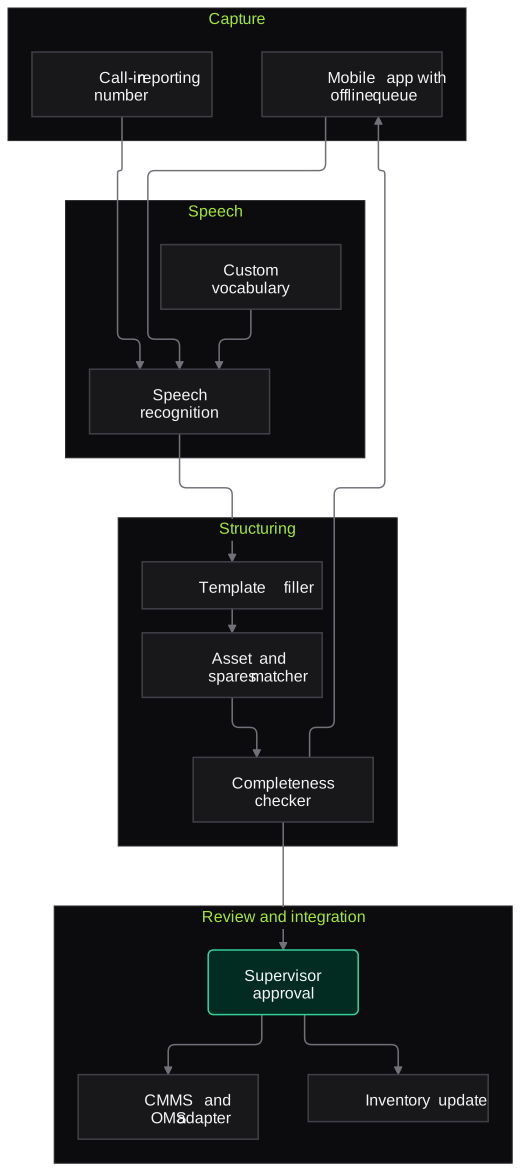
Architecture
- Capture
- Mobile app with offline queue
- Call-in reporting number
- Photo attachment
- Speech
- Speech recognition with custom vocabulary
- Code-mixed language handling
- Structuring
- LLM template filler
- Asset and spares code matcher
- Completeness checker
- Review and integration
- Supervisor approval screen
- CMMS and OMS adapter
- Inventory system update
Inputs and outputs
Inputs
- Voice notes or calls from technicians
- Photos of the asset before and after the job
- Work order or complaint number
- Asset register and spares catalogue with store codes
- Report templates and mandatory fields
Outputs
- Structured job completion and breakdown reports
- Outage restoration times recorded against complaints
- Spares consumption entries for stores
- Searchable transcripts and audio
- List of reports returned for correction
Where people stay in control
A supervisor or junior engineer approves every report before it updates the CMMS, outage records or inventory. Permit-to-work closure and line clearance remain with the authorised person under your existing procedure; the system only drafts the report.
Integrations
- SAP PM, IBM Maximo or another CMMS
- Outage management system
- ERP stores module such as SAP MM
- Existing workforce mobile app
- Microsoft Teams or WhatsApp for supervisor notifications
Guardrails
- Never closes a permit-to-work or declares equipment safe
- Asks rather than guesses when a field is unclear
- Asset and spares matches shown with alternatives for confirmation
- Audio retained only for the period your policy sets
- Supervisor edits logged against each report
Compliance notes
- Permit-to-work and line clearance follow your safety rules and CEA safety regulations; voice reports do not change those steps.
- Worker voice recordings are personal data and are handled with notice and retention limits under the DPDP Act 2023.
A typical pilot
Duration: 3 weeks
One maintenance crew or subdivision and two report types, such as breakdown restoration and preventive maintenance completion, in Hindi plus the local language.
Deliverables
- 01Vocabulary list and templates agreed with supervisors
- 02Voice reporting in the pilot app or a call-in number
- 03Supervisor approval screen
- 04Transcription and field accuracy report
- 05Integration plan for the CMMS and stores
What we measure
- First-submission completeness
- Share of reports with all mandatory fields filled when first submitted.
- Supervisor edits
- Number of fields changed by supervisors per report.
- Domain term accuracy
- Transcription accuracy on a sample containing asset and spares terms.
- Report delay
- Time from job completion to submitted report, compared with current practice.
FAQs
01Will it work in noisy places like substations and conveyor galleries?
We test on recordings from your sites and tune for background noise. Short follow-up questions help where a phrase was not caught, and the technician can always type a correction.
02What if there is no network on site?
Recordings are stored on the phone and processed when the network returns. The technician gets any follow-up questions then, while the job is still fresh.
03Which languages are supported?
Hindi and Hinglish, plus regional languages such as Marathi, Gujarati, Odia, Bengali, Telugu or Tamil depending on your crews. Technical terms in English are handled within the same sentence.
04Does this replace our permit-to-work system?
No. Permit issue, isolation and closure stay in your existing process. The voice report records what was done once the job is complete.
Related use cases
- Energy, Mining & Utilities
Inspection and Maintenance Report Extraction
Extract readings, observations and recommendations from test reports, NDT surveys, vendor service reports and job cards into your CMMS, with out-of-limit values flagged for engineers.
- Energy, Mining & Utilities
Meter Reading from Photos
Read kWh, kVAh and demand values from meter photos taken by readers or consumers, check them against what was keyed in, and route mismatches to billing staff before bills go out.
- Energy, Mining & Utilities
Conveyor and Equipment Anomaly Detection from Video
Video and thermal analytics on conveyor transfer points and idler runs that flag belt drift, spillage, chute blockage and hot idlers for maintenance teams to review.
- Pharma & Life Sciences
Medical Rep Call Reporting by Voice
Medical representatives speak a short note in Hindi, English or a regional language after each doctor visit, and the agent drafts the call report, sample entries and follow-ups for them to confirm.

Founded by Akhilesh Mittal. 8 years building a security platform for a New Zealand company. IIT ISM Dhanbad and IMT Ghaziabad. Builds production agentic AI.
Start with one site, one camera cluster or one call queue
Book a discovery call to choose a narrow pilot on your own footage, reports or call recordings. We agree the measures with your team before any build starts.