Parent Progress Update Automation
Send each parent a short WhatsApp update on attendance, test results and homework in their language, with mentor review for sharp drops or absences and replies routed to the right teacher.
- Capability:
- AI Sales & Marketing Automation
- Industry:
- Education & Coaching
Who it is for
- Academic Head
- Student Mentor Lead
- School Principal
- Parent Relations Manager
The problem
Parents of students in coaching hostels or day schools want to know how their child is doing, especially when they live in another city. The data sits in attendance systems, test results and homework records, but turning it into a clear message for every family after each test is more than mentors can manage, so updates are generic, late or sent only when something has gone wrong.
Data spread across systems
Attendance, test scores, homework completion and teacher remarks sit in different tools and spreadsheets.
Generic broadcasts
A batch-wide result PDF tells a parent little about their own child's progress or what to do next.
Problems noticed late
A run of absences or a sharp fall in scores often reaches parents only at the parent-teacher meeting.
Replies go nowhere
When parents reply with a question, it lands on a shared number that nobody owns.
What we build
We build an update engine that pulls attendance, test results, homework completion and teacher remarks from your ERP and test platform, and drafts a short message for each parent in Hindi, English or another chosen language. It explains the latest result in context, such as subject-wise strengths and chapters to revise, without shaming comparisons. Students with a sharp drop, a run of absences or a mentor note are held back from the automatic send; their mentor reviews the draft and usually calls instead. Messages go out as approved WhatsApp templates, and parent replies are routed to the right mentor or teacher.
- Combines attendance, test, homework and remark data for each student
- Drafts short updates in Hindi, English or regional languages from approved templates
- Explains subject and chapter-level performance with next steps, not just ranks
- Holds back flagged students for mentor review and a phone call
- Routes parent replies to the assigned mentor or subject teacher
- Schedules parent-teacher meetings and sends reminders
How it works
- 01Collect the week's dataAttendance, test scores, homework status and remarks are pulled after each test or at a fixed weekly time.
- 02Compute trendsChanges in attendance and subject-wise performance are calculated against the student's own history.
- 03Flag students who need attentionSharp drops, absence streaks and mentor notes move a student onto the review list.
- 04Draft messagesEach parent gets a short draft in their language, built from approved templates and the student's data.
- 05Mentor reviewMentors edit or replace drafts for flagged students and call those families.
- 06Send and route repliesMessages go out on WhatsApp, and replies are assigned to the right mentor or teacher.

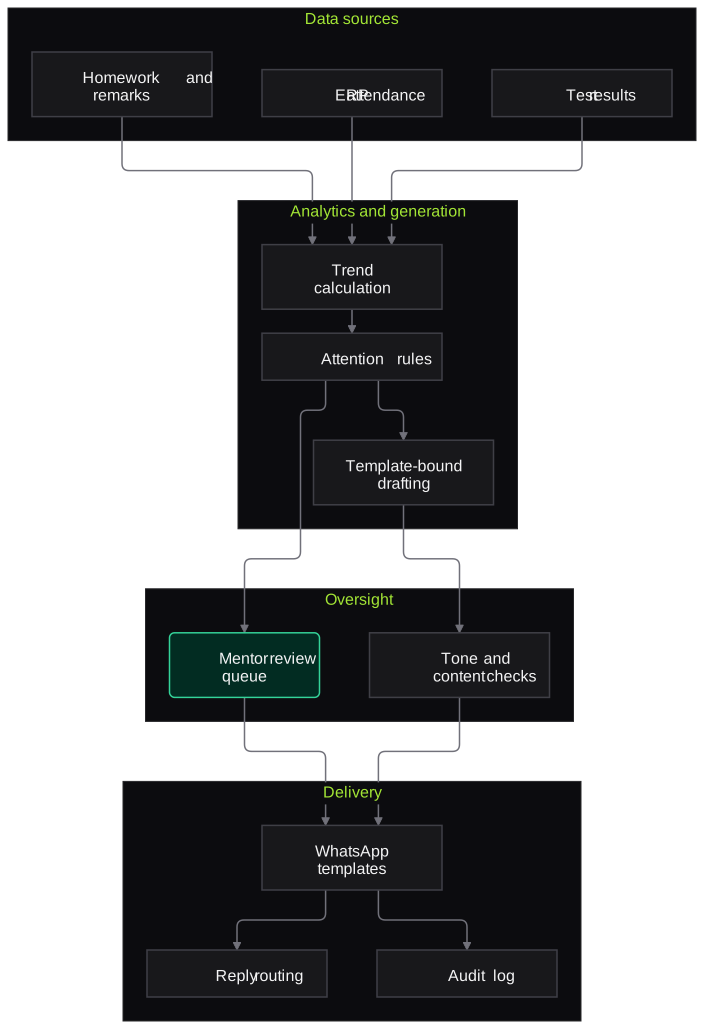
Architecture
- Data sources
- ERP attendance and fee status
- Test platform results
- Homework and DPP completion records
- Mentor remarks
- Analytics
- Per-student trend calculation
- Attention rules agreed with academics
- Message generation
- Template library per language
- LLM drafting limited to the student's data
- Tone and content checks
- Delivery and replies
- WhatsApp Business API
- Reply routing to mentors
- Parent-teacher meeting scheduling
- Oversight
- Mentor review queue
- Message audit log
- Parent opt-out handling
Inputs and outputs
Inputs
- Attendance from biometric, RFID or manual registers
- Test results with subject and chapter breakdown
- Homework and practice sheet completion
- Mentor and teacher remarks
- Parent contact numbers and language preference
Outputs
- Personalised WhatsApp updates for each parent
- Mentor review list of students needing attention
- Routed parent questions with owners
- Parent-teacher meeting schedule and reminders
- Message and reply log in the ERP
Where people stay in control
Mentors review and personalise every message for a flagged student, and usually call the family rather than rely on a message. Academic heads approve the templates and the rules that decide which students need attention.
Integrations
- School or coaching ERP
- Online test platform
- Attendance devices or app
- WhatsApp Business API
- Mentor workspace or CRM
Guardrails
- No public ranks or comparisons with named classmates in parent messages
- Drafts limited to the student's own data and approved templates
- Students flagged for wellbeing or performance concerns never receive an automatic message
- Parents can opt out or choose how often they hear from you
- Messages sent only to registered guardian numbers
Compliance notes
- Student performance and attendance are children's data under the DPDP Act 2023; the system uses them only to inform the parent, not for profiling or advertising.
- WhatsApp templates must follow the platform's business messaging policies.
A typical pilot
Duration: 4 weeks
One class or batch across two test cycles, with mentors reviewing flagged students and all other updates sent automatically.
Deliverables
- 01Templates and attention rules approved by academics
- 02Data connections to the ERP and test platform
- 03Mentor review queue
- 04Parent feedback summary
- 05Roll-out plan and messaging cost estimate
What we measure
- Parent read and reply rates
- WhatsApp delivery, read and reply data per message.
- Flagged students followed up
- Flagged students whose families a mentor reached within the agreed time.
- Mentor time per update cycle
- Time mentors spend on updates, from their logs, before and during the pilot.
- Parent satisfaction
- Short WhatsApp survey at the end of the pilot.
FAQs
01Will parents see their child's rank?
Only if you choose. Many institutes prefer subject-wise strengths and chapters to revise over ranks, and messages never compare the student with named classmates.
02What if the AI writes something inaccurate?
Drafts are built only from the student's data and approved templates, and content checks block anything outside them. Flagged students always get mentor-reviewed messages.
03Can parents reply?
Yes. Replies are assigned to the student's mentor or subject teacher, and unanswered replies are escalated after a time you set.
04Do you support Hindi and other languages?
Yes. Templates are written and approved per language, and each parent receives updates in their chosen language.
Related use cases
- Education & Coaching
Fee Reminder Agent (Voice + WhatsApp)
Remind parents of upcoming and overdue fee instalments on WhatsApp and by voice in their language, share a UPI link, confirm payments and route hardship requests to the accounts office.
- Education & Coaching
Answer Sheet and OMR Evaluation Assistance
Read OMR sheets and the marks grid on answer-booklet covers from ordinary scans or phone photos, apply the right answer key and send every doubtful mark to the exam cell.
- Education & Coaching
Lead Nurture for Counselling Funnels
Score and route enquiries from ads, forms and scholarship-test registrations, send consented WhatsApp and email follow-ups to parents and adult learners, and give counsellors a briefed call list.

Founded by Akhilesh Mittal. 8 years building a security platform for a New Zealand company. IIT ISM Dhanbad and IMT Ghaziabad. Builds production agentic AI.
Start with one test cycle or one admission season
Tell us where the backlog is worst, whether that is test evaluation, admission documents or parent calls. We will scope a short pilot on your own data and walk you through what it found before any wider roll-out.