Spare Parts Catalogue Matching from Photos
Identify spare parts from customer or mechanic photos by reading part numbers, matching catalogue images and filtering by vehicle fitment, then confirm stock and price before quoting.
- Industry:
- Automotive & Mobility
Who it is for
- Dealer Parts Manager
- Aftermarket Distributor Owner
- Parts Counter Executive
- E-commerce Catalogue Manager
The problem
Mechanics and customers send parts counters a photo of a worn brake pad, filter, lamp or sensor along with the car model and year. Finding the right part number means searching the electronic parts catalogue by model, variant and fitment, and the answer often depends on one experienced counter executive.
Wrong parts and returns
Lookalike parts across variants, fuel types and model years lead to wrong orders, returns and an unhappy garage.
Worn or missing part numbers
Stamped numbers wear off and labels peel away, leaving only the shape and a few markings to go on.
Expertise concentrated in a few people
Fast, accurate identification depends on senior counter staff, which caps how many enquiries a counter can handle.
WhatsApp enquiries pile up
Photo enquiries arrive all day and wait until someone has time to search the catalogue.
What we build
We build a parts identification service that takes a photo and vehicle details from WhatsApp or the counter app. It first narrows the search to the vehicle's fitment list, decoded from the VIN or RC details. It then reads any stamped numbers, labels or barcodes and compares the part's shape against catalogue images within that list, producing a ranked shortlist with the evidence for each candidate. Supersession and interchange tables are applied, and stock, price and alternate locations come from your DMS or ERP. A parts executive confirms the part number before a quote goes back on WhatsApp or an order is created.
- Reads stamped and printed part numbers, OEM labels and barcodes from photos
- Narrows candidates by make, model, variant, fuel type and year from the VIN or RC
- Compares part shape with catalogue images within the vehicle's fitment list
- Applies supersession and interchange tables to reach current part numbers
- Shows stock, price and alternate branch availability from the DMS or ERP
- Handles intake and replies on WhatsApp with the confirmed part and quote
How it works
- 01Receive the enquiryA photo and vehicle details arrive on WhatsApp or are captured at the counter.
- 02Decode fitmentThe VIN or RC details are decoded to the exact model, variant and year to narrow the catalogue.
- 03Read and matchPart numbers and labels are read, and the shape is matched against catalogue images in the fitment list.
- 04Confirm the partThe parts executive confirms a clear leading candidate in one tap, or chooses from the shortlist when candidates are close.
- 05Check stock and priceSupersessions are applied, and stock and price are pulled from the DMS or ERP.
- 06Quote and orderThe quote goes back on WhatsApp, and confirmed orders become a pick list or sales order.

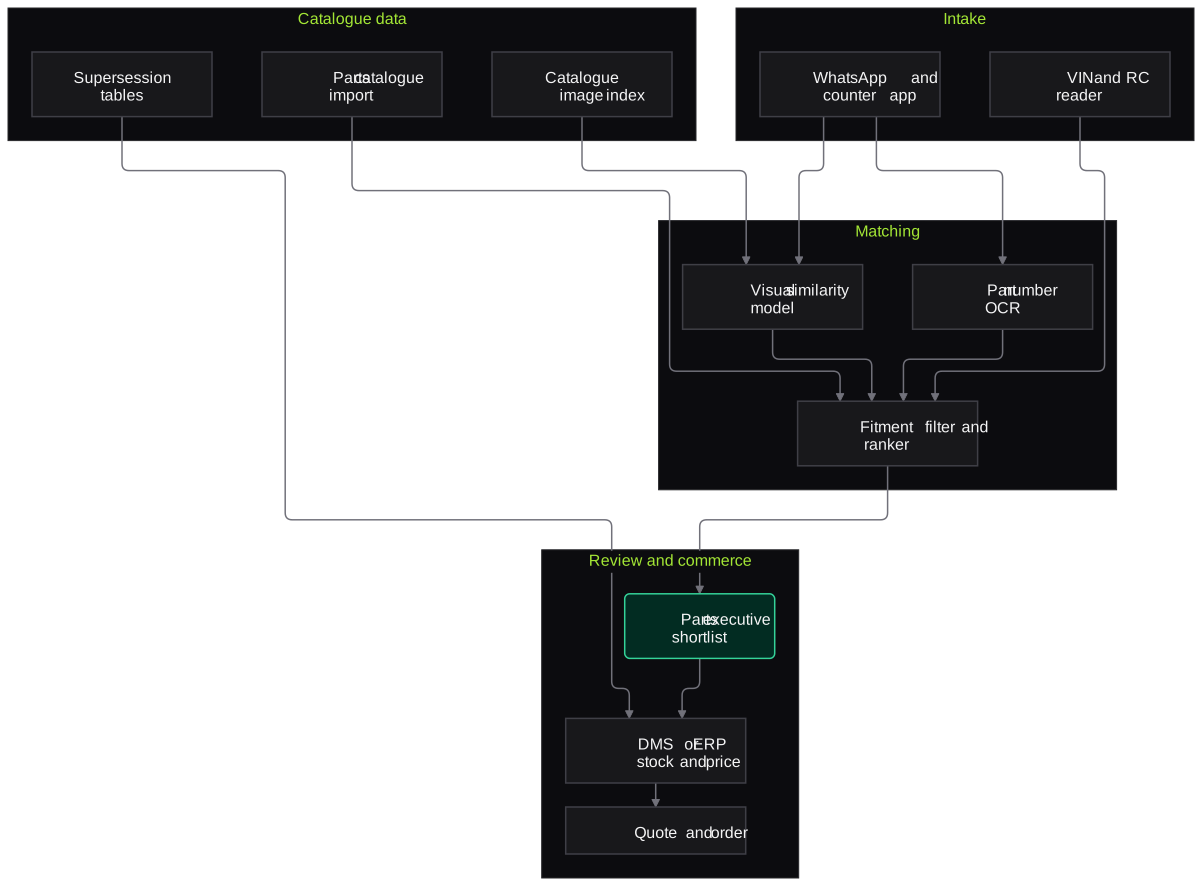
Architecture
- Intake
- WhatsApp Business API
- Counter app and web upload
- VIN and RC reader
- Catalogue data
- Electronic parts catalogue import
- Catalogue image index
- Supersession and interchange tables
- Matching
- Part number and label OCR
- Visual similarity model
- Fitment filter and ranker
- Review and commerce
- Parts executive shortlist screen
- DMS or ERP stock and price API
- Quote and order creation
Inputs and outputs
Inputs
- Part photos from customers, mechanics or counter staff
- VIN, RC details or model, variant and year
- Electronic parts catalogue data and images under your licence
- Supersession and interchange tables
- Stock and price from the DMS or ERP
Outputs
- Ranked candidate part numbers with fitment evidence
- Confirmed part number and current supersession
- Quotes sent on WhatsApp
- Pick lists or sales orders
- Log of unmatched enquiries showing catalogue gaps
Where people stay in control
The parts executive confirms every part number before a quote is sent. Safety-critical parts such as brake, steering and suspension components are always checked against catalogue fitment by staff.
Integrations
- Dealer management system or ERP such as Tally or SAP Business One
- OEM electronic parts catalogue or licensed aftermarket catalogue data
- WhatsApp Business API
- E-commerce storefront or B2B ordering portal
- Barcode scanners at the counter
Guardrails
- Matches only within the vehicle's fitment list unless staff widen the search
- Shortlists instead of a single answer when candidates are close
- Staff confirmation for safety-critical parts
- Catalogue data used only under your licence terms
- Every quote logged with the evidence used to identify the part
Compliance notes
- Customer phone numbers and chat history handled under the DPDP Act 2023, with WhatsApp messages sent only to opted-in contacts.
A typical pilot
Duration: 4 weeks
One dealer parts counter for one brand, covering fast-moving categories such as filters, brake pads, lamps and clutch parts.
Deliverables
- 01Catalogue and image index for the pilot brand
- 02WhatsApp and counter intake flow
- 03Shortlist screen for parts executives
- 04Identification accuracy report
- 05Plan for further brands and categories
What we measure
- Shortlist accuracy
- Whether the confirmed part number appears first or within the shortlist, checked against the executive's final choice.
- Enquiry response time
- Time from photo received to quote sent, compared with the current counter.
- Wrong-part returns
- Returns logged as wrong part during the pilot.
- Unmatched enquiries
- Enquiries the system could not narrow down, grouped by category.
FAQs
01Does it work for multi-brand aftermarket parts?
Yes, if you have licensed catalogue data and images for those brands. Aftermarket identification leans more on fitment filtering and cross-reference tables, which we load during setup.
02Where does the catalogue data come from?
From the OEM electronic parts catalogue your dealership already licenses, or from an aftermarket catalogue provider. We work within those licence terms and do not scrape catalogues.
03What if the part has no visible number?
The system relies on vehicle fitment and shape matching, and shows a shortlist with catalogue images side by side. The executive can ask the customer for one more photo from a specific angle.
04Can it handle two-wheeler and commercial vehicle parts?
Yes, provided catalogue data is available. Two-wheeler parts are often small and similar, so we pay particular attention to fitment filtering in those categories.
Related use cases
- Automotive & Mobility
Used Car Inspection and Damage Detection
Guided photo capture and damage detection for used-car evaluations, with panel-wise damage maps, odometer and chassis checks and draft refurbishment items for evaluators to confirm.
- Automotive & Mobility
Dealer Lead Routing and Follow-Up Automation
Pull leads from OEM portals, websites, classifieds, social forms and walk-ins into one hub, remove duplicates, route them to the right consultant and run approved WhatsApp follow-ups.
- Automotive & Mobility
Warranty Claim Document Processing
Pre-check dealer warranty claims before OEM submission: extract job card, VIN, odometer, labour and parts data, test it against policy and flag gaps for the warranty desk.
- Retail, D2C & Quick Commerce
Catalogue Enrichment from Product Images
Read product photos and back-of-pack images to fill category attributes, mandatory declarations and listing copy for each marketplace, with every value checked before publishing.

Founded by Akhilesh Mittal. 8 years building a security platform for a New Zealand company. IIT ISM Dhanbad and IMT Ghaziabad. Builds production agentic AI.
Pick one showroom, workshop or claim queue to start
Book a discovery call and we will scope a short pilot on your own photos, documents or call recordings, with the measures agreed up front.