RM Meeting Notes and CRM Update Agent
Turn RM client meetings and voice notes in English or Hindi into structured notes, CRM updates and follow-up drafts, with compliance mentions flagged and the RM approving everything.
- Industry:
- Capital Markets & Wealth Management
Who it is for
- Head of Wealth or Private Banking
- Relationship Manager
- Sales Operations and CRM Lead
- Compliance Officer
The problem
Relationship managers spend their best hours with clients and their worst hours updating the CRM. Notes end up in notebooks, WhatsApp chats or memory, follow-ups slip, and when compliance or a new RM needs to know what was discussed, the record is thin.
CRM updates lag the meeting
Notes are written days later or not at all, so pipeline reports and service follow-ups are unreliable.
Action items get lost
Promises such as sending a scheme document, updating a nominee or checking a maturity date depend on the RM's memory.
Thin records for compliance
Registered advisers must keep records of client interactions, and distributors need evidence of what was explained, but notes are often brief.
Mixed-language conversations
Meetings move between English, Hindi and regional languages, which generic transcription tools handle poorly.
What we build
We build an agent that turns client meetings into CRM records. With the client's consent, the RM records the meeting or dictates a voice note afterwards on a mobile app. The agent transcribes the audio, including mixed English and Hindi, and drafts a structured note: attendees, goals and life events discussed, products or topics covered, client questions, action items with owners and dates, and the next meeting. Mentions of complaints, risk profile changes or requests outside the client's profile are flagged for compliance review. The RM edits and approves the note, and only then does the agent update CRM fields, create tasks and draft a follow-up for the RM to send.
- Records meetings or post-meeting voice notes on mobile, with consent captured first
- Transcribes mixed English, Hindi and selected regional languages, with speaker separation
- Drafts structured notes with goals, life events, topics discussed, client questions and action items
- Flags complaints, risk profile changes and other compliance-relevant mentions for review
- Updates CRM fields and creates tasks only after RM approval
- Drafts follow-up emails or WhatsApp messages for the RM to edit and send
How it works
- 01Capture with consentThe RM records the meeting with client consent, or dictates a voice note after it.
- 02TranscribeAudio is transcribed with speakers separated, including mixed-language speech.
- 03Draft the noteA structured note with action items and next steps is drafted against your CRM fields.
- 04Flag compliance mentionsComplaints, risk profile changes and similar mentions are flagged to a compliance queue.
- 05RM approvesThe RM edits and approves the note; nothing is written to the CRM before this.
- 06Update CRM and follow upCRM fields and tasks are updated, and a follow-up draft is prepared for the RM.

Architecture
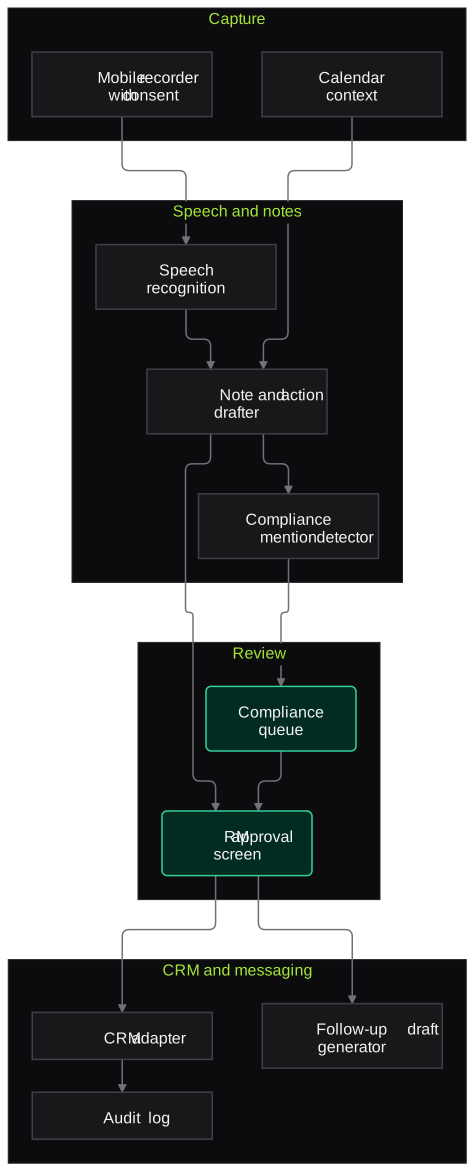
- Capture
- Mobile recording app with consent prompt
- Calendar integration for meeting context
- Speech and notes
- Speech recognition for English, Hindi and mixed speech
- Speaker separation
- LLM note drafter mapped to CRM fields
- Compliance mention detector
- Review
- RM approval screen
- Compliance review queue
- CRM and messaging
- CRM adapter for fields, activities and tasks
- Email and WhatsApp draft generator
- Audit log and audio retention rules
Inputs and outputs
Inputs
- Meeting recordings or RM voice notes
- Client profile, risk category and holdings summary from the CRM
- Calendar entries for meeting context
- Compliance topics and keywords to flag
- CRM field schema and task types
Outputs
- Structured meeting notes in the CRM
- Updated CRM fields, activities and next steps
- Tasks with owners and due dates
- Draft follow-up emails or WhatsApp messages
- Compliance flag log
Where people stay in control
The RM reviews and approves every note before anything is written to the CRM, and sends every client message personally. Compliance reviews flagged mentions, and the agent never generates recommendations.
Integrations
- CRM such as Salesforce Financial Services Cloud, Microsoft Dynamics 365 or Zoho
- Microsoft Outlook or Google Calendar
- Mobile recording app
- Email and WhatsApp Business
- Data warehouse for activity reporting
Guardrails
- Client consent captured before any recording
- No CRM write without RM approval
- No automatic sending of messages to clients
- No product recommendations generated by the agent
- Audio retained only for the agreed period, with access limited to the RM's own clients
Compliance notes
- Helps advisers keep the records of client interactions that SEBI's Investment Adviser regulations expect, while the RM remains responsible for their content.
- Recording consent and retention follow the DPDP Act 2023, and client messages stay under your communication approval policy.
A typical pilot
Duration: 3 weeks
A small group of RMs in one team or city, covering in-person meetings and post-meeting voice notes in English and Hindi.
Deliverables
- 01Note template mapped to your CRM fields
- 02Mobile capture and transcription set-up
- 03RM approval screen and CRM integration in a test environment
- 04Compliance flag rules and review queue
- 05Pilot report and roll-out plan
What we measure
- Time from meeting to CRM note
- CRM timestamps compared with meeting times, before and during the pilot.
- RM acceptance of drafts
- Share of draft notes approved with minor or no edits, from the approval screen.
- Action items closed on time
- Tasks created by the agent and completed by their due date.
- Weekly active RMs
- RMs using the agent at least once per week.
FAQs
01Do clients need to agree to recording?
Yes. The app asks the RM to capture consent before recording. If a client declines, the RM can dictate a voice note after the meeting instead.
02Can it handle meetings in Hindi or mixed languages?
Yes. Speech recognition is configured for English, Hindi and mixed speech, with regional languages added where needed. Notes are written in English for the CRM unless you prefer otherwise.
03Does audio leave our environment?
It can stay entirely within your cloud account. Where a managed speech service is used, we configure it in your chosen region with no data retention.
04Will it work with our CRM?
Yes, through the CRM's API. We map the note template to your fields during the pilot, including custom objects for wealth workflows.
Related use cases
- Capital Markets & Wealth Management
Client Statement and Portfolio Extraction
Read CAS, mutual fund, broker, PMS and AIF statements into one consolidated, reconciled portfolio, with every holding linked to its source page and exceptions sent to operations.
- Capital Markets & Wealth Management
Dormant Trading Account Re-Activation Campaigns
Find out why trading accounts went dormant, fix KYC and access blockers first, and run consent-based, compliance-approved journeys that bring clients back without tips or inducements.
- Accounting, Audit & Consulting
Board and Client Meeting Minutes Drafting
Turn recorded board, audit committee and client meetings, including Hinglish discussion, into draft minutes and action lists in your format for the company secretary or partner to finalise.
- Banking
Cross-Sell Lead Scoring and Personalised Outreach
Score existing customers for products they are likely to need from consented banking data, and draft compliant, personalised outreach that relationship managers review before sending.

Founded by Akhilesh Mittal. 8 years building a security platform for a New Zealand company. IIT ISM Dhanbad and IMT Ghaziabad. Builds production agentic AI.
Start with one statement type, queue or chatbot
Book a discovery call and we will scope a short pilot on your de-identified documents or staging systems, with measures agreed before we start.