Ticket and Email Triage
Classify and route incoming emails, web complaints and tickets by issue, account, urgency and regulatory risk, extract what the resolver needs and draft a first reply for approval.
- Capability:
- Document Intelligence
- Industry:
- Telecom & Contact Centres
Who it is for
- Head of Customer Care Back Office
- Complaints and Appellate Cell Manager
- Enterprise Service Desk Manager
- BPO Email Process Lead
The problem
Written complaints arrive by email, web form, app and social media, and as escalations through the nodal officer or appellate channel, in English, Hindi and regional languages, often with bill screenshots or speed-test images attached. First-level agents read each one to decide the category, find the account and route it, and urgent items such as a regulatory escalation, a legal notice or an enterprise link outage wait in the same queue as everything else.
Manual reading and categorisation
Agents read every message to pick a category, and miscategorised tickets bounce between teams.
Urgency is buried
Escalations that mention a regulator, a consumer forum or a legal notice are not visible until someone opens them.
Missing details
The mobile or account number sits in a screenshot or signature, so agents reply asking for information the customer already sent.
Duplicates across channels
The same customer writes by email, web form and social media, creating parallel tickets that different agents work on.
What we build
We build a triage service that reads each incoming email, form submission or ticket along with its attachments and prepares it for the resolver. It identifies the language, classifies the issue against your category tree, extracts the mobile or account number, circle, dates, amounts and disputed charges from the text and screenshots, and looks up the customer in the CRM. It assigns priority from your rules, raising anything that mentions a regulator, consumer forum, legal notice or enterprise outage, and links duplicates from the same customer. The ticket lands in the right queue with a summary and a drafted reply in the customer's language, for an agent to approve.
- Language detection and classification against your category and sub-category tree
- Extraction of mobile number, account ID, circle, dates and disputed amounts from text and attachments
- OCR for bill screenshots, speed-test images and scanned letters
- Priority rules for regulatory escalations, legal notices, repeat complaints and enterprise outages
- Duplicate and thread linking across email, web, app and social channels
- Drafted replies in the customer's language for agent approval
How it works
- 01Receive the messageEmails, form submissions, app complaints and social tickets arrive in one intake.
- 02Read text and attachmentsThe language is detected and attachments such as screenshots and letters are read with OCR.
- 03Classify and extractThe issue is classified, key fields are extracted and the customer is found in the CRM.
- 04Prioritise and linkPriority rules run, regulatory and legal mentions are raised, and duplicates are linked.
- 05Confirm uncertain categoriesLow-confidence classifications go to a triage agent before routing.
- 06Route and draftThe ticket reaches the right queue with a summary and a drafted reply, which the resolver approves and sends.

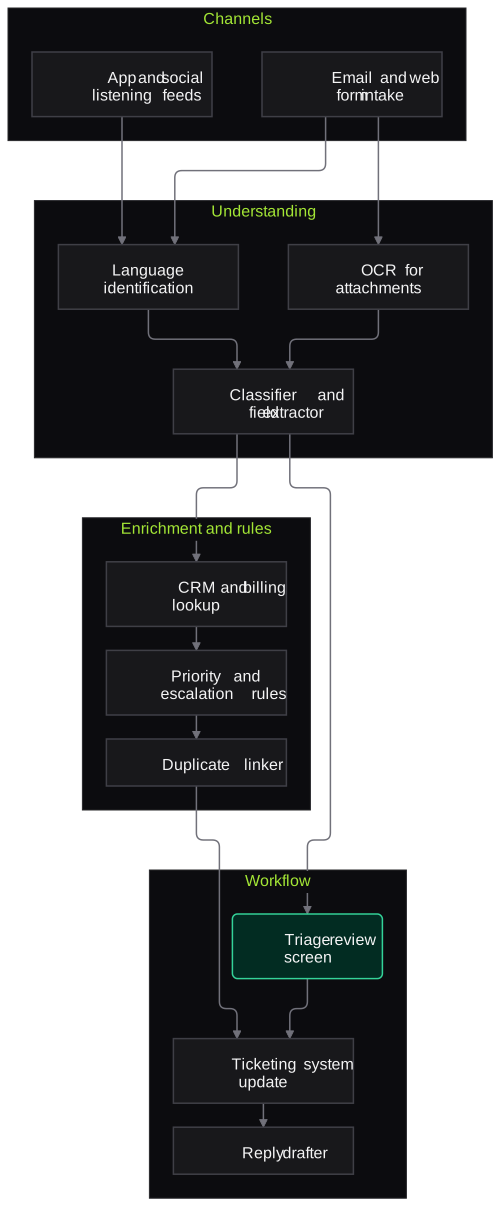
Architecture
- Channels
- Email intake from Exchange or Gmail
- Web form and app complaint feeds
- Social listening tool feed
- Ticketing system webhooks
- Understanding
- Language identification
- OCR for attachments
- Classifier and field extractor
- Enrichment and rules
- CRM and billing lookup
- Priority and escalation rules
- Duplicate linker
- Workflow
- Triage review screen
- Ticketing system update
- Reply drafter
- Category and escalation analytics
Inputs and outputs
Inputs
- Inbound emails
- Web and app complaint forms
- Tickets from social listening tools
- Attachments such as bills, screenshots and letters
- Category tree and SLA rules
- CRM and billing data
Outputs
- Classified and prioritised tickets
- Extracted account and complaint fields
- Duplicate links across channels
- Draft replies in the customer's language
- Category and escalation reports
Where people stay in control
Triage agents confirm low-confidence classifications, and resolvers approve every reply before it reaches the customer. Regulatory and legal escalations always go to the named complaints or legal owner and are never answered automatically.
Integrations
- Ticketing such as Salesforce Service Cloud, Zendesk, Freshdesk, ServiceNow or an in-house CRM
- Exchange or Gmail mailboxes
- BSS and billing systems
- Social listening tools
Guardrails
- No reply sent without agent approval
- Regulatory, consumer forum and legal mentions always escalated to a named owner
- Personal data masked in logs
- Draft replies limited to approved templates and knowledge
- Confidence thresholds per category, reviewed monthly
Compliance notes
- Supports the complaint registration and escalation flow operators run under TRAI's complaint redressal regulations; docket handling stays in your ticketing system.
- Customer emails and attachments are personal data under the DPDP Act 2023.
A typical pilot
Duration: 3 weeks
One inbound mailbox or web complaint queue, evaluated first on historic tickets and then in shadow mode on live traffic.
Deliverables
- 01Category tree and priority rules configured
- 02Triage service integrated with your ticketing system in shadow mode
- 03Reply drafts for the top categories
- 04Accuracy report against agents' final categories
- 05Roll-out plan and cost estimate
What we measure
- Classification accuracy
- System categories compared with the final category agents assigned.
- Routing correctness
- Tickets reassigned after routing, compared with the current process.
- Time to first response
- Elapsed time from arrival to first reply, from ticketing data.
- Escalation detection
- Regulatory and legal mentions caught on a labelled test set of historic tickets.
FAQs
01Does it handle Hindi and regional-language emails?
Yes. It detects the language, classifies the complaint and drafts the reply in the same language, with an English summary for resolvers who need one.
02Will it reply to customers automatically?
Not by default. Drafts go to agents for approval. Some acknowledgement messages can be automated later if you choose, but regulatory and legal escalations are always handled by people.
03Does it work with our ticketing system?
Yes, through APIs or webhooks for common platforms such as Salesforce Service Cloud, Zendesk, Freshdesk and ServiceNow, or through your in-house CRM's integration layer.
04Can it read screenshots and scanned letters?
Yes. Bill screenshots, speed-test images and scanned letters are read with OCR, and extracted values such as amounts or dates are shown with the image region they came from.
Related use cases
- Telecom & Contact Centres
Multilingual Inbound Voice Agent for L1 Support
A voice agent that answers routine L1 calls in Hindi, Hinglish and regional languages, resolves what it safely can through your systems and hands the rest to an agent with full context.
- Telecom & Contact Centres
Real-Time Agent Assist
Live transcription and prompts on the agent's screen: the right knowledge-base answer, the next compliance step and a drafted call summary, so new agents handle complex calls with fewer holds.
- Banking
Customer Complaint Triage and Routing
Classify complaints from email, branches, social media and RBI CMS, spot urgent cases such as unauthorised transactions, route them to resolver teams and draft acknowledgements.
- Telecom & Contact Centres
Churn-Risk Outreach Automation
Spot customers showing churn signals, explain why for each one, and run consented retention outreach on WhatsApp, SMS, voice or a human call with offers from your eligibility rules.

Founded by Akhilesh Mittal. 8 years building a security platform for a New Zealand company. IIT ISM Dhanbad and IMT Ghaziabad. Builds production agentic AI.
Start with one queue or one campaign
Bring a sample of recordings or one call flow. We will scope a pilot on your own calls, in your languages, and measure it against your current process.